The box in question is a rather older machine, but has always been
steady and actually the one I use the most because it is out in my
workshop area. That said, it was originally win 7 that I installed win
10 on several years ago. It runs all day long usually, and I put it to
sleep at night. Not as fast as my newer one in my office, but it works nicely with latest Firefox, BBird, Office 2019 and most other programs I need.
So, a couple days ago, I would come to the computer and notice it had rebooted. The arrangement on my Core Temp taskbar icons were not as I
had left them, and the BBird was closed. So after a couple of these, I started investigating.
The box in question is a rather older machine, but has always been steady and
actually the one I use the most because it is out in my workshop area.ÿ That said,
it was originally win 7 that I installed win 10 on several years ago.ÿ It runs
all day long usually, and I put it to sleep at night.ÿ Not as fast as my newer
one in my office, but it works nicely with latest Firefox, BBird, Office 2019
and most other programs I need.
So, a couple days ago, I would come to the computer and notice it had rebooted.
The arrangement on my Core Temp taskbar icons were not as I had left them, and
the BBird was closed.ÿ So after a couple of these, I started investigating.
Event Viewer showed it booted because of a bugcheck error.ÿ This error was the
same for several reboots.ÿ It didn't reboot while I was using it, and otherwise
worked just fine.
So I did the DISM /restore which couldn't find a source.ÿ It did say the files
were repairable.ÿ So I got an win 10 iso and used it for the source and it did
say it repaired everything.
I then did an SFC/ scannow and it reported everything OK.
Next I did a chkdsk /f and it reported nothing to fix.
Used it for awhile and all seemed ok.ÿ Came back later and it had rebooted again.
Checked on video driver and already had the best one.
Virus check and nothing there
Rebooted again, so I decided to try a system restore point.ÿ First time, it rebooted after a short time doing the restore.
Did a memory check using the windows memory test.ÿ I know it's not the best, but it said all was good.
Tried a second time to restore and after over 2 hours I finally shut it down and restarted.ÿ Hated doing that, but it seemed to be stuck.
Decided to do a restore, saving my files, and it got to the first reboot at about 12% and failed, resetting back to before the setup.ÿ I didn't catch the
error on that one before restarting, but when it came back on it said 0x8007025D - 0x2000C The installation failed in the SAFE_OS phase with an error during APPLY-IMAGE operation.
Today, the damn thing ran fine all day until about 5 PM.ÿ The above error suggested faulty install media, so I got a new usb card and made a new set of install files and tried again.ÿ This time it rebooted several times and got to 82% and screen said the stop code was MEMORY MANAGEMENT.ÿ Upon restarting the screen said 0xC1900101 - 0x4000D The installation failed in the SECOND BOOT
phase with an error during MIGRATE DATA operation.
It has been running since and I'm typing this on it now.
My questions:
Am I missing something I should do?
Do you think this is a software issue, or hardware?
I would like to fix it if it is a screwed up install or corrupted files, but I don't really want to do something like try new memory on this old box.
Any help appreciated!
On Tue, 11/18/2025 11:26 PM, sticks wrote:
The box in question is a rather older machine, but has always been steady and
actually the one I use the most because it is out in my workshop area.ÿ That said,
it was originally win 7 that I installed win 10 on several years ago.ÿ It runs
all day long usually, and I put it to sleep at night.ÿ Not as fast as my newer
one in my office, but it works nicely with latest Firefox, BBird, Office 2019
and most other programs I need.
So, a couple days ago, I would come to the computer and notice it had rebooted.
The arrangement on my Core Temp taskbar icons were not as I had left them, and
the BBird was closed.ÿ So after a couple of these, I started investigating. >>
Event Viewer showed it booted because of a bugcheck error.ÿ This error was the
same for several reboots.ÿ It didn't reboot while I was using it, and otherwise
worked just fine.
So I did the DISM /restore which couldn't find a source.ÿ It did say the files
were repairable.ÿ So I got an win 10 iso and used it for the source and it did
say it repaired everything.
I then did an SFC/ scannow and it reported everything OK.
Next I did a chkdsk /f and it reported nothing to fix.
Used it for awhile and all seemed ok.ÿ Came back later and it had rebooted again.
Checked on video driver and already had the best one.
Virus check and nothing there
Rebooted again, so I decided to try a system restore point.ÿ First time, it >> rebooted after a short time doing the restore.
Did a memory check using the windows memory test.ÿ I know it's not the best, >> but it said all was good.
Tried a second time to restore and after over 2 hours I finally shut it down >> and restarted.ÿ Hated doing that, but it seemed to be stuck.
Decided to do a restore, saving my files, and it got to the first reboot at >> about 12% and failed, resetting back to before the setup.ÿ I didn't catch the
error on that one before restarting, but when it came back on it said
0x8007025D - 0x2000C The installation failed in the SAFE_OS phase with an
error during APPLY-IMAGE operation.
Today, the damn thing ran fine all day until about 5 PM.ÿ The above error
suggested faulty install media, so I got a new usb card and made a new set of
install files and tried again.ÿ This time it rebooted several times and got >> to 82% and screen said the stop code was MEMORY MANAGEMENT.ÿ Upon restarting >> the screen said 0xC1900101 - 0x4000D The installation failed in the SECOND BOOT
phase with an error during MIGRATE DATA operation.
It has been running since and I'm typing this on it now.
My questions:
Am I missing something I should do?
Do you think this is a software issue, or hardware?
I would like to fix it if it is a screwed up install or corrupted files, but >> I don't really want to do something like try new memory on this old box.
Any help appreciated!
The first observation, is this is a workshop area PC.
Do you generate a lot of sawdust in the area ? Do you smoke ?
I'm looking for evidence the cooling system is not in good shape,
or the HDD breathe-able hepafilter has ingested a solvent
in the air, or smoke has gummed up the equipment.
Your post makes no reference to the storage device, how many
years it has been spinning all day.
A general idea of make/model of machine would help ascertain
what era of memory it uses, and whether we should be concerned
about memory. DDR2 seemed to be error prone (I only had one
machine which was rock solid on DDR2, and it ran at DDR2-533
which tells you "speed makes a difference" there). DDR3 generally
seems to be pretty good. I have a couple machines on DDR3 and
don't see the failure syndrome you are seeing.
On 11/19/2025 8:08 AM, Paul wrote:
On Tue, 11/18/2025 11:26 PM, sticks wrote:
The box in question is a rather older machine, but has always been steady and
actually the one I use the most because it is out in my workshop area.ÿ That said,
it was originally win 7 that I installed win 10 on several years ago.ÿ It runs
all day long usually, and I put it to sleep at night.ÿ Not as fast as my newer
one in my office, but it works nicely with latest Firefox, BBird, Office 2019
and most other programs I need.
So, a couple days ago, I would come to the computer and notice it had rebooted.
The arrangement on my Core Temp taskbar icons were not as I had left them, and
the BBird was closed.ÿ So after a couple of these, I started investigating. >>>
Event Viewer showed it booted because of a bugcheck error.ÿ This error was the
same for several reboots.ÿ It didn't reboot while I was using it, and otherwise
worked just fine.
So I did the DISM /restore which couldn't find a source.ÿ It did say the files
were repairable.ÿ So I got an win 10 iso and used it for the source and it did
say it repaired everything.
I then did an SFC/ scannow and it reported everything OK.
Next I did a chkdsk /f and it reported nothing to fix.
Used it for awhile and all seemed ok.ÿ Came back later and it had rebooted again.
Checked on video driver and already had the best one.
Virus check and nothing there
Rebooted again, so I decided to try a system restore point.ÿ First time, it >>> rebooted after a short time doing the restore.
Did a memory check using the windows memory test.ÿ I know it's not the best,
but it said all was good.
Tried a second time to restore and after over 2 hours I finally shut it down
and restarted.ÿ Hated doing that, but it seemed to be stuck.
Decided to do a restore, saving my files, and it got to the first reboot at >>> about 12% and failed, resetting back to before the setup.ÿ I didn't catch the
error on that one before restarting, but when it came back on it said
0x8007025D - 0x2000C The installation failed in the SAFE_OS phase with an >>> error during APPLY-IMAGE operation.
Today, the damn thing ran fine all day until about 5 PM.ÿ The above error >>> suggested faulty install media, so I got a new usb card and made a new set of
install files and tried again.ÿ This time it rebooted several times and got >>> to 82% and screen said the stop code was MEMORY MANAGEMENT.ÿ Upon restarting
the screen said 0xC1900101 - 0x4000D The installation failed in the SECOND BOOT
phase with an error during MIGRATE DATA operation.
It has been running since and I'm typing this on it now.
My questions:
Am I missing something I should do?
Do you think this is a software issue, or hardware?
I would like to fix it if it is a screwed up install or corrupted files, but
I don't really want to do something like try new memory on this old box. >>>
Any help appreciated!
The first observation, is this is a workshop area PC.
Do you generate a lot of sawdust in the area ? Do you smoke ?
I'm looking for evidence the cooling system is not in good shape,
or the HDD breathe-able hepafilter has ingested a solvent
in the air, or smoke has gummed up the equipment.
I call it a workshop, but it is actually a small portion of my garage. Originally I wanted a computer in there so I could follow along on repair videos for things I was working on, like my motorcycle.
I use Core Temp to keep an eye on temperatures as though I heat it, I do not cool it in the summer.ÿ It does get hot for probably about 10 days each year where the fan really kicks up like when watching a video.ÿ But now, it runs very cool.ÿ I did reapply the thermo paste about two years ago, and if you remember I doubled the ram from 4-8 Gig with your help, even though the book on it said four was the limit.
Your post makes no reference to the storage device, how many
years it has been spinning all day.ÿ
I Like to keep it running because it filters all the incoming crap in my email so I don't have to deal with it during the day when I look at the phone.ÿ It has been only a few years I keep it running, and I do sleep it when it gets hot.ÿ But I'll explain in a minute why I'm delaying looking into this for now.
A general idea of make/model of machine would help ascertain
what era of memory it uses, and whether we should be concerned
about memory. DDR2 seemed to be error prone (I only had one
machine which was rock solid on DDR2, and it ran at DDR2-533
which tells you "speed makes a difference" there). DDR3 generally
seems to be pretty good. I have a couple machines on DDR3 and
don't see the failure syndrome you are seeing.
It's a Compaq Presario BM412AA-ABA CQ5600Y
8GB of DDR2.ÿ Pegatron Narra5 motherboard.
AMD Phenom II X2 B59 (CAllisto) processor
It's pretty "adult" now.
---snip---
That said, here's where I'm at now.ÿ I read something about a failure on an upgrade perhaps being helped by using the windows upgrade tool.ÿ So I did run it and it found three of what seemed relatively minor fixes. This is after it had been running three hours without any problems today.
I decided to try and reinstall one more time.ÿ (Side Note:ÿ Firefox was minimized just now and I was informed it stopped working and closed Hmmm)ÿ Anyways, it finally completed a fresh install taking an hour and a half to complete.ÿ I made a couple adjustments and then immediately imaged the drive.ÿ It has been running now for 8 hours and right up until Firefox just closed, I have had no problems.
I feel I am at least now in a spot where I can decide if it is hardware or software related.ÿ When I step away from now on, I will close my open programs and if it boots on a fresh install, I can figure it is probably hardware related.ÿ If after a couple days I get no problems, I'll leave the mail open and then the browser, both usually minimized, and go from there.
FWIW, I'm not against getting a new system, but with the summer heat this is not the best environment for a computer and if I can keep this one running without wasting a lot of time, I'd prefer to do that.
Thanks for your help and thoughts.ÿ I'll keep them handy in case
On Wed, 11/19/2025 5:04 PM, sticks wrote:
On 11/19/2025 8:08 AM, Paul wrote:
On Tue, 11/18/2025 11:26 PM, sticks wrote:
The box in question is a rather older machine, but has always been steady and
actually the one I use the most because it is out in my workshop area.ÿ That said,
it was originally win 7 that I installed win 10 on several years ago.ÿ It runs
all day long usually, and I put it to sleep at night.ÿ Not as fast as my newer
one in my office, but it works nicely with latest Firefox, BBird, Office 2019
and most other programs I need.
So, a couple days ago, I would come to the computer and notice it had rebooted.
The arrangement on my Core Temp taskbar icons were not as I had left them, and
the BBird was closed.ÿ So after a couple of these, I started investigating.
Event Viewer showed it booted because of a bugcheck error.ÿ This error was the
same for several reboots.ÿ It didn't reboot while I was using it, and otherwise
worked just fine.
So I did the DISM /restore which couldn't find a source.ÿ It did say the files
were repairable.ÿ So I got an win 10 iso and used it for the source and it did
say it repaired everything.
I then did an SFC/ scannow and it reported everything OK.
Next I did a chkdsk /f and it reported nothing to fix.
Used it for awhile and all seemed ok.ÿ Came back later and it had rebooted again.
Checked on video driver and already had the best one.
Virus check and nothing there
Rebooted again, so I decided to try a system restore point.ÿ First time, it
rebooted after a short time doing the restore.
Did a memory check using the windows memory test.ÿ I know it's not the best,
but it said all was good.
Tried a second time to restore and after over 2 hours I finally shut it down
and restarted.ÿ Hated doing that, but it seemed to be stuck.
Decided to do a restore, saving my files, and it got to the first reboot at
about 12% and failed, resetting back to before the setup.ÿ I didn't catch the
error on that one before restarting, but when it came back on it said
0x8007025D - 0x2000C The installation failed in the SAFE_OS phase with an >>>> error during APPLY-IMAGE operation.
Today, the damn thing ran fine all day until about 5 PM.ÿ The above error >>>> suggested faulty install media, so I got a new usb card and made a new set of
install files and tried again.ÿ This time it rebooted several times and got
to 82% and screen said the stop code was MEMORY MANAGEMENT.ÿ Upon restarting
the screen said 0xC1900101 - 0x4000D The installation failed in the SECOND BOOT
phase with an error during MIGRATE DATA operation.
It has been running since and I'm typing this on it now.
My questions:
Am I missing something I should do?
Do you think this is a software issue, or hardware?
I would like to fix it if it is a screwed up install or corrupted files, but
I don't really want to do something like try new memory on this old box. >>>>
Any help appreciated!
The first observation, is this is a workshop area PC.
Do you generate a lot of sawdust in the area ? Do you smoke ?
I'm looking for evidence the cooling system is not in good shape,
or the HDD breathe-able hepafilter has ingested a solvent
in the air, or smoke has gummed up the equipment.
I call it a workshop, but it is actually a small portion of my garage. Originally I wanted a computer in there so I could follow along on repair videos for things I was working on, like my motorcycle.
I use Core Temp to keep an eye on temperatures as though I heat it, I do not cool it in the summer.ÿ It does get hot for probably about 10 days each year where the fan really kicks up like when watching a video.ÿ But now, it runs very cool.ÿ I did reapply the thermo paste about two years ago, and if you remember I doubled the ram from 4-8 Gig with your help, even though the book on it said four was the limit.
Your post makes no reference to the storage device, how many
years it has been spinning all day.
I Like to keep it running because it filters all the incoming crap in my email so I don't have to deal with it during the day when I look at the phone.ÿ It has been only a few years I keep it running, and I do sleep it when it gets hot.ÿ But I'll explain in a minute why I'm delaying looking into this for now.
A general idea of make/model of machine would help ascertain
what era of memory it uses, and whether we should be concerned
about memory. DDR2 seemed to be error prone (I only had one
machine which was rock solid on DDR2, and it ran at DDR2-533
which tells you "speed makes a difference" there). DDR3 generally
seems to be pretty good. I have a couple machines on DDR3 and
don't see the failure syndrome you are seeing.
It's a Compaq Presario BM412AA-ABA CQ5600Y
8GB of DDR2.ÿ Pegatron Narra5 motherboard.
AMD Phenom II X2 B59 (CAllisto) processor
It's pretty "adult" now.
---snip---
That said, here's where I'm at now.ÿ I read something about a failure on an upgrade perhaps being helped by using the windows upgrade tool.ÿ So I did run it and it found three of what seemed relatively minor fixes. This is after it had been running three hours without any problems today.
I decided to try and reinstall one more time.ÿ (Side Note:ÿ Firefox was minimized just now and I was informed it stopped working and closed Hmmm)ÿ Anyways, it finally completed a fresh install taking an hour and a half to complete.ÿ I made a couple adjustments and then immediately imaged the drive.ÿ It has been running now for 8 hours and right up until Firefox just closed, I have had no problems.
I feel I am at least now in a spot where I can decide if it is hardware or software related.ÿ When I step away from now on, I will close my open programs and if it boots on a fresh install, I can figure it is probably hardware related.ÿ If after a couple days I get no problems, I'll leave the mail open and then the browser, both usually minimized, and go from there.
FWIW, I'm not against getting a new system, but with the summer heat this is not the best environment for a computer and if I can keep this one running without wasting a lot of time, I'd prefer to do that.
Thanks for your help and thoughts.ÿ I'll keep them handy in case
Picture of the motherboard.
https://theretroweb.com/motherboard/manual/hp-narra5-english-6519ee7637baf969984176.pdf
Dual channel, one DIMM per channel, DDR2, 2GB DIMMs. The chipset chip
may be converting HT (Hypertransport) to PCIe. The processor has the
memory controller, which considering the chipset maker is NVidia, it's
a good thing the processor drives the memory :-) NVidia had some troubles driving memory with a couple of its separate chipsets.
A bit on the CPU.
https://www.cpu-world.com/CPUs/K10/AMD-Phenom%20II%20X2%20B59%20-%20HDXB59WFK2DGM.html
Released somewhere around 2011 or so, so 14 years old. Not really that old. 80 watt processor. 2 cores, 3.4GHz .
Memory type is motherboard-specific (motherboard design decides it).
Supported memory: DDR2-1066, DDR3-1333
Based on my experience here, you'd want the DDR3 option,
but the DDR2 boards would have been cheaper to populate with RAM
(which is why when I had that choice, I chose the
wrong one, which was the DDR2). In exchange for my cheapness
at the time, the system ended up using three sets of four
sticks, and when the motherboard croaked, the third set of
RAM was still good. If I'd used DDR3, I likely would
have only needed the one set of RAM (no mortality on
DDR3 here, at all). Since you only have one DIMM per channel,
that improves the electrical properties of the situation.
The board has quite a few electrolytics on it. I would
visually inspect the pressure relief on the top of them,
for leakage.
Your board also uses the vertical SATA connectors. If those
are the first generation connectors (I have a board with
two of those), you can rip the SATA connector right out of the
motherboard by tugging on it. Later SATA are swaged into the
board to make them more mechanically secure. The first SATA,
the objective was to use "minimum amounts of plastic", which
was a mistake. On mine, I could tell just by looking at them,
that there would be trouble.
On 11/19/2025 6:57 PM, Paul wrote:
On Wed, 11/19/2025 5:04 PM, sticks wrote:
Your post makes no reference to the storage device, how many
years it has been spinning all day.
I bought the thing several years ago, so long I can't remember actually,
but I am pretty sure I only gave $50 for it.ÿ I used to go wireless, but it's pretty far from the router so I wired out here for ethernet and
that helped with function a lot.ÿ For what my original intentions were
for having something out in the garage, this damn thing has been pretty good.ÿ This is really the first time I've had an issue, and it appears something got corrupted, but just might have been fixed with the
successful reinstall.ÿ All day now with no reboots.ÿ Fingers crossed.
On 11/19/2025 8:52 PM, sticks wrote:
On 11/19/2025 6:57 PM, Paul wrote:
On Wed, 11/19/2025 5:04 PM, sticks wrote:
---snip---
Your post makes no reference to the storage device, how many
years it has been spinning all day.
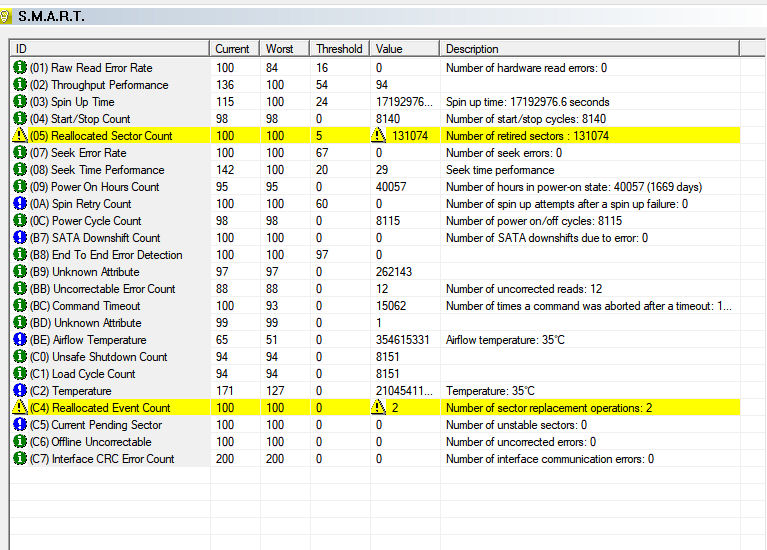
https://i.postimg.cc/4dyW4QHp/Smart.jpg
I bought the thing several years ago, so long I can't remember actually, but I am pretty sure I only gave $50 for it.ÿ I used to go wireless, but it's pretty far from the router so I wired out here for ethernet and that helped with function a lot.ÿ For what my original intentions were for having something out in the garage, this damn thing has been pretty good.ÿ This is really the first time I've had an issue, and it appears something got corrupted, but just might have been fixed with the successful reinstall.ÿ All day now with no reboots.ÿ Fingers crossed.
It started rebooting again, so I reran the chkdsk, sfc, and dism stuff, but it still had problems.ÿ Below were some of the events.ÿ They were not all the same, and I remembered your advice on checking out the disk so I installed HD tune to check it out, and got the results in the link above.ÿ It does look like the drive might be on it's last legs.
So before I just go and buy a new box, I'm gonna try another drive I have laying around.ÿ It's a 640 Gig laptop drive, but I'm not buying a new desktop drive for this old machine.ÿ I have a brand new 1 TB Samsung 990, but I can't use it since it doesn't have the connectors on the board for it.ÿ If the spinner works without errors, I'll know that was the problem.ÿ Fun fun fun.
----------------------
1.ÿ The computer has rebooted from a bugcheck.ÿ The bugcheck was: 0x00000139 (0x0000000000000003, 0xffffb783ade056c0, 0xffffb783ade05618, 0x0000000000000000).
2.ÿ The computer has rebooted from a bugcheck.ÿ The bugcheck was: 0x0000003b (0x00000000c0000005, 0xfffff80627a83518, 0xfffff8062b0ad920, 0x0000000000000000).
The computer has rebooted from a bugcheck.ÿ The bugcheck was: 0x0000003b (0x00000000c0000005, 0xfffff8003fb08db2, 0xffff8e88cd64ba30, 0x0000000000000000).
3.ÿ The computer has rebooted from a bugcheck.ÿ The bugcheck was: 0x0000003b (0x00000000c0000005, 0xfffff8003fb08db2, 0xffff8e88cd64ba30, 0x0000000000000000).
4.ÿ The computer has rebooted from a bugcheck.ÿ The bugcheck was: 0x0000001e (0xffffffffc0000005, 0xfffff800528d23c5, 0x0000000000000001, 0x0000000000000103).
By all means, try another drive. Just don't clone it on
that machine, OK ? Take the two disks to a machine that is
working, and do your cloning there. You may need to run a
CHKDSK using the machine that works well, before setting
up to do a clone. If there is a CRC error during cloning, most
cloning programs stop if that happens. The attempt to clone,
might even be a kind of test.
On 11/24/2025 6:36 PM, Paul wrote:
By all means, try another drive. Just don't clone it on
that machine, OK ? Take the two disks to a machine that is
working, and do your cloning there. You may need to run a
CHKDSK using the machine that works well, before setting
up to do a clone. If there is a CRC error during cloning, most
cloning programs stop if that happens. The attempt to clone,
might even be a kind of test.
When I did finally get windows reinstalled on it, I did immediately take
an image of it.ÿ My first choice of what to do is to go to my desktop in
the house that has a spinner I can temporarily remove.ÿ I'll hook up the laptop drive and just restore that image to it and then see if the
garage machine will boot on it.
If that one seems bad, I do have an image of when I first got it all set
up again about a year ago.ÿ I could try that one next, but I'll try the
one from a few days ago with a fresh windows 10 install first.
| Sysop: | Tetrazocine |
|---|---|
| Location: | Melbourne, VIC, Australia |
| Users: | 14 |
| Nodes: | 8 (0 / 8) |
| Uptime: | 93:05:12 |
| Calls: | 184 |
| Files: | 21,502 |
| Messages: | 81,190 |