On Sat, 1/10/2026 2:55 PM, knuttle wrote:
My brother in law die.ÿ We have his computer but it is locked with a pass word.
If we pull the hard drive, and place it in an external drive enclosure, can we unlock the drive so it can be used as a primary drive in another computer?
locked with Windows start up password.
_____________
I have a 2TB drive from my old desktop and a 1TB drive one from my brother in laws computer.
Long term I would like to keep the 2TB drive as an external backup to back up my existing
25 year old back up 1TB external drive.
On my brother in law's drive there is data that I would download to another drive. I would
then like to put my Brother in Law's 1TB drive in my old Desktop before I donate it, ie get rid of it.
We could not get pass the login password on my Brother in laws computer,
so we removed the drive. (Long irrelevant story)
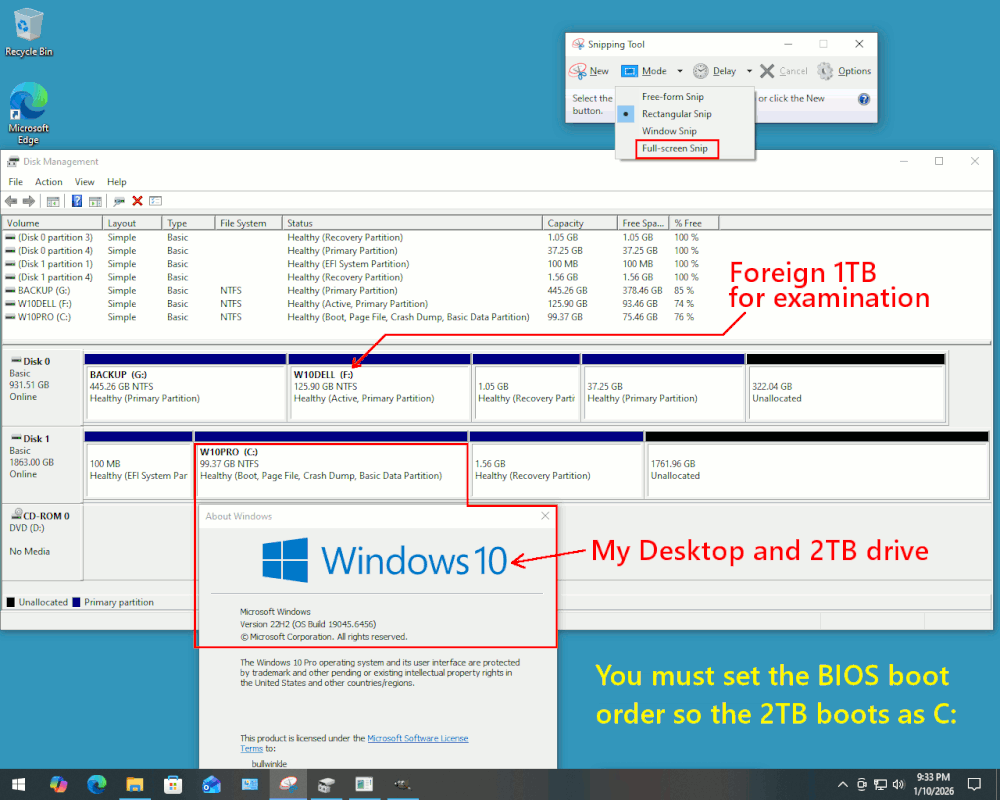
When you place the Guest drive into the technician machine (your old desktop), the boot order on the Technician Machine must be checked at BIOS level so
the 2TB drive which is native to the machine, boots it. That way, no "blocking" will occur during boot.
+------------+ +----------------+
| | | |
| B-I-L PC | | My Old Desktop |
| WindowsPC | | WindowsPC |
+------------+ +----------------+
| 1TB drive |-----+ | 2TB drive |
+------------+ | +----------------+
| | +----->| |
+------------+ +----------------+
You can place the 1TB drive in a bay in the second
computer for examination. For example, when the
1TB drive is moved over, the situation could look like this.
[Picture] Use "Download Original" to collect the picture
https://i.postimg.cc/g0FczW8Q/The-Desktop-Computer-With-Guest-HDD.gif
https://imgur.com/a/dOE0Pfd
Using an Administrator terminal window, I can check for BitLocker.
I'm just showing the status I collected for my Guest drive and its Windows partition.
The Guest is unprotected, and I can now use File Explorer and examine the F: partition.
PS C:\Windows\system32> manage-bde -status
BitLocker Drive Encryption: Configuration Tool version 10.0.19041
Copyright (C) 2013 Microsoft Corporation. All rights reserved.
Disk volumes that can be protected with BitLocker Drive Encryption:
Volume F: [W10DELL]
[Data Volume]
Size: 125.90 GB
BitLocker Version: None
Conversion Status: Fully Decrypted
Percentage Encrypted: 0.0%
Encryption Method: None
Protection Status: Protection Off
Lock Status: Unlocked
Identification Field: None
Automatic Unlock: Disabled
Key Protectors: None Found
*******
To erase the Guest Hard Drive (1TB), using the same Administrator terminal window.
This is not Secure Erase, but it has the advantage of writing zeroes over
the entire 1TB drive and a recycling center for the PC cannot recover your B-I-L
files if erased this way. My assumption when suggesting this, is that the 1TB B-I-L drive is "healthy" and has no CRC errors. The command will likely abort and report a problem, if the disk was not healthy enough to complete the erasure
done by a "Clean All". Clean All, cleans only the "Selected Disk". Make
doubly sure you are erasing the thing you wanted to erase. This command
as shown, does NOT do a double check, does NOT say "are you sure?".
It just does it!
PS C:\Windows\system32> diskpart.exe
Microsoft DiskPart version 10.0.19041.3636
Copyright (C) Microsoft Corporation.
On computer: WOOLY
DISKPART> list disk
Disk ### Status Size Free Dyn Gpt
-------- ------------- ------- ------- --- ---
Disk 0 Online 931 GB 0 B <=== We can erase the 1TB one
Disk 1 Online 1863 GB 1761 GB *
DISKPART> select disk 0
Disk 0 is now the selected disk.
DISKPART> clean all <=== This would take some hours, for the command to complete.
All private information is removed when this completes.
Enter "exit" as your next command, to end the Diskpart session.
Anyway, if you need more assistance with your project, try to take a picture using snippingtool.exe , so the audience can contribute further ideas. Using
a smartphone camera, is not the only option for taking pictures of Windows screens.
The "snippingtool.exe" also takes pictures, of a Windows or the Whole Screen. Using image editing tools, you can snip or cover any privacy infringements.
The imgur.com "New Post" button can upload a photo. The UK audience cannot
see the photos, due to a new law they enacted. But nevertheless, imgur.com represents a relatively easy option for obtaining a URL to an uploaded image. If there is a need to share your artwork, we can upload the picture again
to a different site that the UK audience can see. [2026, my ass]
*******
Some of the audience would like to see the picture of the B-I-L PC denying access, to see if it is a BIOS password, or a BitLocker password, or whatever. But if you've given up on "cracking" the B-I-L machine entirely, that's
fine and we will concentrate on getting the files off the Guest OS partition.
For such a picture, a smartphone camera can capture the screen of the B-I-L machine. There will be a bit of aliasing between the camera sensor and the
rows of pixels, creating Moire, and use your best photographic skills to suppress that. If you turn off room lighting, that can slightly enhance
the contrast ratio, but the bright pixels tend to "bloom" and cameras
have trouble focusing properly when that is going on.
And the "Clean All" can remove content when you are finished.
Paul
--- PyGate Linux v1.5.2
* Origin: Dragon's Lair, PyGate NNTP<>Fido Gate (3:633/10)