On Sun, 1/18/2026 6:46 PM, Steve wrote:
Thanks to all who offered advice. I'm finally running with the new SSD.
To review... Samsung Magician wouldn't recognize its own drive when it was installed in the computer.
Macrium did recognize it and transferred all of the C: drive to the new drive, but then the computer
would not boot from the new drive. I tried multiple time and transferred all the data twice.
What finally worked was connecting the new SSD to a USB port while keeping it connected to power inside
the box and going back to Samsung Magician. It plodded along for 3 hours to get to 99% then it stopped.
I just left it alone while I did other things. Finally after 3 more hours, a message popped up saying the
migration was successful. I unhooked the old hard drive and hooked up the SSD and it did boot. The first time
I tried, it was looking good but after it got to the screen that says "Welcome Steve" it went gray and
stopped.(I hope it doesn't make a habit of this, forcing me to come back here with more questions.)
I had to push the button to shut it down and try again. The second time, it opened up properly.
Windows opened faster that with the original hard drive, but not as fast as I had been lead to believe it would.
Steve
When copying the old drive, if Macrium had done it, it copies in cluster order. You would hardly hear any seeks from the hard drive, that way.
The WBAdmin method, it's hard to say whether that is file by file. I mean,
the trace from Samsung Magician, showed methodical paving going on, with no gaps,
but in order to do that, softwares can be doing some pretty slow things under the hood. And since Samsung didn't write the engine, and they just
used some library to do it, it is not like they had a hand in "optimizing" it.
Macrium, one of the slower aspects, is it likes to do checksums on various things, and the performance tops out around ~300MB/sec or so. A clone should not
need checksums particularly, and if Macrium ran separate threads/CPUcores for some of the things it does, it could run closer to wire speed. But as long as there are a lot of HDD in a story, copy speed is usually a HDD issue, and
not really a reason to be blaming the software.
*******
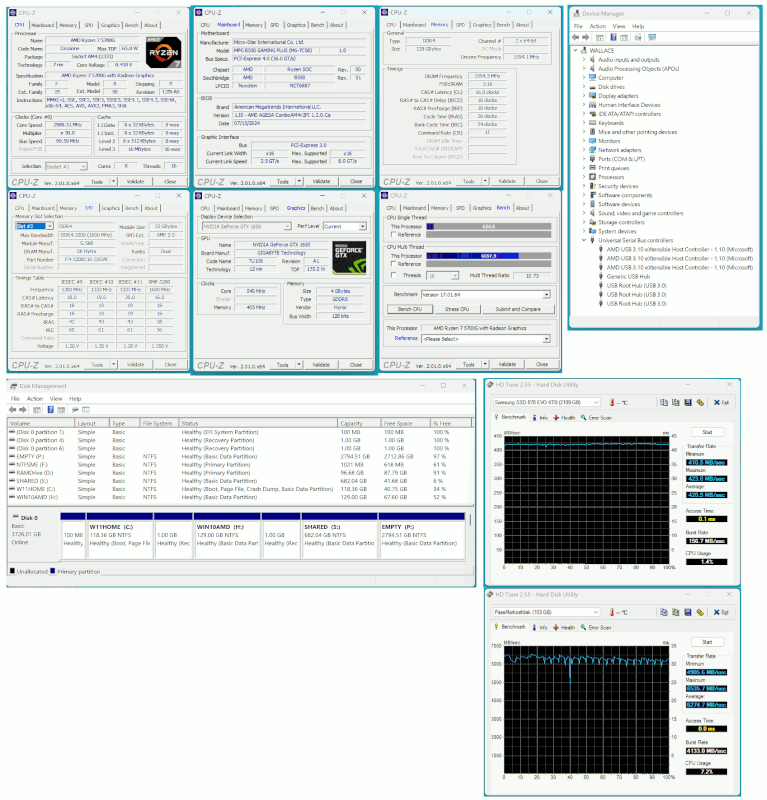
Your machine knows what is going on. The horses are under the hood.
[Picture] Use Download Original when the barrage of adverts appears...
https://i.postimg.cc/sX30S2TK/machine.gif
Device Manager shows I have some USB3 ports, but as machines go, it isn't
all that impressive hardware wise. I've got no DDR5 at all in the house.
There could be an extreme number of files on the partition.
Using Agent Ransack (MythicSoftware) and "searching for a blank search field", counts the files.
382,806 on my C: drive.
421,634 on my H: drive (also an OS partition).
You've probably got way more than me.
At startup, Windows Defender has a limited space it scans to ensure
some level of integrity. That runs pretty slowly on a HDD, but
on the SSD the random seek should be more consistent and fast.
You can probably get down to 10 seconds with Fast Startup, but that's
not how I run it here. It takes as long as it takes, when it starts here.
And an NVMe would be faster storage than the 870 in the picture,
but I like my drives to be easily removable, which is why I did not
bother having stacks of those here. I hate installing those, especially
when the connector is hidden under some overhanging software, and that
bloody screw is so tiny. Even a magnetic screwdriver isn't a big help
when the screwdriver tip is on an angle.
The current fastest NVMe in production is 14000MB/sec and they have finally made one approaching the hardware limit. But the pricing on storage
today, means we are not likely to be buying the stuff. The PCIe Rev5 ones
had been dragging their heels for a while, somewhere between 10000 and 12000, and they're getting closer to "keeping up" inside those. Error correcting
at 14000MB/sec, must be hellishly difficult (many ARM cores).
If you want to run the free version of HDTune, it is available here.
https://www.hdtune.com/files/hdtune_255.exe
That is an older version, which does not read the SMART properly on
an SSD, but otherwise, it's pretty handy for a quick read benchmark
to see that the cable speed you were expecting is there. Your SATA cable
could be SATA II or SATA III, and in terms of perking up performance,
it's the improvement in seek speed that is helping. The sustained transfer rate, these SATA SSDs are just too slow to impress. But at least with
the Samsung, it's not like the other brands where the read rate is
all over the place depending on "how mushy" the flash is.
The absolute worst SATA SSD here, did the read bench at 100MB/sec
and I took that back to the store. When you buy cheap drives, they
do prove their credentials pretty quickly.
Paul
--- PyGate Linux v1.5.2
* Origin: Dragon's Lair, PyGate NNTP<>Fido Gate (3:633/10)