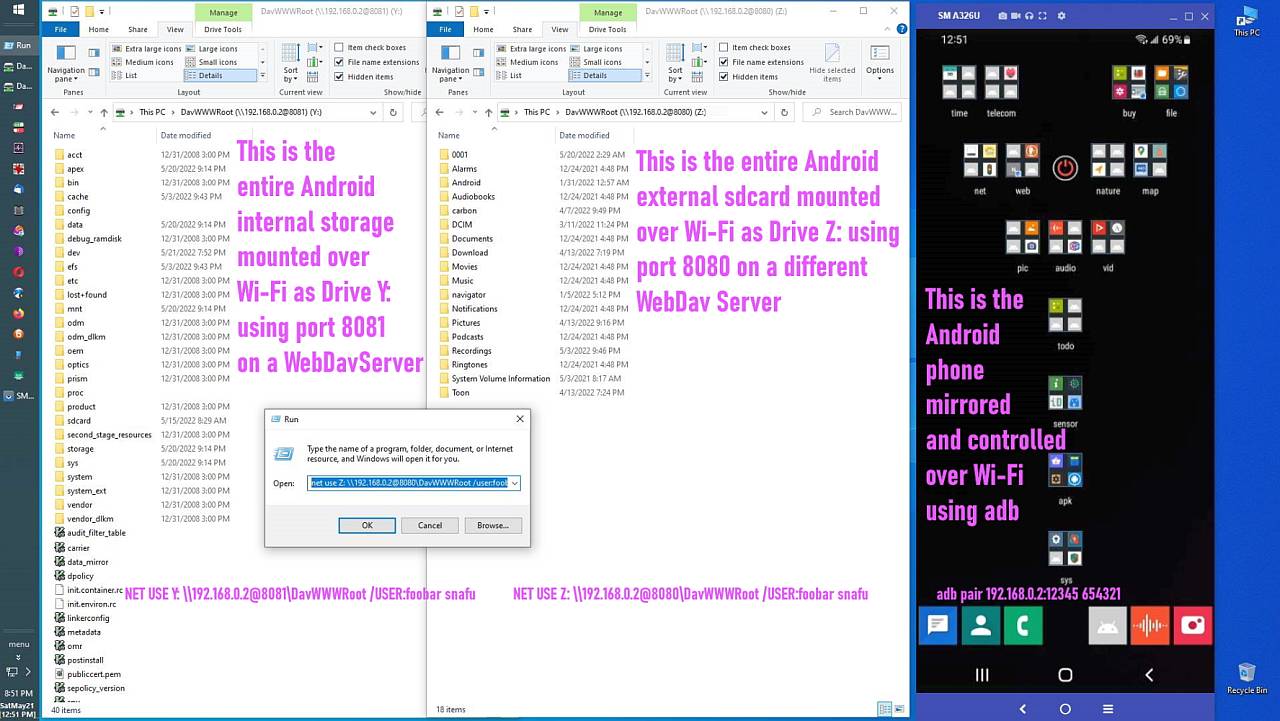
Subject: Re: Discussion of FTP vs WebDav for Android/iOS filesystem sharing on Windows PC
Maria Sophia, 2026-01-29 17:34:
[...]
Regarding your comment that WebDAV in Windows is not reliable, I do not
doubt that it can fail. I am only saying that in my specific use model it
has been reliable enough to be useful. If you have concrete failure cases
it would help to list them, since the discussion here is about FTP vs
WebDAV. Without examples it is hard to understand what you mean by
unreliable in this context.
Just some examples:
<
https://learn.microsoft.com/en-us/troubleshoot/windows-client/networking/cannot-access-webdav-web-folder>
<
https://learn.microsoft.com/en-us/troubleshoot/windows-client/networking/cannot-automatically-reconnect-dav-share>
I also experienced caching issues in some cases, so that the file list
was not correct or cached files did not get updated when changed on the
remote device.
When just using WebDAV to access Android this may not be that relevant,
but with bigger servers used by many other users as well and not just a smartphone acting like a server, things like these may be an issue.
My setup is simple. I run a free WebDAV server on Android or iOS, then use the built in Windows WebDAV client:
net use Z: \\192.168.1.2@8000\DavWWWRoot /USER:joe * /PERSISTENT:YES
No third party software on Windows, no shell extensions, no drivers.
Windows maps it as a normal filesystem. For my purposes this has been
As you also explain, it is a redirector. The underlying protocol
handling still the same as in the explorer namespace with all its
potential pitfalls (for example limited number of files in a folder,
caching issues etc.). There is only a translation from file system calls
to WebDAV - but you do not have a real "filesystem" there.
[....]
But the question remains. How do you directly save an APK obtained during a Windows web browsing session to the mobile device? That is the specific
Personally I use Cx File Explorer to access my NAS via SMB, where all my downloads live - or I put things to my Nextcloud server which is also accessible with Cx File Explorer using WebDAV remotely.
workflow where a mapped drive letter matters, and where WebDAV provides something that FTP cannot provide on Windows without extra software.
If we arbitrarily toss SMB into the mix, this is my assessment:
a. Can a web browser save an APK directly to Android with SMB?
b. Can a web browser save an APK directly to Android with WebDav?
c. Can a web browser save an APK directly to Android with FTP?
I don't have a need for this.
--
Arno Welzel
https://arnowelzel.de
--- PyGate Linux v1.5.11
* Origin: Dragon's Lair, PyGate NNTP<>Fido Gate (3:633/10)