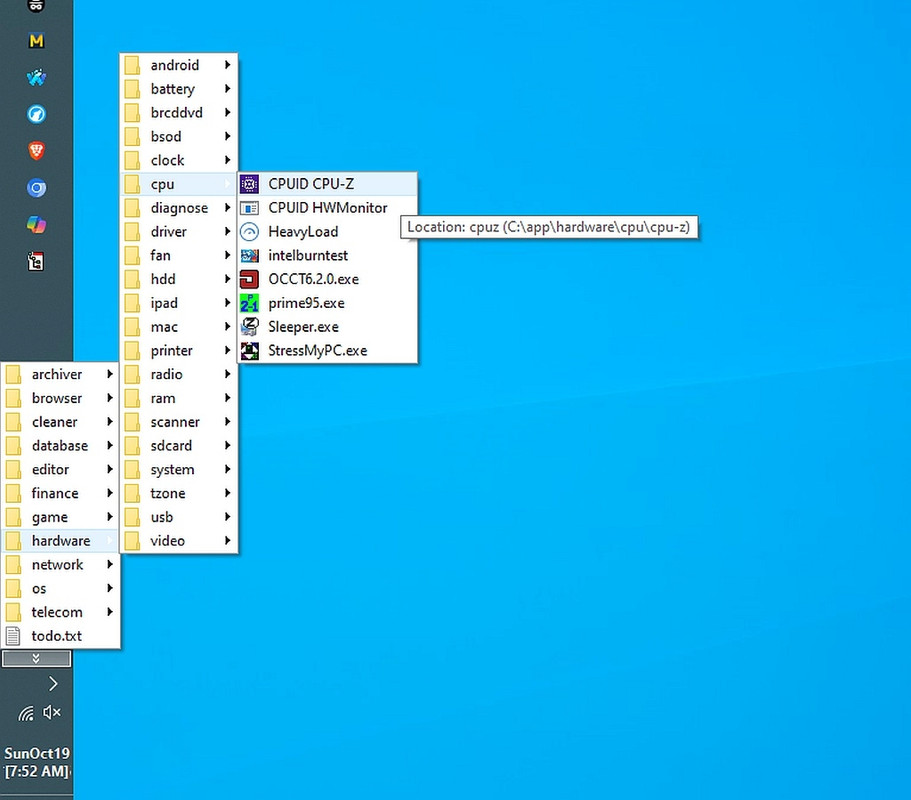
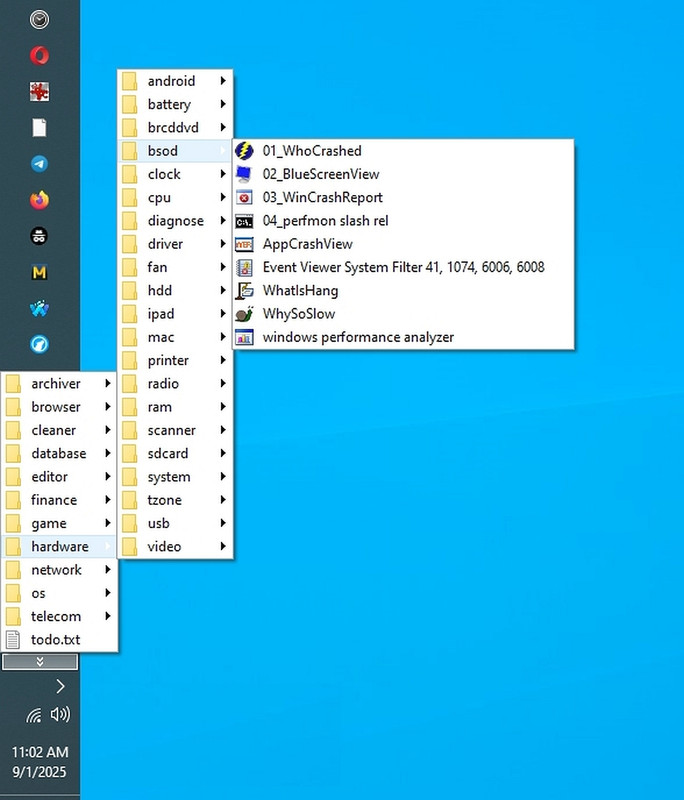
Has Windows 11's user interface yet caught up with that of Windows 10? <https://i.postimg.cc/V5QfgrQr/cpu-menu.jpg>
When you look at an operating system as a system that YOU use most,
then you realize the user interface is the part you control first &
foremost.
The Windows 11 user interface is, IMHO, vastly inferior to that of
Win10. But if someone can disabuse me of that assessment, I'd like to
know more.
Has Windows 11's user interface yet caught up with that of Windows 10? <https://i.postimg.cc/V5QfgrQr/cpu-menu.jpg>
When you look at an operating system as a system that YOU use most, then
you realize the user interface is the part you control first & foremost.
The Windows 11 user interface is, IMHO, vastly inferior to that of Win10.
But if someone can disabuse me of that assessment, I'd like to know more.
Mainly because I don't test Windows 11. I've only installed it sans MSA.
And that was for a grandkid (whom I taught how to organize computers).
From the little I know of Windows 11, it appears to be a punitive
downgrade
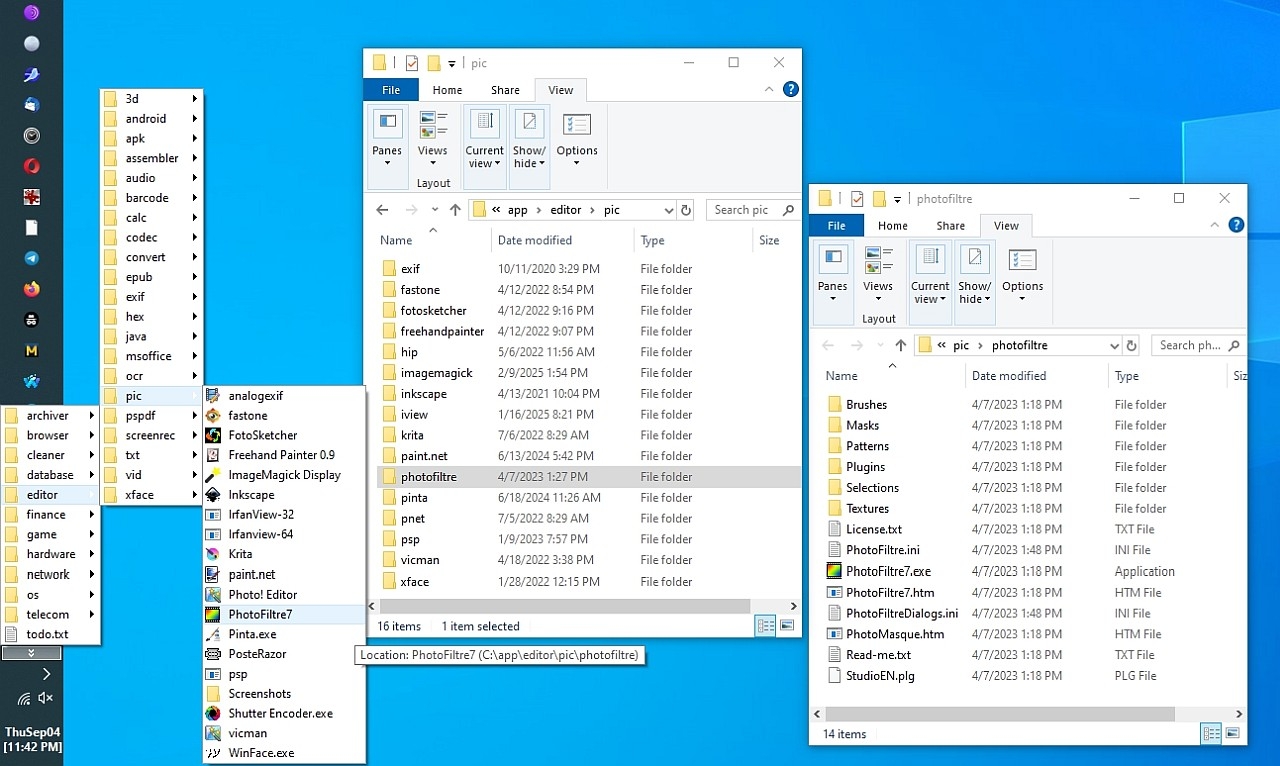
from Windows 10 at least in terms of the GUI we all interact with daily. <https://i.postimg.cc/2yf9Hf9v/photofiltre.jpg>
I put together systems as a living for decades in the Silicon Valley, so
the systems I used for Windows 95 and up on corporate systems and expensive million-dollar (SunOS/Solaris) software was to organize EVERYTHING by what functionality they have. Not brand name. Not whimsical fruit names. Functionality.
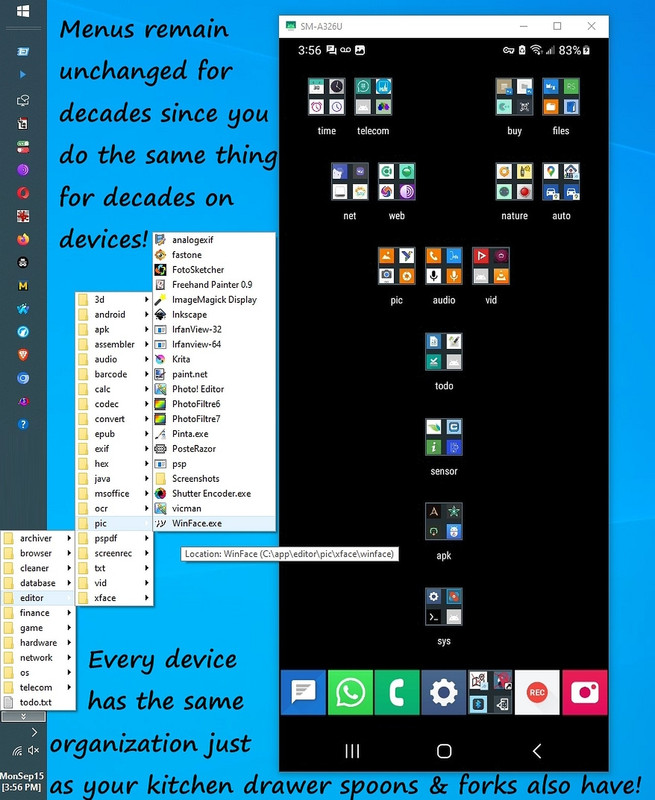
Every bit of software "does something" no matter what the platform. <https://i.postimg.cc/fW38dhsX/android-windows-menus.jpg>
Everything that is not data, fits into those dozen functional folders. {archivers, browsers, cleaners, editors, finance, games, etc}
Removing the plural (unless it's required, as with 'news') makes that.
list becomes {archiver, browser, cleaner, editor, finance, game, etc}.
This works for everything you can think of, where there is no concept of
the catch-all of "misc" or "util" crutch we've all used in the past.
The system is (almost) foolproof, as it does away with Microsoft's idiotically polluted Start menu (both the binary tiles & shortcuts).
You can just copy the menu folder from one system to another.
And it all just works.
You can copy a WindowsXP folder to Windows 10, and it still just works.
It's genius.
And yet, it's trivially simple.
I liken it to how everyone organizes their fork/spoon/knife drawers.
First, I make a software hierarchy to place the original installers
mkdir C:\software\{archiver, browser, cleaner, editor, finance, game, etc}
Then I make an app hierarchy to install all the programs into:
mkdir C:\app\{archiver, browser, cleaner, editor, finance, game, etc}
Then I mkdir the menu hierarchy pinned to the taskbar for a pullout cascade mkdir C:\menu\{archiver, browser, cleaner, editor, finance, game, etc}
Oh wait. Did I say pinned taskbar pullout menus? <https://i.postimg.cc/ TPDd40Br/app-cleaner-uninstaller.jpg>
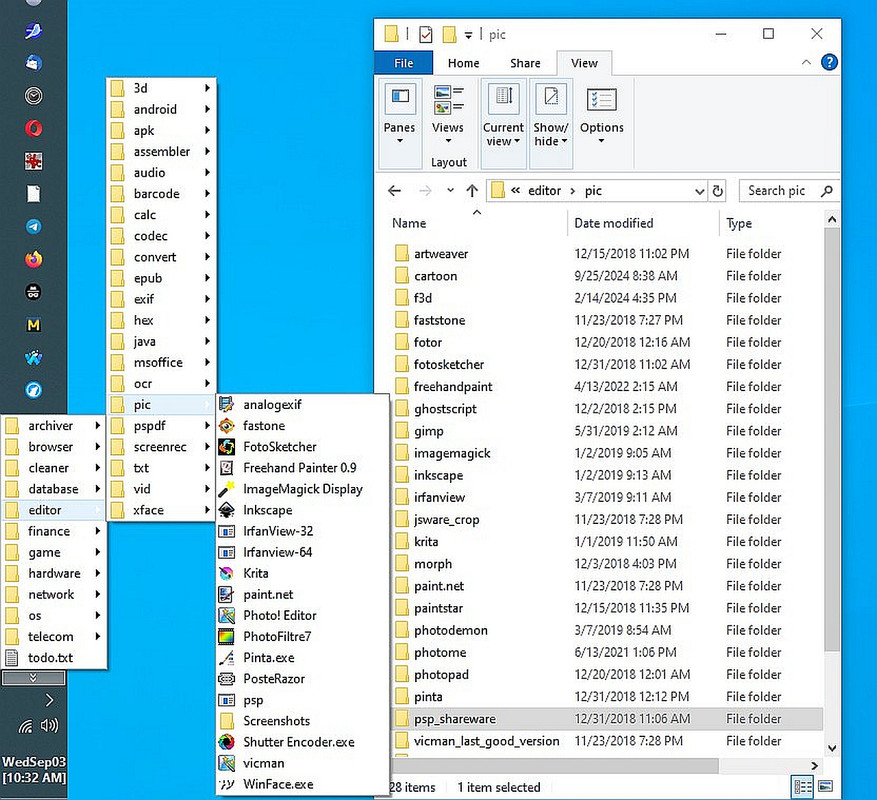
You can't use user-controlled taskbar-pinned accordions in Windows 11. <https://i.postimg.cc/sDWhsB18/editor-pic.jpg>
One of the strongest features of Windows is (apparently) gone in Win11.
ÿ<https://i.postimg.cc/PxyN9RtS/hardwaremenu.jpg> hardware
Why?
Somebody please tell me why Microsoft removed user-populated menus?
Q: What benefit did Microsoft get in removing taskbar pullout cascades?
A: ?
Maria Sophia wrote:
Has Windows 11's user interface yet caught up with that of Windows 10?
<https://i.postimg.cc/V5QfgrQr/cpu-menu.jpg>
When you look at an operating system as a system that YOU use most,
then you realize the user interface is the part you control first &
foremost.
The Windows 11 user interface is, IMHO, vastly inferior to that of
Win10. But if someone can disabuse me of that assessment, I'd like to
know more.
I used OpenShell on Windows 10 and now use it on Windows 11 Pro so I do not >see Microsoft's cellphone interface.
Has Windows 11's user interface yet caught up with that of Windows 10? <https://i.postimg.cc/V5QfgrQr/cpu-menu.jpg>
When you look at an operating system as a system that YOU use most, then
you realize the user interface is the part you control first & foremost.
The Windows 11 user interface is, IMHO, vastly inferior to that of Win10.
But if someone can disabuse me of that assessment, I'd like to know more.
Mainly because I don't test Windows 11. I've only installed it sans MSA.
And that was for a grandkid (whom I taught how to organize computers).
From the little I know of Windows 11, it appears to be a punitive
downgrade
from Windows 10 at least in terms of the GUI we all interact with daily. <https://i.postimg.cc/2yf9Hf9v/photofiltre.jpg>
I put together systems as a living for decades in the Silicon Valley, so
the systems I used for Windows 95 and up on corporate systems and expensive million-dollar (SunOS/Solaris) software was to organize EVERYTHING by what functionality they have. Not brand name. Not whimsical fruit names. Functionality.
Every bit of software "does something" no matter what the platform. <https://i.postimg.cc/fW38dhsX/android-windows-menus.jpg>
Everything that is not data, fits into those dozen functional folders. {archivers, browsers, cleaners, editors, finance, games, etc}
Removing the plural (unless it's required, as with 'news') makes that.
list becomes {archiver, browser, cleaner, editor, finance, game, etc}.
This works for everything you can think of, where there is no concept of
the catch-all of "misc" or "util" crutch we've all used in the past.
The system is (almost) foolproof, as it does away with Microsoft's idiotically polluted Start menu (both the binary tiles & shortcuts).
You can just copy the menu folder from one system to another.
And it all just works.
You can copy a WindowsXP folder to Windows 10, and it still just works.
It's genius.
And yet, it's trivially simple.
I liken it to how everyone organizes their fork/spoon/knife drawers.
First, I make a software hierarchy to place the original installers
mkdir C:\software\{archiver, browser, cleaner, editor, finance, game, etc}
Then I make an app hierarchy to install all the programs into:
mkdir C:\app\{archiver, browser, cleaner, editor, finance, game, etc}
Then I mkdir the menu hierarchy pinned to the taskbar for a pullout cascade mkdir C:\menu\{archiver, browser, cleaner, editor, finance, game, etc}
Oh wait. Did I say pinned taskbar pullout menus? <https://i.postimg.cc/ TPDd40Br/app-cleaner-uninstaller.jpg>
You can't use user-controlled taskbar-pinned accordions in Windows 11. <https://i.postimg.cc/sDWhsB18/editor-pic.jpg>
One of the strongest features of Windows is (apparently) gone in Win11.
ÿ<https://i.postimg.cc/PxyN9RtS/hardwaremenu.jpg> hardware
Why?
Somebody please tell me why Microsoft removed user-populated menus?
Q: What benefit did Microsoft get in removing taskbar pullout cascades?
A: ?
Maria Sophia wrote:
Somebody please tell me why Microsoft removed user-populated menus?
Q: What benefit did Microsoft get in removing taskbar pullout cascades?
A: ?
I use Windows PCs regularly; and Apple devices, iPad and iPhone.Oh, and android phones.
All of those seem debased from previous versions to me. I don't know whether the
programmers are becoming less competent, or whether the amount of things that the
OSes have to handle is growing too large for them.
At all events, I welcome the continuing presence of Control Panel in Win11. It's
a throwback to former times; but, no doubt, MS will soon be getting rid of it.
Ed
You can copy a WindowsXP folder to Windows 10, and it still just works.
It's genius.
Windows 7 was great. For me 10 was a disaster - slow and weirdly
inconstant. 11 is better than 10 but some old software tends to crash
the new explorer.exe. And I do wish the 11 start menu could be
configured to work more like the Windows 7 one worked.
Frank Slootweg wrote:
Windows 7 was great. For me 10 was a disaster - slow and weirdly
inconstant. 11 is better than 10 but some old software tends to crash
the new explorer.exe. And I do wish the 11 start menu could be
configured to work more like the Windows 7 one worked.
For all intents and purposes, Open-Shell Menu *is* the Windows 7 Start menu.
I use(d) it on Windows 8.1, 10 and now 11. You don't have to use the native Windows 11 Start menu at all if you don't want to.
Frank brings up an interesting point, which is even though nobody ever
needed Open Shell Menu in the past (yes, even on Windows 10), now it's actually needed on Windows 11 for the first time since pinned taskbar menus are (apparently) no longer allowed on Windows 11 (but they were on Win10).
<https://i.postimg.cc/fW38dhsX/android-windows-menus.jpg>
For the first time ever, Open Shell Menu is needed (only in Windows 11).
The good news is you can copy your Windows XP menus to Windows 11 and it "should" work but I haven't tested that yet but that works on Windows 10.
Brian Gregory wrote:As far as I can see it's not really much different.
I do wish the 11 start menu could be configured to work more like the
Windows 7 one worked.
I understand there is a 'new' start menu included in 25H2 which has not
been widely enabled yet?ÿ There's a tool somewhere to force it on ...
Frank Slootweg wrote:
Windows 7 was great. For me 10 was a disaster - slow and weirdly
inconstant. 11 is better than 10 but some old software tends to crash
the new explorer.exe. And I do wish the 11 start menu could be
configured to work more like the Windows 7 one worked.
ÿ For all intents and purposes, Open-Shell Menu *is* the Windows 7 Start
menu.
ÿ I use(d) it on Windows 8.1, 10 and now 11. You don't have to use the
native Windows 11 Start menu at all if you don't want to.
Frank brings up an interesting point, which is even though nobody ever
needed Open Shell Menu in the past (yes, even on Windows 10), now it's actually needed on Windows 11 for the first time since pinned taskbar menus are (apparently) no longer allowed on Windows 11 (but they were on Win10).
ÿ<https://i.postimg.cc/fW38dhsX/android-windows-menus.jpg>
For the first time ever, Open Shell Menu is needed (only in Windows 11).
The good news is you can copy your Windows XP menus to Windows 11 and it "should" work but I haven't tested that yet but that works on Windows 10.
Winston wrote:
On 2/5/2026 9:12 AM, Maria Sophia wrote:
You can copy a WindowsXP folder to Windows 10, and it still just works.
It's genius.
Not always true.
XP folder name
ÿ C:\Documents and Settings\[Username]
Win10 folder name
ÿ C:\Users\[Username]\Documents
In XP, username was always local account
IN W10, username is either local or MSA account(the latter 5
characters of the email address or a system generated user name of
alpha based character name).
Copying from XP to 10 best approach is to not copy the folder, but the
contents of the folder's files and contents of the subfolder files to
the same named or system generated(or user created) folder names.
ÿ - the destination for the initial copy(disk, usb, network drive)
from XP, then to the Win10 \users\username\Documents folders, subfolders.
Note: Reply only to Win10 group(since the comment was relative to XP
to Win10)
Hi Winston,
I never disagree with a logically sensible statement, so I certainly will
not disagree with a single statement you made above, but I'm different.
Since I worked in the Silicon Valley for decades putting together complex systems for a living I set up my Windows XP machine as a complete system.
Portability is always a key consideration when setting up software systems.
My Windows XP Irfanview, for example, was always located in: C:\app\editor\pic\irfanview
On every Windows XP machine I've ever owned.
My Win8 Irfanview, for example, was located in:
C:\app\editor\pic\irfanview
On every Windows Win8 machine I've ever owned.
My Windows Vista Irfanview, for example, was located in: C:\app\editor\pic\irfanview
On every Windows Vista machine I've ever owned.
My Windows 10 Irfanview, for example, was located in: C:\app\editor\pic\irfanview
On every Windows 10 machine I've ever owned.
A shortcut from Windows XP days would still work (although sometimes a
minor change to the TARGET is needed, e.g., when going from 32->64 bit).
Almost nothing has changed such that a minor tweak to the shortcut TARGET wouldn't fix it, so I can copy my WinXP menus over to Win10 & they work.
But, of course, I put NOTHING in the folders which are polluted.
So I don't use the user folders (all my machines are single user).
Nor do I ever put anything on purpose in the Program Files folders.
But, as Frank already noted, I'm brilliant when it comes to organizing a computer system, so I do agree most people can't do what I easily do.
Still... I'm always trying to help edify others so that they can too.
Zaidy036 wrote:
' I use(d) it on Windows 8.1, 10 and now 11. You don't have to use the >>>> native Windows 11 Start menu at all if you don't want to.
Frank brings up an interesting point, which is even though nobody ever
needed Open Shell Menu in the past (yes, even on Windows 10), now it's
actually needed on Windows 11 for the first time since pinned taskbar
menus
are (apparently) no longer allowed on Windows 11 (but they were on
Win10).
ÿ'<https://i.postimg.cc/fW38dhsX/android-windows-menus.jpg>
For the first time ever, Open Shell Menu is needed (only in Windows 11). >>>
The good news is you can copy your Windows XP menus to Windows 11 and it >>> "should" work but I haven't tested that yet but that works on Windows
10.
Lots of free mods including Windows 11 Start Menu
<https://windhawk.net/mods>
Hi Zaidy,
You've helped me a lot over the years so I very much appreciate that customization treasure trove which contains items such as a. Windows 11 Start Menu (Classic-style tweaks) ÿÿ Adds more traditional layouts,
spacing and behavior.
b. Classic Taskbar ÿÿ Restores labels, ungrouped icons and more granular control.
c. Classic Volume Mixer ÿÿ Brings back the old vertical mixer UI.
d. Classic Alt-Tab ÿÿ Reverts to the compact list instead of the
thumbnail grid.
e. Explorer tweaks ÿÿ Restoring the ribbon, adjusting spacing or
removing the command bar.
Windows has never fundamentally changed, in reality, but Microsoft has visibly changed the Start Menu implementation something like five times
since XP days in order to make it "look" like a different operating system. But the one thing Microsoft never removed until Windows 11, AFAIK, was the ability to pin a folder and let Explorer render it as a cascading menu.
So my Windows XP start menu worked fine pinned as a toolbar to Windows 10.
What I easily pulled off in the Windows'8 era was something only a tiny fraction users even realized was possible. Everyone else was panicking
about the "death of the Start Menu," installing Classic Shell, Start8, StartIsBack, and a dozen other band-aids, while I just pinned my own XP-era menu tree to the taskbar and kept going like nothing happened. <https://i.postimg.cc/qvJDMQcq/taskbarmenu02.jpg>
It's my understanding that Windows 11 is lost functionality in that
A. We cannot add a folder toolbar
B. We cannot pin a folder as a cascading menu
C. We cannot recreate the XP-style accordion menu on the taskbar
A the entire "Toolbars" subsystem (Address, Links, Desktop, custom folders) was removed so that Microsoft could claim a different operating system.
It's my understanding that Windows 11 replaced the taskbar with a
completely rewritten XAML-based shell component. The old Explorer-based taskbar (which supported toolbars) was removed. Because toolbars were implemented inside Explorer's taskband, the feature disappeared with it.
Our C:\menu structure still works as a filesystem-based Start Menu replacement, but we cannot attach it to the Windows 11 taskbar the way we
did in XP -> Vista -> 7 -> 8 -> 10 days, as far as I'm aware.
As far as I can tell, unfortunately, Windhawk does NOT currently offer a
mod that restores the Windows 10-style "folder toolbar" or XP-style
cascading menu on the Windows 11 taskbar.
However, I'm told tools like ExplorerPatcher or StartAllBack can restore
the Windows 10 taskbar, and that version still supports toolbars.
Frank Slootweg wrote:
For the first time ever, Open Shell Menu is needed (only in Windows 11).
Nope, that is for *your* - rather uncommon - use.
For the rest of the world, Open-Shell Menu (first Classic Start Menu) was/is needed in Windows 8[.1] and beyond, when Microsoft abandoned the Start menu which existed from XP through 7 (and IIRC earlier, 2000 and
NT).
The good news is you can copy your Windows XP menus to Windows 11 and it >> "should" work but I haven't tested that yet but that works on Windows 10.
I doubt that many - if any - use your "pinned taskbar menus".
Hi Frank,
I posted many times there's no need for that "Classic" stuff if all
we wanted was an accordion menu in the later Windows releases
(although the tool did a LOT MORE than just pin a taskbar menu).
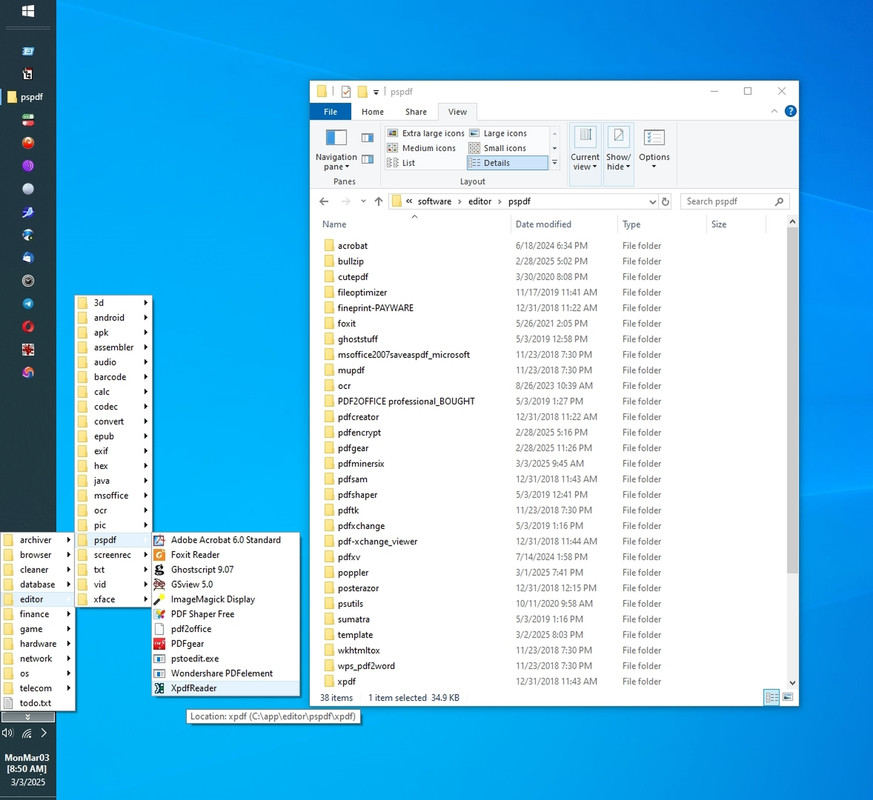
This menu is just a folder containing a hierarchy of shortcuts anyway.
<https://i.postimg.cc/jSNb7bkF/pspdf.jpg>
The "Classic" tool that everyone "thought" they needed in, oh, was it
Windows 8 when it came about, was never needed "if", all people wanted was the classic accordion pullout menus pinned to the taskbar.
<https://i.postimg.cc/j5K0RL7H/taskbarmenu01.jpg>
The "Classic" product of the time (which morphed into a few names over
time) purported to "add back" what Microsoft removed, but the fact was Microsoft never removed it. They just moved it.
MikeS wrote:
However, I'm told tools like ExplorerPatcher or StartAllBack can restore >>> the Windows 10 taskbar, and that version still supports toolbars.
I have used every version of Windows since 3.1 and tweaked each one to
my liking, sometimes adding free utilities. For example, an ancient
program (RUNit) in use from W95 to W11 provides me with a simple,
familiar cascading menu system which does much of what you lament.
The time you have spent complaining on Usenet would have been ample to
customise W11 to your specific liking.
It's quite understandable that people who don't approach Windows as a
system would think asking how to do so on Windows 11 is complaining.
But Zaidy goes way back and understands we're working together here to
solve a problem, which, in this case, is the problem of the menus.
We've solved almost every problem we've encountered in the past two
decades, and we'll solve this one too - perhaps with the code that Zaidy kindly referred us to for finding it.
If folks have never solved problems think that trying to solve them is "complaining", then maybe that's the main reason they can't solve 'em.
But we can.
When/if I get Windows 11, I'll first look into Zaidy's suggested tools!
Thanks!
Frank Slootweg wrote:That windhawk site has some interesting mods.
Bottom line: Use what you want and how you want it, but don't rule out
the needs of others.
I never disagree with a logically sensible statement, so I agree with you. For many people, Windows 11 is not a downgrade from Windows 10 for example.
But, for me, since the accordion menu is what I've been using for decades
as a main kickoff point for programs, Windows 11 is lost functionality.
The solution set Zaidy pointed out perhaps contains the workaround.
<https://windhawk.net/mods>
MikeS wrote:
As for "Zaidy goes way back and understands we're working together
here to solve a problem", that's just more nonsense. Zaidy simply
suggested one of the thousands of utilities that have been created
over the years to help users customise every version of Windows. The
"problem" you want to solve only exists in your mind.
Hi MikeS,
You clearly have strong opinions about the differences between Windows 10
and Windows 11, and we respect that. Since you've stated pretty confidently that the "problem" only exists in my mind, I'd appreciate it if you could point to the specific improvements in Windows 11 that you believe address
the concerns I've raised.
You seem very knowledgeable about what Windows 11 does better than Windows 10, so I'm genuinely interested in hearing which concrete features you
think we would all benefit from.
Facts are always more helpful than general statements.
To that point, since the specific issue here is that Windows 11 removed cascading taskbar toolbars (the pull-out accordion menus that Windows 10 supported), what do you suggest as the actual solution to that? If you believe the issues raised are imaginary, then you should be able to point
to the Windows 11 feature that replaces this functionality.
Andy Burns wrote:
Brian Gregory wrote:
I do wish the 11 start menu could be configured to work more like the
Windows 7 one worked.
I understand there is a 'new' start menu included in 25H2 which has not been widely enabled yet?? There's a tool somewhere to force it on ...
Have just noticed it's been enabled on this machine (new
category/grid/list option in Start).
Can't see it helping Brian ...
Frank Slootweg wrote:
The Category one is completely bonkers! > most is in Other (Duh!), even things like Thunderbird!
FF and TB both went into productivity here along with Chrome, Edge and LibreOffice
Andy Burns wrote:
Brian Gregory wrote:Have just noticed it's been enabled on this machine (new category/grid/
I do wish the 11 start menu could be configured to work more like the
Windows 7 one worked.
I understand there is a 'new' start menu included in 25H2 which has
not been widely enabled yet?ÿ There's a tool somewhere to force it on ...
list option in Start).
Can't see it helping Brian ...
Andy Burns <usenet@andyburns.uk> wrote:
Frank Slootweg wrote:
The Category one is completely bonkers! > most is in Other (Duh!), even things like Thunderbird!
FF and TB both went into productivity here along with Chrome, Edge and
LibreOffice
I also have Chrome and Edge in Productivity (don't have FF, nor LibreOffice).
My Thunderbird is old (60.9..0) and 32-bit, perhaps that 'explains'
why they put it in Other.
But all of this does not explain putting the Windows Security UI in Productivity.
Let's hope *some* people actually like the 'new' Start menu.
| Sysop: | Tetrazocine |
|---|---|
| Location: | Melbourne, VIC, Australia |
| Users: | 15 |
| Nodes: | 8 (0 / 8) |
| Uptime: | 234:19:56 |
| Calls: | 207 |
| Files: | 21,502 |
| Messages: | 83,204 |