PSA: Creating *any* RGB solid color for mobile wallpaper or Windows background
On the Android newsgroup is a lengthy thread about setting the homescreen/lockscreen to a solid-colored wallpaper, where, for Android, the capability depends greatly on the device particulars (launcher, Android version, OEM, model, etc.).
Newsgroups: comp.mobile.android
Subject: How to create a plain wallpaper/background?
Date: Mon, 16 Feb 2026 13:09:54 +0000
Message-ID: <2ihb6m-91k63.ln1@q957.zbmc.eu>
The holy grail goal would be to select *any* RGB/HEX color by value,
such as R=AB, G=CD, B=EF (decimal 171, 205, 239) for the color.
As far as I know, none of the three platforms I own (and hence can
test), allow the user to *directly* natively set the background color by number
(although "some" of the Android devices do allow things I'm unaware of).
Maria Sophia wrote:
On my iPadOS 26.3 device, I could choose Settings > Wallpaper > Add a new
wallpaper > colors but those are not true colors but color gradients.
Oops. I made another minor mistake in hastily writing that PSA just now.
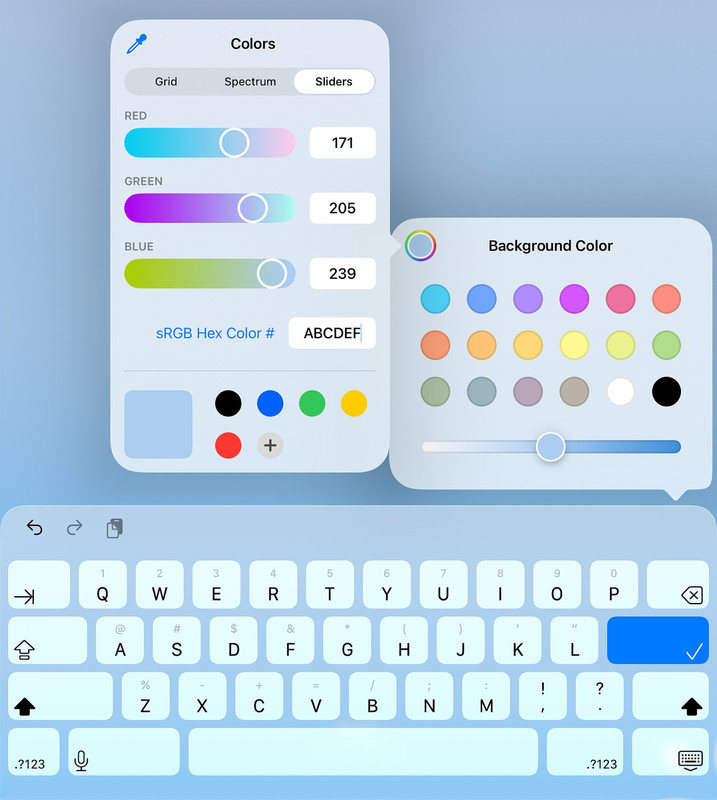
I can't get my iPad to set a solid color, but you can fake it (not
really) by using the gradient screen (which you can type into "ABCDEF")
as shown.
<https://i.postimg.cc/RFJJph5s/abcdef.jpg>
But it's a gradient. Not a solid color.
If anyone knows how to use that native GUI to get a solid color, that would be in keeping with this PSA which is about setting solid-color backgrounds.
PSA:And some of them have an interesting hurdle to jump over. On my Xiaomi
Creating *any* RGB solid color for mobile wallpaper or Windows background
On the Android newsgroup is a lengthy thread about setting the homescreen/lockscreen to a solid-colored wallpaper, where, for Android, the capability depends greatly on the device particulars (launcher, Android version, OEM, model, etc.).
On 2026-02-17 18:09, Maria Sophia wrote:
Maria Sophia wrote:
On my iPadOS 26.3 device, I could choose Settings > Wallpaper > Add a new >> wallpaper > colors but those are not true colors but color gradients.
Oops. I made another minor mistake in hastily writing that PSA just now.
I can't get my iPad to set a solid color, but you can fake it (not
really) by using the gradient screen (which you can type into "ABCDEF")
as shown.
<https://i.postimg.cc/RFJJph5s/abcdef.jpg>
But it's a gradient. Not a solid color.
If anyone knows how to use that native GUI to get a solid color, that would be in keeping with this PSA which is about setting solid-color backgrounds.
Ah, the goalpost drag!
This was about setting a "plain wallpaper" originally.
The fact that iOS applies a gradient doesn't really make the wallpaper
any less "plain".
Alan <nuh-uh@nope.com> wrote:
On 2026-02-17 18:09, Maria Sophia wrote:
Maria Sophia wrote:Ah, the goalpost drag!
On my iPadOS 26.3 device, I could choose Settings > Wallpaper > Add a new >>>> wallpaper > colors but those are not true colors but color gradients.
Oops. I made another minor mistake in hastily writing that PSA just now. >>>
I can't get my iPad to set a solid color, but you can fake it (not
really) by using the gradient screen (which you can type into "ABCDEF")
as shown.
<https://i.postimg.cc/RFJJph5s/abcdef.jpg>
But it's a gradient. Not a solid color.
If anyone knows how to use that native GUI to get a solid color, that would >>> be in keeping with this PSA which is about setting solid-color backgrounds. >>
This was about setting a "plain wallpaper" originally.
The fact that iOS applies a gradient doesn't really make the wallpaper
any less "plain".
OP here, I certainly meant with no gradient when I asked the question. :-)
I.e. I just want the whole screen the same colour and brightness.
On 2026-02-18 04:27, Chris Green wrote:
Alan <nuh-uh@nope.com> wrote:
On 2026-02-17 18:09, Maria Sophia wrote:
Maria Sophia wrote:
On my iPadOS 26.3 device, I could choose Settings > Wallpaper > Add >>>>> a newOops. I made another minor mistake in hastily writing that PSA just
wallpaper > colors but those are not true colors but color gradients. >>>>
now.
I can't get my iPad to set a solid color, but you can fake it (not
really) by using the gradient screen (which you can type into "ABCDEF") >>>> as shown.
<https://i.postimg.cc/RFJJph5s/abcdef.jpg>
But it's a gradient. Not a solid color.
If anyone knows how to use that native GUI to get a solid color,
that would
be in keeping with this PSA which is about setting solid-color
backgrounds.
Ah, the goalpost drag!
This was about setting a "plain wallpaper" originally.
The fact that iOS applies a gradient doesn't really make the wallpaper
any less "plain".
OP here, I certainly meant with no gradient when I asked the
question.ÿ :-)
I.e. I just want the whole screen the same colour and brightness.
Well I'd call a simple gradient with a colour you choose pretty plain.
?
On 2026-02-18 17:12, Alan wrote:
On 2026-02-18 04:27, Chris Green wrote:
Alan <nuh-uh@nope.com> wrote:
On 2026-02-17 18:09, Maria Sophia wrote:
Maria Sophia wrote:
On my iPadOS 26.3 device, I could choose Settings > Wallpaper >Oops. I made another minor mistake in hastily writing that PSA just >>>>> now.
Add a new
wallpaper > colors but those are not true colors but color gradients. >>>>>
I can't get my iPad to set a solid color, but you can fake it (not
really) by using the gradient screen (which you can type into
"ABCDEF")
as shown.
<https://i.postimg.cc/RFJJph5s/abcdef.jpg>
But it's a gradient. Not a solid color.
If anyone knows how to use that native GUI to get a solid color,
that would
be in keeping with this PSA which is about setting solid-color
backgrounds.
Ah, the goalpost drag!
This was about setting a "plain wallpaper" originally.
The fact that iOS applies a gradient doesn't really make the wallpaper >>>> any less "plain".
OP here, I certainly meant with no gradient when I asked the
question.ÿ :-)
I.e. I just want the whole screen the same colour and brightness.
Well I'd call a simple gradient with a colour you choose pretty plain.
?
Can't you choose a zero gradient?
Still I think this is converted to a display bitmap which is what the rendering routine uses.Completely agree. Calculate pixel values every time? No way.
Alan <nuh-uh@nope.com> wrote:
On 2026-02-17 18:09, Maria Sophia wrote:
Maria Sophia wrote:Ah, the goalpost drag!
On my iPadOS 26.3 device, I could choose Settings > Wallpaper > Add a new >>>> wallpaper > colors but those are not true colors but color gradients.
Oops. I made another minor mistake in hastily writing that PSA just now. >>>
I can't get my iPad to set a solid color, but you can fake it (not
really) by using the gradient screen (which you can type into "ABCDEF")
as shown.
<https://i.postimg.cc/RFJJph5s/abcdef.jpg>
But it's a gradient. Not a solid color.
If anyone knows how to use that native GUI to get a solid color, that would >>> be in keeping with this PSA which is about setting solid-color backgrounds. >>
This was about setting a "plain wallpaper" originally.
The fact that iOS applies a gradient doesn't really make the wallpaper
any less "plain".
OP here, I certainly meant with no gradient when I asked the question. :-)
I.e. I just want the whole screen the same colour and brightness.
Your Name wrote:
On 2026-02-18 12:27:48 +0000, Chris Green said:
Alan <nuh-uh@nope.com> wrote:
On 2026-02-17 18:09, Maria Sophia wrote:
Maria Sophia wrote:
On my iPadOS 26.3 device, I could choose Settings >
Wallpaper > Add a new wallpaper > colors but those are not
true colors but color gradients.
Oops. I made another minor mistake in hastily writing that
PSA just now.
I can't get my iPad to set a solid color, but you can fake
it (not really) by using the gradient screen (which you can
type into "ABCDEF") as shown. <https://i.postimg.cc/RFJJph5s/
abcdef.jpg>
But it's a gradient. Not a solid color.
If anyone knows how to use that native GUI to get a solid
color, that would be in keeping with this PSA which is about
setting solid-color backgrounds.
Ah, the goalpost drag!
This was about setting a "plain wallpaper" originally.
The fact that iOS applies a gradient doesn't really make the
wallpaper any less "plain".
OP here, I certainly meant with no gradient when I asked the
question. :-)
I.e. I just want the whole screen the same colour and
brightness.
It's simply the Maria / Arlen troll making a know-nothing
complaint about Apple yet again. Just ignore the the moron.
Let's try to stay focused on topic for the technical question, since
the thread concerns cross-platform behavior rather than
personalities.
Apple won't allow
On 2026-02-18 14:38, Maria Sophia wrote:
Your Name wrote:
On 2026-02-18 12:27:48 +0000, Chris Green said:
Alan <nuh-uh@nope.com> wrote:
On 2026-02-17 18:09, Maria Sophia wrote:
Maria Sophia wrote:
On my iPadOS 26.3 device, I could choose Settings >
Wallpaper > Add a new wallpaper > colors but those are not
true colors but color gradients.
Oops. I made another minor mistake in hastily writing that
PSA just now.
I can't get my iPad to set a solid color, but you can fake
it (not really) by using the gradient screen (which you can
type into "ABCDEF") as shown. <https://i.postimg.cc/RFJJph5s/
abcdef.jpg>
But it's a gradient. Not a solid color.
If anyone knows how to use that native GUI to get a solid
color, that would be in keeping with this PSA which is about
setting solid-color backgrounds.
Ah, the goalpost drag!
This was about setting a "plain wallpaper" originally.
The fact that iOS applies a gradient doesn't really make the
wallpaper any less "plain".
OP here, I certainly meant with no gradient when I asked the
question.? :-)
I.e. I just want the whole screen the same colour and
brightness.
It's simply the Maria / Arlen troll making a know-nothing
complaint about Apple yet again. Just ignore the the moron.
Let's try to stay focused on topic for the technical question, since
the thread concerns cross-platform behavior rather than
personalities.
You mean the way you did when you posted all of this (everything
included to show Arlen-the-narcissists "focus" on the technical):
To add value so that this becomes a useful reference for all three common platforms, Android, iOS and Windows, here's a quick summary of details.
1. The universal 1x1 pixel solid-color privacy-aware method:
A mathematically perfect solid-color wallpaper only needs one pixel.
Every OS scales it losslessly because all pixels are identical.
Minimal PPM format (ASCII only):
?? P3 1 1 255 R G B
This produces a 1x1 pixel image with the exact RGB values you want.
It contains:
a. no EXIF
b. no metadata
c. no compression artifacts
d. no camera noise
e. no unique patterns
f. no fingerprintable entropy beyond the RGB value
This works on Windows, Android, and iOS/iPadOS.
2. Windows notes:
Windows supports solid colors natively, but the GUI color picker:
a. does not accept HEX directly
b. does not always allow precise RGB entry
c. may apply GPU dithering depending on settings
Using a generated PNG guarantees:
a. exact RGB
b. no dithering
c. no metadata
d. no artifacts
Windows accepts any PNG as wallpaper without modification.
3. Android notes:
Android is the most flexible platform.
Universally true:
a. Any app can set wallpaper via the public API.
b. Any image viewer can "Set as wallpaper".
c. A 1x1 PNG scales perfectly on all devices.
Not universal:
a. Native solid-color pickers vary by OEM.
b. Google Wallpapers app has a limited palette.
Yet, the offline PPM -> PNG method in this PSA works on all devices.
4. IOS/iPadOS notes:
iOS and iPadOS cannot generate a true solid color using the built-in
"Color" wallpaper option. Even when entering a HEX value, Apple applies
a gradient.
Limitations:
a. All "Color" wallpapers are gradients.
b. No API exists for apps to set wallpaper.
c. No toggle to disable shading.
d. No way to force a flat color through Accessibility.
Therefore:
a. The best way to get a true solid color is to import an image.
5. Privacy benefits of solid colors on the various platforms:
A. Android (modern versions) exposes only:
? a. 3 main colors
? b. 1 secondary color
? c. 1 tertiary color
? d. luminance metadata
B. A pure solid color collapses all of these to the same value, producing:
? a. near-zero entropy
? b. no unique fingerprint
? c. no reconstructable image
iOS:
a. Apps cannot read wallpaper data unless the user gives them the image.
Windows:
a. Any program can read the wallpaper file, but a 1x1 PNG contains
?? nothing but three bytes of color.
6. Imagmagic command syntax:
This works on Windows, macOS, Linux, Android (via Termux), etc. but I
could find no native, user-installable version of ImageMagick for iOS
or iPadOS so only iOS can't do what all other operating systems easily do.
I. Create a solid-color PNG from a HEX value:
?? magick -size 1x1 xc:"#ABCDEF" solid-abcdef.png
?II. Scale it to device resolution:
?? magick solid-abcdef.png -scale 2360x1640! ipad-2360x1640.png
7. How does pure solid black help with privacy?
Pure black (#000000) produces the lowest possible entropy on Android.
Every device returns the same WallpaperColors object.
Benefits:
a. hardest wallpaper to fingerprint
b. reduces OLED power consumption
c. visually clean and uniform
Note that while the gradient contains more entropy than pure black, on iOS, apps cannot access it anyway, so the difference is irrelevant in practice.
Windows exposes the wallpaper file directly, so gradients absolutely
contain more fingerprintable data than pure black would.
To add value so that this becomes a useful reference for all three common platforms, Android, iOS and Windows, here's a quick summary of details.
2. Windows notes:
Windows supports solid colors natively, but the GUI color picker:
a. does not accept HEX directly
6. Imagmagic command syntax:
This works on Windows, macOS, Linux, Android (via Termux), etc.
but I could find no native, user-installable version of ImageMagick for iOS or iPadOS so only iOS can't do what all other operating systems easily do.
I. Create a solid-color PNG from a HEX value:
magick -size 1x1 xc:"#ABCDEF" solid-abcdef.png
II. Scale it to device resolution:
magick solid-abcdef.png -scale 2360x1640! ipad-2360x1640.png
Jeff Layman wrote:uckily for you, this PSA hits home as Xiaomi's Themes app is optional.
You can bypass Xiaomi's theme ecosystem entirely by:
1. Generating your own solid-color wallpaper
2. Setting it through the system wallpaper picker
3. Which bypasses Xiaomi's theme catalog
4. Which also bypasses Xiaomi's cloud sync
5. And bypasses Xiaomi's analytics
Herbert Kleebauer wrote:
That is why the 1x1 PPM -> PNG method is still a more precise and platform-neutral way to generate a true solid-color wallpaper. It produces
a file that contains literally three bytes of color data and nothing else.
It's important to note that most people only know about three of the
million things they should know about privacy, which is why most people
think it's absurd for anyone to add privacy into their daily use model.
Herbert Kleebauer wrote:
<html><head></head><body>
<img src="data:image/bmp,%42%4D%3A%00%00%00%00%00%00%00%36%00%00%00%28%00%00%00%01%00%00%00%01%00%00%00%01%00%18%00%00%00%00%00%04%00%00%00%C4%0E%00%00%C4%0E%00%00%00%00%00%00%00%00%00%00%FF%80%40%00"
width=100% border=0></body></html>
D. You solve problems by hand-crafting binary structures.
The HTML-screenshot trick:
However, a screenshot isn't as mathematically pure as a 1x1 pixel is.
Herbert Kleebauer wrote:
1. Pixel-level purity
As you said, if the original image contains only one RGB value, then
every pixel in the screenshot will also contain that same RGB value.
Zooming in won't reveal anything else. That part is guaranteed.
2. File-level purity
Even though the pixels remain uniform, the *saved file* may still
contain extra metadata, color-space tags, or compression artifacts
| Sysop: | Tetrazocine |
|---|---|
| Location: | Melbourne, VIC, Australia |
| Users: | 15 |
| Nodes: | 8 (0 / 8) |
| Uptime: | 234:20:59 |
| Calls: | 207 |
| Files: | 21,502 |
| Messages: | 83,204 |