• Re: Windows Secure Boot Certificate

    From Frank Slootweg@3:633/10 to All on Mon Mar 9 19:28:14 2026
    ...w??? <winstonmvp@gmail.com> wrote:
    On 3/9/2026 9:16 AM, J. P. Gilliver wrote:
    On 2026/3/8 19:0:22, Paul wrote:
    On Sun, 3/8/2026 2:41 PM, J. P. Gilliver wrote:
    []
    The post is at the end of the thread.

    Thanks. I think I do remember seeing it; not sure why I've lost it.


    Force Secure Boot Update

    (I thought we'd just agreed that was - for me, anyway - better off!)
    [rest snipped (but post kept)]


    Leave Secure Boot enabled.
    Just run the following one at at time in the following order in a
    Powershell admin.
    - copy each command and paste into Powershell, press the 'Return' key.

    Set-ItemProperty -Path
    ?HKLM:\SYSTEM\CurrentControlSet\Control\SecureBoot? -Name
    ?AvailableUpdates? -Value 0x40

    Start-ScheduledTask -TaskName ?\Microsoft\Windows\PI\Secure-Boot-Update?

    If I were to follow this advice, I would first *check* if the
    mentioned key or/and Scheduled Task do not already exist.

    For example on my Windows 11 25H2 system they are both already there
    and the task has been run and is run every 12 hours. (Minor nit: I think
    you mean 0x400 (1024 decimal). That's what mine is set to and what I
    have seen mentioned in several web articles.)

    BTW, in that same ...\PI branch, there's also a 'Sqm-Tasks' task with Description: 'This task gathers information about the Trusted Platform
    Module (TPM), Secure Boot, and Measured Boot.'.

    Restart the device twice, once after performing the above, and again
    when Windows finishes the first restart(do not logon to Windows, restart
    for the second time)...once the second restart finishes logon to Windows
    in an Admin account.

    Your done.

    --- PyGate Linux v1.5.12
    * Origin: Dragon's Lair, PyGate NNTP<>Fido Gate (3:633/10)
  • From J. P. Gilliver@3:633/10 to All on Mon Mar 9 19:39:22 2026
    On 2026/3/9 17:34:54, ...w­¤?ñ?¤ wrote:
    []
    Just run the following one at at time in the following order in a
    Powershell admin.

    By that, I assume you mean run powershell as administrator. Have opened
    that (white-on-blue window).

    - copy each command and paste into Powershell, press the 'Return' key.

    Set-ItemProperty -Path
    ?HKLM:\SYSTEM\CurrentControlSet\Control\SecureBoot? -Name
    ?AvailableUpdates? -Value 0x40

    I copied that, as one line, into powershell, and pressed return. I just
    got the prompt again.

    Start-ScheduledTask -TaskName ?\Microsoft\Windows\PI\Secure-Boot-Update?

    I copied that into powershell, and pressed return. Just prompt again,
    but perceptible pause before I did.

    Restart the device twice, once after performing the above, and again
    when Windows finishes the first restart(do not logon to Windows, restart

    I think I have it set to login without asking, but I think there's a
    point where it tells me there have been no unsuccessful logins since
    last time, so I'll just restart at that point.

    for the second time)...once the second restart finishes logon to Windows

    OK - saving this post as a draft ...

    in an Admin account.

    Your done.

    Not sure how to logon in an Admin account, but if "my done" at that
    point, presumably don't need to.

    Right, going to save this draft now, then try those two restarts ...
    ...
    I'm back, after two restarts (though they were full ones, getting into Windows). Not sure what I do next ...
    --
    J. P. Gilliver. UMRA: 1960/<1985 MB++G()ALIS-Ch++(p)Ar++T+H+Sh0!:`)DNAf

    You'll need to have this fish in your ear.
    (First series, fit the first.)

    --- PyGate Linux v1.5.12
    * Origin: Dragon's Lair, PyGate NNTP<>Fido Gate (3:633/10)
  • From J. P. Gilliver@3:633/10 to All on Mon Mar 9 19:45:49 2026
    On 2026/3/9 17:34:27, Paul wrote:
    On Mon, 3/9/2026 12:16 PM, J. P. Gilliver wrote:

    (I thought we'd just agreed that was - for me, anyway - better off!)
    [rest snipped (but post kept)]

    See my reply to Winston ...

    You should use the administrator terminal and try winstons two status commands.

    I started powershell as Administrator, then copied his two commands into
    it, pressing return each time. I just got the prompt back each time,
    though after a noticeable few seconds' pause after the second one. I
    then did two restarts.

    Just to see if PCA 2023 has already wandered in there.

    How would I know?

    I'm seeing them both return True, even though my motherboard

    If you mean Winston's two commands, they didn't return anything.

    did not have a BlackLotus patch like the other motherboards.
    And my Secure Boot key situation has been changing dynamically
    with time (the kind of behavior I hate). At one time,
    Me too.
    I was even able to get red scare text in Linux about
    Secure Boot, and that seems to have stopped, but I don't
    know what exactly fixed it.

    I wouldn't panic about remedying this right away,
    but a minimum for you to do right now, is to
    run the two status commands.

    If that's
    Set-ItemProperty -Path ?HKLM:\SYSTEM\CurrentControlSet\Control\SecureBoot? -Name
    ?AvailableUpdates? -Value 0x40

    (entered all as one line)
    and
    Start-ScheduledTask -TaskName ?\Microsoft\Windows\PI\Secure-Boot-Update?

    (ditto)
    , then I did, and nothing happened.

    Paul

    John
    --
    J. P. Gilliver. UMRA: 1960/<1985 MB++G()ALIS-Ch++(p)Ar++T+H+Sh0!:`)DNAf

    You'll need to have this fish in your ear.
    (First series, fit the first.)

    --- PyGate Linux v1.5.12
    * Origin: Dragon's Lair, PyGate NNTP<>Fido Gate (3:633/10)
  • From J. P. Gilliver@3:633/10 to All on Mon Mar 9 20:11:56 2026
    On 2026/3/9 17:26:21, ...w­¤?ñ?¤ wrote:
    On 3/8/2026 12:05 PM, Frank Slootweg wrote:
    ..w­¤?ñ?¤ <winstonmvp@gmail.com> wrote:
    [...]

    Open Powershell in an admin prompt, then separately run each of these
    two commands.

    Secure Boot Certs
    ([System.Text.Encoding]::ASCII.GetString((Get-SecureBootUEFI db).bytes)
    -match 'Windows UEFI CA 2023')

    ([System.Text.Encoding]::ASCII.GetString((Get-SecureBootUEFI
    dbdefault).bytes) -match 'Windows UEFI CA 2023')


    - If the first command returns ?true,? then your PC is using the new
    certificate
    - If this second command returns ?true,? your system is running an
    updated BIOS with the new Secure Boot certificates built in.

    Here's what I got (entire session, between ===== lines):
    =====
    Windows PowerShell
    Copyright (C) Microsoft Corporation. All rights reserved.

    Try the new cross-platform PowerShell https://aka.ms/pscore6

    PS C:\Windows\system32> Secure Boot Certs ([System.Text.Encoding]::ASCII.GetString((Get-SecureBootUEFI db).bytes)
    -match 'Windows UEFI CA 2023')
    Secure : The term 'Secure' is not recognized as the name of a cmdlet,
    function, script file, or operable program.
    Check the spelling of the name, or if a path was included, verify that
    the path is correct and try again.
    At line:1 char:1
    + Secure Boot Certs ([System.Text.Encoding]::ASCII.GetString((Get-Secur ...
    + ~~~~~~
    + CategoryInfo : ObjectNotFound: (Secure:String) [], CommandNotFoundException
    + FullyQualifiedErrorId : CommandNotFoundException

    PS C:\Windows\system32> ([System.Text.Encoding]::ASCII.GetString((Get-SecureBootUEFI
    dbdefault).bytes) -match 'Windows UEFI CA 2023')
    False
    PS C:\Windows\system32>
    =====

    The bit from "Secure :" up to just before PS is in red.

    On my HP Windows 11 laptop with the (March) 'Secure Boot Allowed Key

    (According to winver, I have Windows 10 22H2.)

    Exchange Key (KEK) Update', both commands return 'True', while AFAIK,
    the only (Windows Update supplied) BIOS update was done on Sept 19, 2023
    and according to HP documentation, the Secure Boot Certificate BIOS
    update for the age of my laptop (Nov 2022) should have come out around
    September 30 or December 31.

    'HP PCs - Prepare for new Windows Secure Boot certificates'
    <https://support.hp.com/us-en/document/ish_13070353-13070429-16>

    So how can a BIOS which was updated on Sept 19, 2023 include
    certificate fixes which were not released until late 2025?

    It won't.


    Sadly the information on what is fixed in which BIOS version for a
    given model is missing in the documentation on HP's support site. It
    only says something meaningless like 'security fix'.

    For my laptop, the HP support site lists sp167316.exe (8.6 MB, of Dec
    12, 2025) for BIOS Version F.13 Rev.A. But Windows Update hasn't offered
    any new BIOS update and the 'HP Support Assistant' program only offers
    version F.11 (i.e. lower number) of Nov 22, 2024 (i.e. way before end of
    2025).

    Anyway, as I mentioned in another response, I'll probably just
    wait-and-see and if Windows fails to boot in/after June, I'll turn off
    Secure Boot in the BIOS (assuming the HP BIOS has such a setting). (N.B.
    'System Information' of course says "Secure Boot State On".)

    [...]

    Look in System Information for BIOS Version/Date

    What version and date value is reported for your device?

    System Information includes:

    BIOS Version/Date LENOVO 1LCN50WW, 2017/4/17
    SMBIOS Version 2.8
    Embedded Controller Version 1.50
    BIOS Mode UEFI

    does that answer that question?
    []
    --
    J. P. Gilliver. UMRA: 1960/<1985 MB++G()ALIS-Ch++(p)Ar++T+H+Sh0!:`)DNAf

    --- PyGate Linux v1.5.12
    * Origin: Dragon's Lair, PyGate NNTP<>Fido Gate (3:633/10)
  • From Stan Brown@3:633/10 to All on Mon Mar 9 14:44:59 2026
    On Sun, 8 Mar 2026 13:12:51 -0400, Paul wrote:
    So you at least want to check your Secure Boot status.
    If it's enabled, then you could do the PCA 2023 thing.

    In my LG Windows 11 laptop, msinfo32 says
    BIOS Mode UEFI
    Secure Boot State On
    BIOS Version/Date Phoenix Technologies Ltd. A1ZG0380.X64, 2022-07-06

    Both of the GetString commands for Powershell that you posted return
    False.

    The boot options screen doesn't seem to have any way to turn Secure
    Boot off. Can I do that within Windows?

    (Getting new certificates from LG seems to be a non-starter. Since
    Day 1, the LG Update program runs, but after it does its thing and
    re-lists the available updates, all the same ones are listed, and the
    existing versions of programs or drivers to be updated have not
    changed.)


    --
    "The power of accurate observation is frequently called cynicism by
    those who don't have it." --George Bernard Shaw

    --- PyGate Linux v1.5.12
    * Origin: Dragon's Lair, PyGate NNTP<>Fido Gate (3:633/10)
  • From Stan Brown@3:633/10 to All on Mon Mar 9 15:02:16 2026
    On Mon, 9 Mar 2026 14:44:59 -0700, Stan Brown wrote:
    The boot options screen doesn't seem to have any way to turn Secure
    Boot off. Can I do that within Windows?

    I was mistaken. I restarted the laptop and went into the BIOS boot
    options again, this time checking the sub-menus. I found "Secure Boot Configuration" under Security. There are three settings within it:

    * Secure Boot Option [Enabled]; can be changed to Disabled
    * Install Default Secure Boot Keys [Enter] -- I'm nervous about
    testing that without knowing what it will do
    * Delete All Signatures [Enter] -- seems like a bad idea

    There are also three sub-sub-menus:
    Delete Signatures
    Signatures Information
    Enroll Signatures

    Correct me if I'm wrong, but the _least_ likely source of trouble
    seems to me to be changing Secure Boot Option to Disabled.

    --
    "The power of accurate observation is frequently called cynicism by
    those who don't have it." --George Bernard Shaw

    --- PyGate Linux v1.5.12
    * Origin: Dragon's Lair, PyGate NNTP<>Fido Gate (3:633/10)
  • From Stan Brown@3:633/10 to All on Mon Mar 9 15:06:07 2026
    On 8 Mar 2026 19:05:58 GMT, Frank Slootweg wrote:
    Anyway, as I mentioned in another response, I'll probably just
    wait-and-see and if Windows fails to boot in/after June, I'll turn off
    Secure Boot in the BIOS (assuming the HP BIOS has such a setting). (N.B. 'System Information' of course says "Secure Boot State On".)

    Now that I've found where in the BIOS settings to disable Secure
    Boot, I think I'll do the same thing.

    --
    "The power of accurate observation is frequently called cynicism by
    those who don't have it." --George Bernard Shaw

    --- PyGate Linux v1.5.12
    * Origin: Dragon's Lair, PyGate NNTP<>Fido Gate (3:633/10)
  • From ...w¡ñ?±?ñ@3:633/10 to All on Mon Mar 9 18:14:06 2026
    On 3/9/2026 12:39 PM, J. P. Gilliver wrote:

    Not sure how to logon in an Admin account, but if "my done" at that
    point, presumably don't need to.


    You should know which logon accounts on your device(s) are logon
    accounts as an Administrator(i.e. an Admin account)

    I'm back, after two restarts (though they were full ones, getting into Windows). Not sure what I do next ...

    Now, in a Powershell admin window copy and paste the following and press
    the 'Enter' key. The response will indicate True or False.

    ([System.Text.Encoding]::ASCII.GetString((Get-SecureBootUEFI db).bytes)
    -match 'Windows UEFI CA 2023')

    Report the response in a reply.


    --
    ...w­¤?ñ?¤

    --- PyGate Linux v1.5.12
    * Origin: Dragon's Lair, PyGate NNTP<>Fido Gate (3:633/10)
  • From ...w¡ñ?±?ñ@3:633/10 to All on Mon Mar 9 18:25:39 2026
    On 3/9/2026 12:28 PM, Frank Slootweg wrote:
    ...w­¤?ñ?¤ <winstonmvp@gmail.com> wrote:

    Set-ItemProperty -Path
    ?HKLM:\SYSTEM\CurrentControlSet\Control\SecureBoot? -Name
    ?AvailableUpdates? -Value 0x40


    For example on my Windows 11 25H2 system they are both already there
    and the task has been run and is run every 12 hours. (Minor nit: I think
    you mean 0x400 (1024 decimal). That's what mine is set to and what I
    have seen mentioned in several web articles.)

    For Powershell, the value in the command is 0x40
    The registry value in the Data column will show 0x00000040
    - clicking on the 'AvailableUpdates' in thh Name column will show 40
    and Hexadecimal will be the selected 'Base'. If one changes the base to decimal it shows 64


    --
    ...w­¤?ñ?¤

    --- PyGate Linux v1.5.12
    * Origin: Dragon's Lair, PyGate NNTP<>Fido Gate (3:633/10)
  • From Paul@3:633/10 to All on Mon Mar 9 21:49:04 2026
    On Mon, 3/9/2026 8:11 PM, rbowman wrote:
    On Mon, 9 Mar 2026 16:07:34 +0000, J. P. Gilliver wrote:

    On 2026/3/9 4:26:7, Paul wrote:
    On Sun, 3/8/2026 2:48 PM, J. P. Gilliver wrote:
    On 2026/3/8 18:25:39, Frank Slootweg wrote:

    and turn off Secure Boot now (and check that it's off with the
    'System

    Does turning it off - assuming it really is as simple as just toggling >>>> something in the BIOS (assuming I can get into that) - scramble
    anything? (I think I've established I don't have bitlocker on.)

    When you turn Secure Boot off, it does not scramble anything in the OS.

    Thanks. I'll try to figure out how to turn it off next time I reboot,
    since I can't see what use it is to me, and it sounds like having it on
    _might_ be problematic at some point.

    I'm fond of penguins so I turn it off and leave it off. It might have some utility for Windows but I don't know what. Zero use with Linux except for complicating life.

    You probably don't want to turn off Fast Boot on a Windows machine.


    Linux supports Secure Boot. Try it :-)
    A representative from each major distro, flies
    to a site with an air-gapped signing setup, and
    a shim is signed. Presumably the case I was
    reading about, could be related to PCA 2023.

    So far, Ubuntu seems to be the most aggressive distro
    in the room, as it messed with something in .db or .dbx .
    And, without indicating it was doing it. The first time
    Ubuntu did this, they popped up Mokutil on the screen
    before the OS was booted, and demand the user immediately
    select "Yes", to whatever they were going to do to the
    four files in the BIOS. When they tried that on me,
    I turned of the PC power, just... like... that.

    it turns out, they were actually attempting to change
    two things with the Mokutil run, but only one was listed.

    The last time they tried this, it was a silent attack,
    and I wasn't really expecting this. I had not taken
    defensive measures. Ubuntu is really on my banned list
    now, it still gets to run here, but only for certain
    experiments. Not as a "promote-able" distro. They've crossed
    a couple red lines, and I can no longer recommend them to anyone.
    Some patronizing behavior in Nautilus was the last straw.
    Plenty of other distros don't have to do that to make friends.

    Paul

    --- PyGate Linux v1.5.12
    * Origin: Dragon's Lair, PyGate NNTP<>Fido Gate (3:633/10)
  • From Char Jackson@3:633/10 to All on Mon Mar 9 20:50:25 2026
    On Mon, 9 Mar 2026 16:16:44 +0000, "J. P. Gilliver" <G6JPG@255soft.uk>
    wrote:

    On 2026/3/8 19:0:22, Paul wrote:
    I'd use HowardKnight, but it's broken and likely for good
    (sooner or later it would lose access to part of what it uses).

    Sad, but inevitable, I think. (Maybe the MID enhancement to Thunderbird
    will come along soon.)

    Not that it's actually needed, though, since MID functionality already
    exists via extensions.


    --- PyGate Linux v1.5.12
    * Origin: Dragon's Lair, PyGate NNTP<>Fido Gate (3:633/10)
  • From Paul@3:633/10 to All on Mon Mar 9 23:02:33 2026
    On Mon, 3/9/2026 6:02 PM, Stan Brown wrote:
    On Mon, 9 Mar 2026 14:44:59 -0700, Stan Brown wrote:
    The boot options screen doesn't seem to have any way to turn Secure
    Boot off. Can I do that within Windows?

    I was mistaken. I restarted the laptop and went into the BIOS boot
    options again, this time checking the sub-menus. I found "Secure Boot Configuration" under Security. There are three settings within it:

    * Secure Boot Option [Enabled]; can be changed to Disabled
    * Install Default Secure Boot Keys [Enter] -- I'm nervous about
    testing that without knowing what it will do
    * Delete All Signatures [Enter] -- seems like a bad idea

    There are also three sub-sub-menus:
    Delete Signatures
    Signatures Information
    Enroll Signatures

    Correct me if I'm wrong, but the _least_ likely source of trouble
    seems to me to be changing Secure Boot Option to Disabled.


    Sure, if you want to do that, Disable is an option.

    The "Install Default Secure Boot Keys", that's the "Factory Option".

    One trick I use, is to install an OS, just for the side-effects
    of the patching it does. But the last time I tried that, I did not
    see any improvement in my symptoms. Either install side-by-side on
    an existing disk, or install fresh on a scratch drive used for such
    purposes.

    Delete All Signatures, yes, that seems particularly silly. Unless
    we know of a utility that is proof-positive to put things back
    properly, the Factory Option would be better.

    What I don't know, is whether forward progress is possible
    when the "TPM" info in Settings does not indicate that
    Attestation is working. For example, mine right now says:

    Status

    Attestation Ready
    Storage Ready

    but at one time I was stuck in Attestation Not Ready. And
    banging my head against the wall at that time, did not help.

    The Storage one would be handy for Bitlocker on W11 Pro.

    The Attestation, I can't see that working unless there is
    some Certificate Structure for Attestation to build upon.
    To measure something, there has to be a certificate chain
    for that to work. What we're trying to do, is take
    a working (but exploitable) chain, and convert it
    into a working chain with a PCA 2023 in it. This means
    adding some materials, then revoking some materials,
    the net result is a "fresher root certificate" and a bunch
    of boot materials revoked.

    https://techcommunity.microsoft.com/blog/windows-itpro-blog/revoking-vulnerable-windows-boot-managers/4121735

    "Windows boot manager mitigations that we released previously

    To address this vulnerability, as part of the May 2023 servicing updates, we introduced
    a code integrity policy that blocked vulnerable Windows boot managers based on their
    version number. For versions of Windows boot manager that remained unaffected by this fix,
    we added them to the DBX.

    However, we have found multiple cases that can bypass the rollback protections released
    during the May 2023 servicing updates. As a result, we are putting forth a more
    comprehensive solution that involves revoking the Microsoft Windows Production PCA
    (Product Certificate Authority) 2011.
    "

    and they cannot revoke PCA 2011, until PCA 2023 is fitted and is working
    to boot the computer. Only then is revoking PCA 2011 going to work. This
    should have an effect on a range of Linux LiveDVD releases (only an issue
    if Secure Boot is enabled, and most all of those would have options
    to still be able to boot).

    At the very least, we want to start with something like the above, for a Status.
    Maybe Attestation status, proves that a lot of material in MOK, KEK, db, dbx are present
    and working properly. One of those databases is for storage of revokes of things.

    *******

    This is turning out to be about as much fun as working with
    Intel Management Engine, where the penultimate web page is
    100 pages long, and I actually got a migraine before reading all of it.

    https://call4cloud.nl/tpm-attestation-troubleshoot-0x81039001/

    Out of that page, I would not go any further than

    PS C:\WINDOWS\system32> tpmtool getdeviceinformation # Daily Driver physical TPM module
    # Purchased specifically for test of these.
    -TPM Present: True
    -TPM Version: 2.0
    -TPM Manufacturer ID: IFX
    -TPM Manufacturer Full Name: Infineon
    -TPM Manufacturer Version: 7.85.4555.0
    -PPI Version: 1.3
    -Is Initialized: True
    -Ready For Storage: True
    -Ready For Attestation: True
    -Is Capable For Attestation: True
    -Clear Needed To Recover: False
    -Clear Possible: True
    -TPM Has Vulnerable Firmware: False <=== Machine received a BlackLotus BIOS/firmware update
    -Bitlocker PCR7 Binding State: Binding Not Possible <=== My secure boot might be off :-)
    -Maintenance Task Complete: True
    -TPM Spec Version: 1.38
    -TPM Errata Date: Monday, January 08, 2018
    -PC Client Version: 1.03
    -Lockout Information:
    -Is Locked Out: False
    -Lockout Counter: 0
    -Max Auth Fail: 32
    -Lockout Interval: 7200s
    -Lockout Recovery: 86400s
    PS C:\WINDOWS\system32>

    Now, I should run that on the Big Machine (Mr.TroubleMaker), uses an AMD fTPM, has no TPM header pins

    [CHEVRON]
    PS C:\Users\bullwinkle> tpmtool getdeviceinformation # Yes, it's an Admin Terminal...

    -TPM Present: True
    -TPM Version: 2.0
    -TPM Manufacturer ID: AMD
    -TPM Manufacturer Full Name: AMD
    -TPM Manufacturer Version: 3.94.2.5
    -PPI Version: 1.3
    -Is Initialized: True
    -Ready For Storage: True
    -Ready For Attestation: True
    -Is Capable For Attestation: True
    -Clear Needed To Recover: False
    -Clear Possible: True
    -TPM Has Vulnerable Firmware: False <=== This machine had no BlackLotus specific BIOS patch
    -Bitlocker PCR7 Binding State: Binding Possible <=== This means it just Secure Booted... all ducks aligned
    -Maintenance Task Complete: True
    -TPM Spec Version: 1.38
    -TPM Errata Date: Thursday, January 28, 2021
    -PC Client Version: 1.05
    -Lockout Information:
    -Is Locked Out: False
    -Lockout Counter: 0
    -Max Auth Fail: 31
    -Lockout Interval: 600s
    -Lockout Recovery: 86400s
    PS C:\Users\bullwinkle>

    *******

    Before we get too excited, I like to collect some statuses
    for the "comfort they bring". Even if we don't have a
    tool to name and shame the certificates, we can pretend
    we know what is going on. You'll notice that other
    certificate interfaces on our computers, do have Properties
    and you can ask the machine about the validity. This is one
    interface where my local tools are "zero". But, I live in hope...

    Paul


    --- PyGate Linux v1.5.12
    * Origin: Dragon's Lair, PyGate NNTP<>Fido Gate (3:633/10)
  • From Paul@3:633/10 to All on Mon Mar 9 23:20:05 2026
    On Mon, 3/9/2026 4:11 PM, J. P. Gilliver wrote:
    On 2026/3/9 17:26:21, ...w­¤?ñ?¤ wrote:
    On 3/8/2026 12:05 PM, Frank Slootweg wrote:
    ..w­¤?ñ?¤ <winstonmvp@gmail.com> wrote:
    [...]

    Open Powershell in an admin prompt, then separately run each of these
    two commands.

    Secure Boot Certs
    ([System.Text.Encoding]::ASCII.GetString((Get-SecureBootUEFI db).bytes) >>>> -match 'Windows UEFI CA 2023')

    ([System.Text.Encoding]::ASCII.GetString((Get-SecureBootUEFI
    dbdefault).bytes) -match 'Windows UEFI CA 2023')


    - If the first command returns ?true,? then your PC is using the new >>>> certificate
    - If this second command returns ?true,? your system is running an
    updated BIOS with the new Secure Boot certificates built in.

    Here's what I got (entire session, between ===== lines):
    =====
    Windows PowerShell
    Copyright (C) Microsoft Corporation. All rights reserved.

    Try the new cross-platform PowerShell https://aka.ms/pscore6

    PS C:\Windows\system32> Secure Boot Certs ([System.Text.Encoding]::ASCII.GetString((Get-SecureBootUEFI db).bytes) -match 'Windows UEFI CA 2023')
    Secure : The term 'Secure' is not recognized as the name of a cmdlet, function, script file, or operable program.
    Check the spelling of the name, or if a path was included, verify that
    the path is correct and try again.
    At line:1 char:1
    + Secure Boot Certs ([System.Text.Encoding]::ASCII.GetString((Get-Secur ...
    + ~~~~~~
    + CategoryInfo : ObjectNotFound: (Secure:String) [], CommandNotFoundException
    + FullyQualifiedErrorId : CommandNotFoundException

    PS C:\Windows\system32> ([System.Text.Encoding]::ASCII.GetString((Get-SecureBootUEFI dbdefault).bytes) -match 'Windows UEFI CA 2023')
    False
    PS C:\Windows\system32>
    =====

    ([System.Text.Encoding]::ASCII.GetString((Get-SecureBootUEFI db).bytes) -match 'Windows UEFI CA 2023')

    ([System.Text.Encoding]::ASCII.GetString((Get-SecureBootUEFI dbdefault).bytes) -match 'Windows UEFI CA 2023')

    Even when you don't know how a computer thing works, you can start with the "root"
    of the statement and work with it. I actually did that some time ago with one of these. [following in an Administrator Terminal]

    (Get-SecureBootUEFI db).bytes <=== binary, but listed in decimal! Yikes.
    This is the "db" file from the BIOS.
    See if this much works.

    ASCII.GetString((Get-SecureBootUEFI db).bytes) <=== did not work

    [System.Text.Encoding]::ASCII.GetString((Get-SecureBootUEFI db).bytes) <=== will need to pattern-match this mess.
    Suited to some Wordpad examination.
    Using findstr 2023 the last line there, gives these along with emojis

    Windows UEFI CA 2023 <=== Winstons string is there
    Microsoft UEFI CA 2023

    So what is this one ? Don't know exactly.

    (Get-SecureBootUEFI dbdefault).bytes

    [System.Text.Encoding]::ASCII.GetString((Get-SecureBootUEFI dbdefault).bytes) <=== mixed binary and strings, like the other

    [System.Text.Encoding]::ASCII.GetString((Get-SecureBootUEFI dbdefault).bytes) | findstr 2023

    Windows UEFI CA 2023
    Microsoft UEFI CA 2023

    That's an example of breaking a thing apart in bits, which is how I checked
    out this string-thing originally when the topic came up.

    Paul


    --- PyGate Linux v1.5.12
    * Origin: Dragon's Lair, PyGate NNTP<>Fido Gate (3:633/10)
  • From Paul@3:633/10 to All on Tue Mar 10 01:23:50 2026
    On Mon, 3/9/2026 8:11 PM, rbowman wrote:


    I'm fond of penguins so I turn it off and leave it off. It might have some utility for Windows but I don't know what. Zero use with Linux except for complicating life.

    You probably don't want to turn off Fast Boot on a Windows machine.


    If you were to check how my machines were set in the room,
    you would not conclude I was a believer in Secure Boot.

    But once a CVE exists for this, you can't rule out that
    BlackLotus will come looking for you. I don't know if
    the CVE has a proof-of-concept or not, for you to analyze,
    but it is good to know (like if it is rated as a 10),
    whether it is a threat or not.

    The BIOS patches may not be a complete solution. And some
    machines didn't get a BIOS patch (they're Secure Boot but
    too old for another BIOS to show up).

    Moving Security Issues into the BIOS, has made the BIOS update
    strategy of "a couple years of support" as being bogus. The
    motherboard companies definitely do not like the idea of
    having to issue hundreds of BIOS files on a given day.
    They would need to hire more fairly trained staff
    to keep up with this.

    Paul


    --- PyGate Linux v1.5.12
    * Origin: Dragon's Lair, PyGate NNTP<>Fido Gate (3:633/10)
  • From J. P. Gilliver@3:633/10 to All on Tue Mar 10 13:39:24 2026
    On 2026/3/10 0:11:23, rbowman wrote:
    [Secure Boot]
    I'm fond of penguins so I turn it off and leave it off. It might have some utility for Windows but I don't know what. Zero use with Linux except for complicating life.

    I haven't touched it yet.

    You probably don't want to turn off Fast Boot on a Windows machine.

    That's the first time _Fast_ Boot has been mentioned in this thread (I
    think); not sure if I have that or not. I think I have verbose or
    something like that, as it tells me what's happening, and I like that -
    gives me some idea what's going on (or at least that something is); the
    boot time (I have an SSD) isn't irritatingly slow.
    --
    J. P. Gilliver. UMRA: 1960/<1985 MB++G()ALIS-Ch++(p)Ar++T+H+Sh0!:`)DNAf

    I reckon in a few years we'll have GoogleBum. You'll type in someone's
    name and it will show you what their bum looks like. Even if they've
    never posted a nude picture, it will reconstruct their bum from bits of
    their face and leg and whatever else they can find.
    - Charlie Brooker, RT 2014/12/13-19

    --- PyGate Linux v1.5.12
    * Origin: Dragon's Lair, PyGate NNTP<>Fido Gate (3:633/10)
  • From J. P. Gilliver@3:633/10 to All on Tue Mar 10 13:57:30 2026
    On 2026/3/10 1:14:6, ...w­¤?ñ?¤ wrote:
    On 3/9/2026 12:39 PM, J. P. Gilliver wrote:

    Not sure how to logon in an Admin account, but if "my done" at that
    point, presumably don't need to.


    You should know which logon accounts on your device(s) are logon
    accounts as an Administrator(i.e. an Admin account)

    I think I have two accounts - my normal one (from which I can "run
    [things] as Administrator", but I don't think it is an Admin account),
    and an Administrator one, which I created (or enabled - I think it was
    there, but hidden) in response to something (IIRR) here. I can't
    remember how to get into it - but I could probably find out. (I _think_
    I can remember its password.)

    I'm back, after two restarts (though they were full ones, getting into
    Windows). Not sure what I do next ...

    Now, in a Powershell admin window copy and paste the following and press
    the 'Enter' key. The response will indicate True or False.

    ([System.Text.Encoding]::ASCII.GetString((Get-SecureBootUEFI db).bytes) -match 'Windows UEFI CA 2023')

    Report the response in a reply.


    True

    By the way, when I paste lines like the above (copied from your original email), they come up with the second part ("-match ...") preceded by a
    ">> " (though I am copying from an unquoted post); I delete that so they
    appear as one line, and they seem to work. (I just tried copying and
    pressing enter, and got a lot of angry red, including "Missing closing
    ')'", which makes sense.) This may be a Thunderbird thing.
    --
    J. P. Gilliver. UMRA: 1960/<1985 MB++G()ALIS-Ch++(p)Ar++T+H+Sh0!:`)DNAf

    (please reply to group - they also serve who only look and lurk)
    (William Allen, 1999 - after Milton, of course)

    --- PyGate Linux v1.5.12
    * Origin: Dragon's Lair, PyGate NNTP<>Fido Gate (3:633/10)
  • From J. P. Gilliver@3:633/10 to All on Tue Mar 10 14:00:21 2026
    On 2026/3/10 1:50:25, Char Jackson wrote:
    On Mon, 9 Mar 2026 16:16:44 +0000, "J. P. Gilliver" <G6JPG@255soft.uk>
    wrote:

    On 2026/3/8 19:0:22, Paul wrote:
    I'd use HowardKnight, but it's broken and likely for good
    (sooner or later it would lose access to part of what it uses).

    Sad, but inevitable, I think. (Maybe the MID enhancement to Thunderbird
    will come along soon.)

    Not that it's actually needed, though, since MID functionality already
    exists via extensions.

    I have the "Open By Message-ID" one (though I think I'd forgotten that I
    do!); however, I prefer not to rely on extensions, as updates sometimes
    break them (or at best they have to be manually updated after updates).
    --
    J. P. Gilliver. UMRA: 1960/<1985 MB++G()ALIS-Ch++(p)Ar++T+H+Sh0!:`)DNAf

    (please reply to group - they also serve who only look and lurk)
    (William Allen, 1999 - after Milton, of course)

    --- PyGate Linux v1.5.12
    * Origin: Dragon's Lair, PyGate NNTP<>Fido Gate (3:633/10)
  • From J. P. Gilliver@3:633/10 to All on Tue Mar 10 14:18:08 2026
    On 2026/3/10 3:20:5, Paul wrote:
    On Mon, 3/9/2026 4:11 PM, J. P. Gilliver wrote:
    On 2026/3/9 17:26:21, ...w­¤?ñ?¤ wrote:
    On 3/8/2026 12:05 PM, Frank Slootweg wrote:
    ..w­¤?ñ?¤ <winstonmvp@gmail.com> wrote:
    [...]

    Open Powershell in an admin prompt, then separately run each of these >>>>> two commands.

    Secure Boot Certs
    ([System.Text.Encoding]::ASCII.GetString((Get-SecureBootUEFI db).bytes) >>>>> -match 'Windows UEFI CA 2023')

    ([System.Text.Encoding]::ASCII.GetString((Get-SecureBootUEFI
    dbdefault).bytes) -match 'Windows UEFI CA 2023')


    - If the first command returns ?true,? then your PC is using the new >>>>> certificate
    - If this second command returns ?true,? your system is running an >>>>> updated BIOS with the new Secure Boot certificates built in.

    Here's what I got (entire session, between ===== lines):
    =====
    Windows PowerShell
    Copyright (C) Microsoft Corporation. All rights reserved.

    Try the new cross-platform PowerShell https://aka.ms/pscore6

    PS C:\Windows\system32> Secure Boot Certs
    ([System.Text.Encoding]::ASCII.GetString((Get-SecureBootUEFI db).bytes)
    -match 'Windows UEFI CA 2023')
    Secure : The term 'Secure' is not recognized as the name of a cmdlet,
    function, script file, or operable program.
    Check the spelling of the name, or if a path was included, verify that
    the path is correct and try again.
    At line:1 char:1
    + Secure Boot Certs ([System.Text.Encoding]::ASCII.GetString((Get-Secur ... >> + ~~~~~~
    + CategoryInfo : ObjectNotFound: (Secure:String) [],
    CommandNotFoundException
    + FullyQualifiedErrorId : CommandNotFoundException

    PS C:\Windows\system32>
    ([System.Text.Encoding]::ASCII.GetString((Get-SecureBootUEFI
    dbdefault).bytes) -match 'Windows UEFI CA 2023')
    False
    PS C:\Windows\system32>
    =====

    ([System.Text.Encoding]::ASCII.GetString((Get-SecureBootUEFI db).bytes) -match 'Windows UEFI CA 2023')

    ([System.Text.Encoding]::ASCII.GetString((Get-SecureBootUEFI dbdefault).bytes) -match 'Windows UEFI CA 2023')


    Ah, got it: I hadn't realised that Winston's "Secure Boot Certs" was
    just him telling me what the next two lines did - I thought that was
    supposed to be part of what I was to enter.

    I've just entered the above two lines into an Admin powershell, and the
    first one said True, the second False.

    (Incidentally, copying them from _your_ post _didn't_ give any embedded
    ">> " bits, even though they were split.)
    []
    So what does one returning True and one returning False tell me/you/us?
    --
    J. P. Gilliver. UMRA: 1960/<1985 MB++G()ALIS-Ch++(p)Ar++T+H+Sh0!:`)DNAf

    (please reply to group - they also serve who only look and lurk)
    (William Allen, 1999 - after Milton, of course)

    --- PyGate Linux v1.5.12
    * Origin: Dragon's Lair, PyGate NNTP<>Fido Gate (3:633/10)
  • From Paul@3:633/10 to All on Tue Mar 10 10:23:08 2026
    On Tue, 3/10/2026 9:39 AM, J. P. Gilliver wrote:
    On 2026/3/10 0:11:23, rbowman wrote:
    [Secure Boot]
    I'm fond of penguins so I turn it off and leave it off. It might have some >> utility for Windows but I don't know what. Zero use with Linux except for >> complicating life.

    I haven't touched it yet.

    You probably don't want to turn off Fast Boot on a Windows machine.

    That's the first time _Fast_ Boot has been mentioned in this thread (I think); not sure if I have that or not. I think I have verbose or
    something like that, as it tells me what's happening, and I like that -
    gives me some idea what's going on (or at least that something is); the
    boot time (I have an SSD) isn't irritatingly slow.


    There are "two fast things" on your computer.

    The "Fast" one in the BIOS, that setting can change the behavior
    of the BIOS.

    Any time electrical components are changed inside the computer,
    it reverts to "slow boot" while it does a slightly better
    memtest on the way up. I've had modern computers take
    90 seconds to come up, when they are doing their "thorough"
    method. The motherboards with the four white "staging LEDs",
    none of the LEDs are lit while the guru in there contemplates
    its navel. The next time, the BIOS might be 5-8 seconds, because
    it knows the hardware content of the box has not changed. We
    see this slow startup behavior, on new screwdriver assembly
    of computer components. The first boot is a slow one. You
    sit with crossed fingers waiting waiting for the staging
    LEDs to light up :-) It's like waiting for Christmas.

    *******

    In Windows, in the Power options, there is a control to enable
    things you would not normally enable. If you hibernate just
    the kernel of the OS, between sessions (and writing hiberfil.sys
    for storage space), that takes a minimum of time at shutdown
    (350MB write), and on the way up, the kernel blob is "bulk loaded",
    and that saves time on reading in the individual driver files
    for all the hardware. That reduces the OS boot component to
    5-10 seconds (depending on the prowess of your processor).
    The kids with the 6GHz processors, will race their machines
    to see "who is the fastest". And the "Fast Startup" OS option helps.

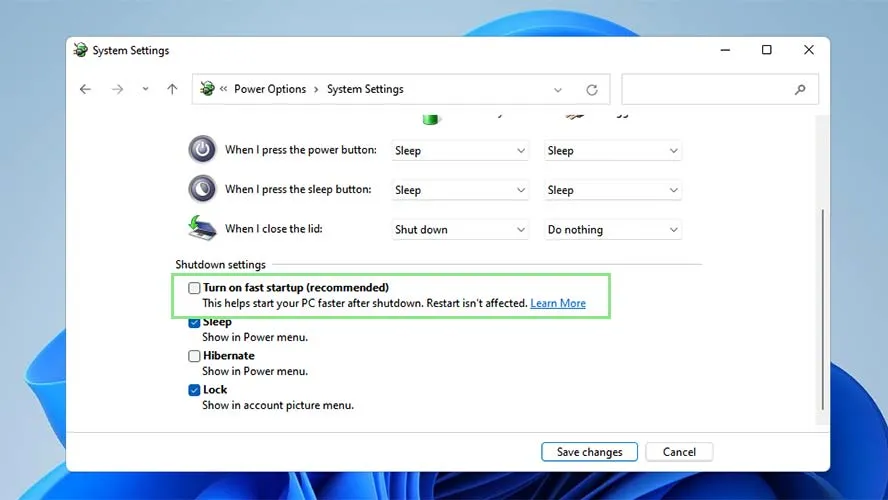
    # If you have trouble opening this .webp graphic, Irfanview can open it.
    # Using "control.exe" and then Power Options, eventually gives this dialog

    https://cdn.mos.cms.futurecdn.net/r5TsgNrpaNUSgzgckzGnEG-888-80.jpg.webp

    There is a similarity between OSes, so other versions have something like this.

    ( https://www.laptopmag.com/how-to/turn-off-fast-startup-on-windows-11 )

    Turning off Fast Startup, is for if you are a multibooter. If you only
    use the one OS on the laptop, then leaving Fast Startup enabled is fine.
    All the kit in the room here, has that turned off, as I refuse to be held hostage by any silliness :-) I only care about boot times if it
    takes 3-5 minutes. A TORAM boot of a Linux DVD takes that long...
    Use a USB stick instead.

    Paul

    --- PyGate Linux v1.5.12
    * Origin: Dragon's Lair, PyGate NNTP<>Fido Gate (3:633/10)
  • From Paul@3:633/10 to All on Tue Mar 10 10:28:51 2026
    On Tue, 3/10/2026 9:57 AM, J. P. Gilliver wrote:
    On 2026/3/10 1:14:6, ...w­¤?ñ?¤ wrote:
    On 3/9/2026 12:39 PM, J. P. Gilliver wrote:

    Not sure how to logon in an Admin account, but if "my done" at that
    point, presumably don't need to.


    You should know which logon accounts on your device(s) are logon
    accounts as an Administrator(i.e. an Admin account)

    I think I have two accounts - my normal one (from which I can "run
    [things] as Administrator", but I don't think it is an Admin account),
    and an Administrator one, which I created (or enabled - I think it was
    there, but hidden) in response to something (IIRR) here. I can't
    remember how to get into it - but I could probably find out. (I _think_
    I can remember its password.)

    control.exe then "User Accounts", then "Manage another account" .

    That allows reviewing the "full" accounts on the machine.

    Mine has three accounts. The administrator group account (the
    one I MUST NOT delete :-) ), plus two unelevated accounts
    used as credentials for file sharing sessions.

    The real administrator account is not enabled on the machine.
    By default, this is OFF and I generally leave it OFF as it
    has a slight security aspect to it. With real malware,
    I don't think it matters what you do but we can always
    pretend these little ceremonies make a difference.

    Paul


    --- PyGate Linux v1.5.12
    * Origin: Dragon's Lair, PyGate NNTP<>Fido Gate (3:633/10)
  • From J. P. Gilliver@3:633/10 to All on Tue Mar 10 15:31:42 2026
    On 2026/3/10 14:23:8, Paul wrote:
    On Tue, 3/10/2026 9:39 AM, J. P. Gilliver wrote:
    []
    That's the first time _Fast_ Boot has been mentioned in this thread (I
    think); not sure if I have that or not. I think I have verbose or
    something like that, as it tells me what's happening, and I like that -
    gives me some idea what's going on (or at least that something is); the
    boot time (I have an SSD) isn't irritatingly slow.


    There are "two fast things" on your computer.

    The "Fast" one in the BIOS, that setting can change the behavior
    of the BIOS.

    Any time electrical components are changed inside the computer,
    it reverts to "slow boot" while it does a slightly better
    memtest on the way up. I've had modern computers take

    Ah yes, I remember that from the '286 (and before) era - it tested each
    (64K was it?) block of memory, emitting a tick for each one, up to the
    massive 640K. You could make it tick faster. (We had one of those still,
    at least up to when I was made redundant in 2017 - it was for testing a
    piece of avionics that came in only once in a blue moon, and it wasn't
    worth updating the kit. [Actually, by that point, I doubt any of the
    original software designers was still with us!]) I hadn't realised
    modern BIOSes did something similar ...

    90 seconds to come up, when they are doing their "thorough"
    method. The motherboards with the four white "staging LEDs",
    none of the LEDs are lit while the guru in there contemplates
    its navel. The next time, the BIOS might be 5-8 seconds, because
    it knows the hardware content of the box has not changed. We

    ... presumably using the microswitch some cases had/have to detect when
    you opened the case.

    see this slow startup behavior, on new screwdriver assembly
    of computer components. The first boot is a slow one. You
    sit with crossed fingers waiting waiting for the staging
    LEDs to light up :-) It's like waiting for Christmas.

    *******

    In Windows, in the Power options, there is a control to enable
    things you would not normally enable. If you hibernate just
    the kernel of the OS, between sessions (and writing hiberfil.sys
    for storage space), that takes a minimum of time at shutdown
    (350MB write), and on the way up, the kernel blob is "bulk loaded",
    and that saves time on reading in the individual driver files
    for all the hardware. That reduces the OS boot component to
    5-10 seconds (depending on the prowess of your processor).
    The kids with the 6GHz processors, will race their machines
    to see "who is the fastest". And the "Fast Startup" OS option helps.

    # If you have trouble opening this .webp graphic, Irfanview can open it.
    # Using "control.exe" and then Power Options, eventually gives this dialog

    https://cdn.mos.cms.futurecdn.net/r5TsgNrpaNUSgzgckzGnEG-888-80.jpg.webp

    There is a similarity between OSes, so other versions have something like this.

    ( https://www.laptopmag.com/how-to/turn-off-fast-startup-on-windows-11 )

    I _do_ seem to have that one turned on. What I was thinking of was some
    setting I came across - maybe in an earlier version of Windows - that
    told you what it was doing; I think they called it "verbose" mode, and
    although it obviously did slow it down a bit, it wasn't much, and I
    found it reassuring that something was happening (otherwise booting - I
    was on HDDs then - just seemed to stop for ages). I had thought I'd
    turned it on for W10, BICBW. It _does_ pause at some point to tell me
    when I last logged in and that there have been no unsuccessful login
    attempts since then - I thought that only appeared after I turned this on.

    Turning off Fast Startup, is for if you are a multibooter. If you only
    use the one OS on the laptop, then leaving Fast Startup enabled is fine.

    That's me.

    All the kit in the room here, has that turned off, as I refuse to be held hostage by any silliness :-) I only care about boot times if it
    takes 3-5 minutes. A TORAM boot of a Linux DVD takes that long...
    Use a USB stick instead.

    My Macrium CD and DVD (I have one of each - don't seem noticeably
    different, though the CD must be slower [not a mini-CD, M8 I think it is
    will no longer fit on one of those]) do seem to take a long time.

    Paul
    --
    J. P. Gilliver. UMRA: 1960/<1985 MB++G()ALIS-Ch++(p)Ar++T+H+Sh0!:`)DNAf

    what - recession? Up north? What we gonna have - more nowt?
    (News Quiz 2013-7-26)

    --- PyGate Linux v1.5.12
    * Origin: Dragon's Lair, PyGate NNTP<>Fido Gate (3:633/10)
  • From J. P. Gilliver@3:633/10 to All on Tue Mar 10 15:39:13 2026
    On 2026/3/10 14:28:51, Paul wrote:
    []
    control.exe then "User Accounts", then "Manage another account" .

    That allows reviewing the "full" accounts on the machine.

    I don't see "Manage another account", but "Add or remove user accounts"
    or "Change account type" seem to show I have only the one, which it says is
    Local Account
    Administrator
    .

    Mine has three accounts. The administrator group account (the
    one I MUST NOT delete :-) ), plus two unelevated accounts
    used as credentials for file sharing sessions.

    The real administrator account is not enabled on the machine.

    I thought I had (leaving it with a password for once), but maybe that
    was on my last machine (the 7-32 one).

    By default, this is OFF and I generally leave it OFF as it
    has a slight security aspect to it. With real malware,
    I don't think it matters what you do but we can always
    pretend these little ceremonies make a difference.

    :-)

    Paul

    --
    J. P. Gilliver. UMRA: 1960/<1985 MB++G()ALIS-Ch++(p)Ar++T+H+Sh0!:`)DNAf

    what - recession? Up north? What we gonna have - more nowt?
    (News Quiz 2013-7-26)

    --- PyGate Linux v1.5.12
    * Origin: Dragon's Lair, PyGate NNTP<>Fido Gate (3:633/10)
  • From Paul@3:633/10 to All on Tue Mar 10 12:22:53 2026
    On Tue, 3/10/2026 10:18 AM, J. P. Gilliver wrote:


    ([System.Text.Encoding]::ASCII.GetString((Get-SecureBootUEFI db).bytes) -match 'Windows UEFI CA 2023')

    ([System.Text.Encoding]::ASCII.GetString((Get-SecureBootUEFI dbdefault).bytes) -match 'Windows UEFI CA 2023')


    Ah, got it: I hadn't realised that Winston's "Secure Boot Certs" was
    just him telling me what the next two lines did - I thought that was
    supposed to be part of what I was to enter.

    I've just entered the above two lines into an Admin powershell, and the
    first one said True, the second False.

    (Incidentally, copying them from _your_ post _didn't_ give any embedded
    ">> " bits, even though they were split.)
    []
    So what does one returning True and one returning False tell me/you/us?


    I don't know :-)

    It depends on what dbdefault means. I don't have such a
    thing in the four file set from my BIOS, to comment.

    Maybe this is something a BlackLotus BIOS patch would have loaded,
    but I'm just guessing and we'll see if Winston knows what that is.

    The answers at the bottom here, seem to suggest "dbdefault" is a
    Factory state patch via a BlackLotus BIOS patch file. It's strange that
    the commands both return True on the Big Machine, as the Big Machine
    was not supposed to have a BlackLotus patch. But maybe the tricky bastards snuck that into one of the previous files, without labeling what was
    included.

    https://learn.microsoft.com/en-gb/answers/questions/5784883/uefi-ca-2023

    The reason you would want the Factory copy updated, is so if the
    user does a "reload Factory secure boot" at BIOS level, the reload has PCA 2023 in it.

    Paul

    --- PyGate Linux v1.5.12
    * Origin: Dragon's Lair, PyGate NNTP<>Fido Gate (3:633/10)
  • From Java Jive@3:633/10 to All on Tue Mar 10 18:06:47 2026
    On 2026-03-10 14:23, Paul wrote:

    Turning off Fast Startup, is for if you are a multibooter. If you only
    use the one OS on the laptop, then leaving Fast Startup enabled is fine.

    Also you should disable it if you use imaging software to back up your
    system disk.

    --

    Fake news kills!

    I may be contacted via the contact address given on my website: www.macfh.co.uk


    --- PyGate Linux v1.5.12
    * Origin: Dragon's Lair, PyGate NNTP<>Fido Gate (3:633/10)
  • From Frank Slootweg@3:633/10 to All on Tue Mar 10 18:47:49 2026
    Java Jive <java@evij.com.invalid> wrote:
    On 2026-03-10 14:23, Paul wrote:

    Turning off Fast Startup, is for if you are a multibooter. If you only
    use the one OS on the laptop, then leaving Fast Startup enabled is fine.

    Also you should disable it if you use imaging software to back up your system disk.

    Why?

    The imaging software - in my case Macrium Reflect Free - just does a
    sector copy of the partitions. Any changes to the file-systems/
    partitions while the image backup is taking place are recorded in a
    Volume Shadow Copy.

    So I don't see why Fast Startup, which only does it's preparation/ (partial-)hibernation work during Shutdown, has any effect on an image
    backup.

    Or is your concern that the hibernated system copy might be
    stale compared to the current OS? If so, 1) when restoring, the Rescue
    media will be booted, invalidating the old hibernated system copy and
    2) AFAIK, the hiberfil.sys file is not included in the image, so it
    can't be restored.

    But please educate me/us.

    --- PyGate Linux v1.5.12
    * Origin: Dragon's Lair, PyGate NNTP<>Fido Gate (3:633/10)
  • From Java Jive@3:633/10 to All on Tue Mar 10 19:28:10 2026
    On 2026-03-10 18:47, Frank Slootweg wrote:

    Java Jive <java@evij.com.invalid> wrote:

    On 2026-03-10 14:23, Paul wrote:

    Turning off Fast Startup, is for if you are a multibooter. If you only
    use the one OS on the laptop, then leaving Fast Startup enabled is fine.

    Also you should disable it if you use imaging software to back up your
    system disk.

    Why?

    The imaging software - in my case Macrium Reflect Free - just does a sector copy of the partitions. Any changes to the file-systems/
    partitions while the image backup is taking place are recorded in a
    Volume Shadow Copy.

    So I don't see why Fast Startup, which only does it's preparation/ (partial-)hibernation work during Shutdown, has any effect on an image backup.

    Or is your concern that the hibernated system copy might be
    stale compared to the current OS? If so, 1) when restoring, the Rescue
    media will be booted, invalidating the old hibernated system copy and
    2) AFAIK, the hiberfil.sys file is not included in the image, so it
    can't be restored.

    But please educate me/us.

    First, let me clarify things. From what has been discussed before here
    &/or in other Windows NGs, Fast Start only hibernates the state of the
    OS, IIRC at login, whereas user hibernation saves the state of the
    Desktop and running programs. The above is a minimum and there may well
    be other differences, but I'm not aware of them, and particularly not
    wrt the following problem, which I know happens when an OS is user
    hibernated.

    When an OS is hibernated by the user, the state of play of ALL the
    Windows readable disks is remembered, not just that of the system disk.
    If then the PC is booted into a different OS which results in changes to
    any of the disks readable by Windows, say you copy in a file, when the original Windows OS is reverted to, it will attempt to revert the state
    of ALL the disks back to their remembered state, and thus any changes
    made, such as copying in that file, will probably be lost. At very
    least a chkdsk is likely to be triggered.

    Similarly, if you restore a Windows OS from a backup taken while the OS
    was hibernated, then when the restored OS boots it will attempt to
    revert all the disks back to their state when the backup was taken, potentially losing any legitimate changes made in the meantime, even
    those to a data disk.

    So I'm thinking that possibly/probably the same thing may happen when
    Fast Start is enabled, and thus I cannot recommend using imaging
    software to back up a Windows OS with Fast Start enabled.

    --

    Fake news kills!

    I may be contacted via the contact address given on my website: www.macfh.co.uk


    --- PyGate Linux v1.5.12
    * Origin: Dragon's Lair, PyGate NNTP<>Fido Gate (3:633/10)
  • From Paul@3:633/10 to All on Tue Mar 10 18:34:18 2026
    On Tue, 3/10/2026 3:28 PM, Java Jive wrote:
    On 2026-03-10 18:47, Frank Slootweg wrote:

    Java Jive <java@evij.com.invalid> wrote:

    On 2026-03-10 14:23, Paul wrote:

    Turning off Fast Startup, is for if you are a multibooter. If you only >>>> use the one OS on the laptop, then leaving Fast Startup enabled is fine. >>>
    Also you should disable it if you use imaging software to back up your
    system disk.

    ÿÿ Why?

    ÿÿ The imaging software - in my case Macrium Reflect Free - just does a
    sector copy of the partitions. Any changes to the file-systems/
    partitions while the image backup is taking place are recorded in a
    Volume Shadow Copy.

    ÿÿ So I don't see why Fast Startup, which only does it's preparation/
    (partial-)hibernation work during Shutdown, has any effect on an image
    backup.

    ÿÿ Or is your concern that the hibernated system copy might be
    stale compared to the current OS? If so, 1) when restoring, the Rescue
    media will be booted, invalidating the old hibernated system copy and
    2) AFAIK, the hiberfil.sys file is not included in the image, so it
    can't be restored.

    ÿÿ But please educate me/us.

    First, let me clarify things.ÿ From what has been discussed before here &/or in other Windows NGs, Fast Start only hibernates the state of the OS, IIRC at login, whereas user hibernation saves the state of the Desktop and running programs.ÿ The above is a minimum and there may well be other differences, but I'm not aware of them, and particularly not wrt the following problem, which I know happens when an OS is user hibernated.

    When an OS is hibernated by the user, the state of play of ALL the Windows readable disks is remembered, not just that of the system disk. If then the PC is booted into a different OS which results in changes to any of the disks readable by Windows, say you copy in a file, when the original Windows OS is reverted to, it will attempt to revert the state of ALL the disks back to their remembered state, and thus any changes made, such as copying in that file, will probably be lost.ÿ At very least a chkdsk is likely to be triggered.

    Similarly, if you restore a Windows OS from a backup taken while the OS was hibernated, then when the restored OS boots it will attempt to revert all the disks back to their state when the backup was taken, potentially losing any legitimate changes made in the meantime, even those to a data disk.

    So I'm thinking that possibly/probably the same thing may happen when Fast Start is enabled, and thus I cannot recommend using imaging software to back up a Windows OS with Fast Start enabled.


    Does a Macrium Rescue CD "allow" a backup to run while a hiberfil.sys
    has a validated header on it (the OS partition being in a hibernated state) ?

    If I run this through CoPilot, I think you can imagine what the answer
    is, but I'm not convinced the LLM-AI knows this to be true. It could be
    a projection of logical-consequences instead of an observation based
    on seeing someone report this.

    ************** CoPilot Answer *********************

    Here?s the clear, technically accurate answer <=== Pinocchio's nose seems longer...
    you?re looking for - and the short version is: **No, a Macrium Rescue CD Answer has no cites.
    will not allow you to run a proper image backup of a Windows partition that
    is in a hibernated state (i.e., with a valid hiberfil.sys header).**

    ---

    # **Short Answer**
    **Macrium Reflect Rescue Media will *refuse* to image an OS partition that contains a valid hibernation file header**, because that indicates the filesystem
    is in an *inconsistent* state. This is by design ? imaging a hibernated Windows volume would produce a corrupted or unbootable image.

    ---

    # **Why This Happens**
    When Windows hibernates:

    - It writes the entire memory state into **hiberfil.sys**.
    - It marks the filesystem as **?dirty / hibernated?** in the NTFS metadata.
    - The volume is *not* in a crash-consistent state.

    Macrium Reflect (including the Rescue CD environment) checks for this condition.
    If it detects a valid hibernation header:

    - It **blocks the backup**
    - It warns that the volume is in a hibernated state
    - It requires you to **disable hibernation or boot Windows normally** before imaging

    This is the same behavior you see when trying to mount or image a
    hibernated NTFS volume under Linux ? the filesystem is considered unsafe to access
  • From Paul@3:633/10 to All on Tue Mar 10 19:25:43 2026
    On Tue, 3/10/2026 2:06 PM, Java Jive wrote:
    On 2026-03-10 14:23, Paul wrote:

    Turning off Fast Startup, is for if you are a multibooter. If you only
    use the one OS on the laptop, then leaving Fast Startup enabled is fine.

    Also you should disable it if you use imaging software to back up your system disk.


    You can back up the system hot. Not a problem.
    (That's why it uses VSS, the Volume Shadow Service, it
    freezes a "snapshot" of the OS files, and anything saved
    after the ten second quiesce phase, will be backed up
    on your *next* backup.)

    Backing up from a Rescue CD, the X: OS partition there does not
    have VSS, but the C: filesystem is at rest and so it is
    easier to back up (compared to backing up hot).

    Macrium can pretend to record the pagefile.sys while the
    OS is running on C: , but the contents are all zero. There
    is a good chance it is just faking it.

    It would be nice if some utilities would agree as to what
    files are on various representations of a partition like C:
    (and the C: backup), but this hardly happens. There are
    too many little differences to get an exact match out of anything.

    Whereas a data partition like D: , it is more likely to have utilities
    that see the same things on there.

    Paul

    --- PyGate Linux v1.5.12
    * Origin: Dragon's Lair, PyGate NNTP<>Fido Gate (3:633/10)
  • From ...w¡ñ?±?ñ@3:633/10 to All on Tue Mar 10 18:41:24 2026
    On 3/10/2026 7:18 AM, J. P. Gilliver wrote:
    On 2026/3/10 3:20:5, Paul wrote:
    On Mon, 3/9/2026 4:11 PM, J. P. Gilliver wrote:
    On 2026/3/9 17:26:21, ...w­¤?ñ?¤ wrote:
    On 3/8/2026 12:05 PM, Frank Slootweg wrote:
    ..w­¤?ñ?¤ <winstonmvp@gmail.com> wrote:
    [...]

    Open Powershell in an admin prompt, then separately run each of these >>>>>> two commands.

    Secure Boot Certs
    ([System.Text.Encoding]::ASCII.GetString((Get-SecureBootUEFI db).bytes) >>>>>> -match 'Windows UEFI CA 2023')

    ([System.Text.Encoding]::ASCII.GetString((Get-SecureBootUEFI
    dbdefault).bytes) -match 'Windows UEFI CA 2023')


    - If the first command returns ?true,? then your PC is using the new >>>>>> certificate
    - If this second command returns ?true,? your system is running an >>>>>> updated BIOS with the new Secure Boot certificates built in.

    Here's what I got (entire session, between ===== lines):
    =====
    Windows PowerShell
    Copyright (C) Microsoft Corporation. All rights reserved.

    Try the new cross-platform PowerShell https://aka.ms/pscore6

    PS C:\Windows\system32> Secure Boot Certs
    ([System.Text.Encoding]::ASCII.GetString((Get-SecureBootUEFI db).bytes)
    -match 'Windows UEFI CA 2023')
    Secure : The term 'Secure' is not recognized as the name of a cmdlet,
    function, script file, or operable program.
    Check the spelling of the name, or if a path was included, verify that
    the path is correct and try again.
    At line:1 char:1
    + Secure Boot Certs ([System.Text.Encoding]::ASCII.GetString((Get-Secur ... >>> + ~~~~~~
    + CategoryInfo : ObjectNotFound: (Secure:String) [],
    CommandNotFoundException
    + FullyQualifiedErrorId : CommandNotFoundException

    PS C:\Windows\system32>
    ([System.Text.Encoding]::ASCII.GetString((Get-SecureBootUEFI
    dbdefault).bytes) -match 'Windows UEFI CA 2023')
    False
    PS C:\Windows\system32>
    =====

    ([System.Text.Encoding]::ASCII.GetString((Get-SecureBootUEFI db).bytes) -match 'Windows UEFI CA 2023')

    ([System.Text.Encoding]::ASCII.GetString((Get-SecureBootUEFI dbdefault).bytes) -match 'Windows UEFI CA 2023')


    Ah, got it: I hadn't realised that Winston's "Secure Boot Certs" was
    just him telling me what the next two lines did - I thought that was
    supposed to be part of what I was to enter.

    I've just entered the above two lines into an Admin powershell, and the
    first one said True, the second False.

    (Incidentally, copying them from _your_ post _didn't_ give any embedded
    ">> " bits, even though they were split.)
    []
    So what does one returning True and one returning False tell me/you/us?

    It means you're done with updating the device for the current 2023 cert,
    and good to go.
    The only other option until the Secure Boot 2011 are
    revoked/expired/removed is an OEM provided UEFI/BIOS update - which can
    be installed if released, if not, your done.
    Any future Windows Updates with Secure Boot will be installed via
    Windows Update, the scheduled task will continue to run and update the
    2023 cert if necessary. After 2011 cert is revoked and 2023 fully
    implemented the scheduled task can be deleted or ignored.


    --
    ...w­¤?ñ?¤

    --- PyGate Linux v1.5.12
    * Origin: Dragon's Lair, PyGate NNTP<>Fido Gate (3:633/10)
  • From J. P. Gilliver@3:633/10 to All on Wed Mar 11 12:47:21 2026
    On 2026/3/11 1:41:24, ...w­¤?ñ?¤ wrote:
    On 3/10/2026 7:18 AM, J. P. Gilliver wrote:
    On 2026/3/10 3:20:5, Paul wrote:
    []
    ([System.Text.Encoding]::ASCII.GetString((Get-SecureBootUEFI db).bytes) -match 'Windows UEFI CA 2023')

    ([System.Text.Encoding]::ASCII.GetString((Get-SecureBootUEFI dbdefault).bytes) -match 'Windows UEFI CA 2023')


    Ah, got it: I hadn't realised that Winston's "Secure Boot Certs" was
    just him telling me what the next two lines did - I thought that was
    supposed to be part of what I was to enter.

    I've just entered the above two lines into an Admin powershell, and the
    first one said True, the second False.
    []
    So what does one returning True and one returning False tell me/you/us?

    It means you're done with updating the device for the current 2023 cert,
    and good to go.

    Thanks! That sounds reassuring.

    The only other option until the Secure Boot 2011 are
    revoked/expired/removed is an OEM provided UEFI/BIOS update - which can
    be installed if released, if not, your done.

    Given
    BIOS Version/Date LENOVO 1LCN50WW, 2017/4/17
    , I don't think that's likely. (Almost certainly pre Windows 10?)

    Any future Windows Updates with Secure Boot will be installed via
    Windows Update, the scheduled task will continue to run and update the
    2023 cert if necessary. After 2011 cert is revoked and 2023 fully implemented the scheduled task can be deleted or ignored.

    I guess I'll find out in June! (Or am O safe from that one?)


    --
    J. P. Gilliver. UMRA: 1960/<1985 MB++G()ALIS-Ch++(p)Ar++T+H+Sh0!:`)DNAf

    Who's General Failure & why's he reading my disk?
    (Stolen from another .sig)

    --- PyGate Linux v1.5.12
    * Origin: Dragon's Lair, PyGate NNTP<>Fido Gate (3:633/10)
  • From Java Jive@3:633/10 to All on Wed Mar 11 13:29:21 2026
    On 2026-03-10 22:34, Paul wrote:
    On Tue, 3/10/2026 3:28 PM, Java Jive wrote:
    On 2026-03-10 18:47, Frank Slootweg wrote:

    Java Jive <java@evij.com.invalid> wrote:

    On 2026-03-10 14:23, Paul wrote:

    Turning off Fast Startup, is for if you are a multibooter. If you only >>>>> use the one OS on the laptop, then leaving Fast Startup enabled is fine. >>>>
    Also you should disable it if you use imaging software to back up your >>>> system disk.

    ÿÿ Why?

    ÿÿ The imaging software - in my case Macrium Reflect Free - just does a >>> sector copy of the partitions. Any changes to the file-systems/
    partitions while the image backup is taking place are recorded in a
    Volume Shadow Copy.

    ÿÿ So I don't see why Fast Startup, which only does it's preparation/
    (partial-)hibernation work during Shutdown, has any effect on an image
    backup.

    ÿÿ Or is your concern that the hibernated system copy might be
    stale compared to the current OS? If so, 1) when restoring, the Rescue
    media will be booted, invalidating the old hibernated system copy and
    2) AFAIK, the hiberfil.sys file is not included in the image, so it
    can't be restored.

    ÿÿ But please educate me/us.

    First, let me clarify things.ÿ From what has been discussed before here &/or in other Windows NGs, Fast Start only hibernates the state of the OS, IIRC at login, whereas user hibernation saves the state of the Desktop and running programs.ÿ The above is a minimum and there may well be other differences, but I'm not aware of them, and particularly not wrt the following problem, which I know happens when an OS is user hibernated.

    When an OS is hibernated by the user, the state of play of ALL the Windows readable disks is remembered, not just that of the system disk. If then the PC is booted into a different OS which results in changes to any of the disks readable by Windows, say you copy in a file, when the original Windows OS is reverted to, it will attempt to revert the state of ALL the disks back to their remembered state, and thus any changes made, such as copying in that file, will probably be lost.ÿ At very least a chkdsk is likely to be triggered.

    Similarly, if you restore a Windows OS from a backup taken while the OS was hibernated, then when the restored OS boots it will attempt to revert all the disks back to their state when the backup was taken, potentially losing any legitimate changes made in the meantime, even those to a data disk.

    So I'm thinking that possibly/probably the same thing may happen when Fast Start is enabled, and thus I cannot recommend using imaging software to back up a Windows OS with Fast Start enabled.


    Does a Macrium Rescue CD "allow" a backup to run while a hiberfil.sys
    has a validated header on it (the OS partition being in a hibernated state) ?

    If I run this through CoPilot, I think you can imagine what the answer
    is, but I'm not convinced the LLM-AI knows this to be true. It could be
    a projection of logical-consequences instead of an observation based
    on seeing someone report this.

    Macrium is not the only imaging software, though it is the one that
    currently I'm using. As you may remember, I used to use Ghost until I discovered that it is buggy with GPT disks, and that warns you that the filesystem is in a 'dirty' state, advises you not to proceed, but will
    allow you to do so if you choose.

    ************** CoPilot Answer *********************

    Here?s the clear, technically accurate answer <=== Pinocchio's nose seems longer...
    you?re looking for - and the short version is: **No, a Macrium Rescue CD Answer has no cites.
    will not allow you to run a proper image backup of a Windows partition that is in a hibernated state (i.e., with a valid hiberfil.sys header).**

    ---

    # **Short Answer**
    **Macrium Reflect Rescue Media will *refuse* to image an OS partition that contains a valid hibernation file header**, because that indicates the filesystem
    is in an *inconsistent* state. This is by design ? imaging a hibernated Windows volume would produce a corrupted or unbootable image.

    ---

    # **Why This Happens**
    When Windows hibernates:

    - It writes the entire memory state into **hiberfil.sys**.
    - It marks the filesystem as **?dirty / hibernated?** in the NTFS metadata.
    - The volume is *not* in a crash-consistent state.

    Macrium Reflect (including the Rescue CD environment) checks for this condition.
    If it detects a valid hibernation header:

    - It **blocks the backup**
    - It warns that the volume is in a hibernated state
    - It requires you to **disable hibernation or boot Windows normally** before imaging

    This is the same behavior you see when trying to mount or image a
    hibernated NTFS volume under Linux ? the filesystem is considered unsafe to access.

    ---

    # **Why Macrium Blocks It**
    Allowing a backup of a hibernated OS partition would risk:

    - Filesystem corruption
    - Incomplete or inconsistent system state
    - Unbootable restored images

    Macrium?s design philosophy is to guarantee *restorable* images, so it refuses to proceed.

    ---

    # **What *Does* Work**
    If you want to image the OS partition from Rescue Media:

    ### Boot into Rescue Media
    ### Open a command prompt
    ### Run:

    powercfg /h off
    ```
    This deletes **hiberfil.sys** and clears the hibernation flag. <=== sheerest hallucination!
    it is booted off X:, not C:
    After that, Macrium will allow the backup. If this works, this is my
    shocked face.
    ---

    # **Edge Case: Forced Imaging?**
    Even if you try to force it (e.g., using forensic sector-by-sector mode), Macrium still checks the NTFS state and will warn or refuse.
    Macrium does **not** provide an override to ignore a hibernated filesystem.

    ---

    # **Bottom Line**
    **A Macrium Rescue CD will *not* allow a backup of a Windows OS partition
    if hiberfil.sys has a valid header.**
    You must disable hibernation or boot Windows normally first. <=== this is a more sound advice (including no Fast Startup cycle)

    [Please note: This answer had NO reference section with cites at the bottom.]

    [This will require test to validate. I can believe the answer that the consistency problem will be picked up by the Rescue CD (because Macrium
    devs are very thorough individuals -- hardly ever making stupid mistakes),
    if you attempt to pull the old switcheroo. And adjusting your hibernation state before
    going offline to make a backup, that's a good answer. But thinking
    you can erase C:\hiberfil.sys while booted from X: is just silly. If the LLM-AI told me to "del C:\hiberfil.sys" from the X: prompt, that would make more logical (and dangerous) sense for an AI to cook up. And no, don't
    do that either.]

    When you back up, it's up to you as a responsible adult, to not be
    throwing challenges into the picture that are illogical and just
    asking for trouble. Great for an experiment. Bad for a part of your
    regular backup cycle. Since my hiberfil.sys is disabled everywhere in
    this room, I'm not even ready to test this. Purely by accident,
    I'm ready for backup anytime. I didn't plan this.

    I use hibernation on a daily basis. Occasionally I get caught out by
    this, usually by booting into another version of Windows &/or Linux
    without remembering first to go into the hibernated version and fully
    shut it down, the result of which is usually a chkdsk; the latter
    doesn't seem to have any effect within Linux itself, but, as described previously, changes to a Windows readable disk will be lost.

    ---

    Summarising the copious output above, it seems to support pretty much
    what I was suggesting, but with the added information that some imaging software is better than others in guarding against accidental imaging of
    a hibernated partition.

    --

    Fake news kills!

    I may be contacted via the contact address given on my website: www.macfh.co.uk


    --- PyGate Linux v1.5.12
    * Origin: Dragon's Lair, PyGate NNTP<>Fido Gate (3:633/10)
  • From Java Jive@3:633/10 to All on Wed Mar 11 13:49:46 2026
    On 2026-03-10 23:25, Paul wrote:

    Macrium can pretend to record the pagefile.sys while the
    OS is running on C: , but the contents are all zero. There
    is a good chance it is just faking it.

    Which is the sort of reason why I think the whole idea of imaging a
    running system is dodgy, and always shut a system down before imaging it.

    IIRC, another is that there are keys in the registry which flag whether
    a system was shut down properly. If you restore the image of a running system, on first boot it will find that these flags are not in their
    proper state, and a menu will be displayed asking for which version of
    Windows to load, even if there's only one, or whether to load safe mode,
    etc. This might not matter much to a home user, but, speaking as a
    former professional who used to create the OS images for thousands of corporate PCs, I'm pretty sure that I wouldn't have been allowed to
    produce an image that did that, even supposing I had been sufficiently unembarrassed to try!

    --

    Fake news kills!

    I may be contacted via the contact address given on my website: www.macfh.co.uk


    --- PyGate Linux v1.5.12
    * Origin: Dragon's Lair, PyGate NNTP<>Fido Gate (3:633/10)
  • From ...w¡ñ?±?ñ@3:633/10 to All on Wed Mar 11 10:53:45 2026
    On 3/11/2026 6:29 AM, Java Jive wrote:

    Macrium is not the only imaging software, though it is the one that currently I'm using.ÿ As you may remember, I used to use Ghost until I discovered that it is buggy with GPT disks, and that warns you that the filesystem is in a 'dirty' state, advises you not to proceed, but will
    allow you to do so if you choose.

    Hardly a fair comparison(Ghost vs. Macrium). Most today would be using
    the last released free version of Macrium or its current subscription
    released version.

    Ghost last released version compatible for a Windows operating system
    was over 16 years ago(Nov. 2009) - Windows 7 and earlier. Never designed
    for use on Win8x and later, nor with UEFI and GPT.

    For non-enterprise consumer Windows 8x and later Symantec's product was
    System Recovery(for Win10 version SSR version 11.1.3, aka 2013 SP4), Enterprise was Ghost Solution Suite version 3.3 later.
    - Symantec consumer division Veritas was sold to Carlisle Group in
    2016 with SSR rebranded as Veritas System Recovery(initial release
    version 16 for Win10 compatibility).


    --
    ...w­¤?ñ?¤

    --- PyGate Linux v1.5.12
    * Origin: Dragon's Lair, PyGate NNTP<>Fido Gate (3:633/10)
  • From ...w¡ñ?±?ñ@3:633/10 to All on Wed Mar 11 11:08:19 2026
    On 3/11/2026 5:47 AM, J. P. Gilliver wrote:
    On 2026/3/11 1:41:24, ...w­¤?ñ?¤ wrote:
    On 3/10/2026 7:18 AM, J. P. Gilliver wrote:
    On 2026/3/10 3:20:5, Paul wrote:
    []
    ([System.Text.Encoding]::ASCII.GetString((Get-SecureBootUEFI db).bytes) -match 'Windows UEFI CA 2023')

    ([System.Text.Encoding]::ASCII.GetString((Get-SecureBootUEFI dbdefault).bytes) -match 'Windows UEFI CA 2023')


    Ah, got it: I hadn't realised that Winston's "Secure Boot Certs" was
    just him telling me what the next two lines did - I thought that was
    supposed to be part of what I was to enter.

    I've just entered the above two lines into an Admin powershell, and the
    first one said True, the second False.
    []
    So what does one returning True and one returning False tell me/you/us?

    It means you're done with updating the device for the current 2023 cert,
    and good to go.

    Thanks! That sounds reassuring.

    The only other option until the Secure Boot 2011 are
    revoked/expired/removed is an OEM provided UEFI/BIOS update - which can
    be installed if released, if not, your done.

    Given
    BIOS Version/Date LENOVO 1LCN50WW, 2017/4/17
    , I don't think that's likely. (Almost certainly pre Windows 10?)

    Any future Windows Updates with Secure Boot will be installed via
    Windows Update, the scheduled task will continue to run and update the
    2023 cert if necessary. After 2011 cert is revoked and 2023 fully
    implemented the scheduled task can be deleted or ignored.

    I guess I'll find out in June! (Or am O safe from that one?)


    As noted, you're good to go(based on your earlier reply that the
    Powershell command indicated 2023 cert is present in the db store.
    Discussion here and elsewhere regarding Secure Boot has been going on
    for quite some time.

    Some of the articles are missing the point and spreading fear beyond
    what will/does happen.

    For Win10 and Secure Boot with the 2023 cert deployed(like yours True
    for Windows, False for UEFI), the device and its Win10 OS(24H2) should
    be enrolled in ESU to ensure any future Secure Boot updates are
    available, downloaded and installed.


    --
    ...w­¤?ñ?¤

    --- PyGate Linux v1.5.12
    * Origin: Dragon's Lair, PyGate NNTP<>Fido Gate (3:633/10)
  • From Java Jive@3:633/10 to All on Wed Mar 11 18:21:34 2026
    On 2026-03-11 17:53, ...w­¤?ñ?¤ wrote:

    On 3/11/2026 6:29 AM, Java Jive wrote:

    Macrium is not the only imaging software, though it is the one that
    currently I'm using.ÿ As you may remember, I used to use Ghost until I
    discovered that it is buggy with GPT disks, and that warns you that
    the filesystem is in a 'dirty' state, advises you not to proceed, but
    will allow you to do so if you choose.

    Hardly a fair comparison(Ghost vs. Macrium). Most today would be using
    the last released free version of Macrium or its current subscription released version.

    Ghost last released version compatible for a Windows operating system
    was over 16 years ago(Nov. 2009) - Windows 7 and earlier. Never designed
    for use on Win8x and later, nor with UEFI and GPT.

    For non-enterprise consumer Windows 8x and later Symantec's product was System Recovery(for Win10 version SSR version 11.1.3, aka 2013 SP4), Enterprise was Ghost Solution Suite version 3.3 later.
    ÿ- Symantec consumer division Veritas was sold to Carlisle Group in
    2016 with SSR rebranded as Veritas System Recovery(initial release
    version 16 for Win10 compatibility).

    I just used Ghost for as long as it worked for me, because I had rescue
    media which automated a lot of the process of backing up and restoring,
    and stopped using it when I found it was buggy and gave problems on GPT
    disks.

    Anyway, I don't think you've altered my point, which was that there are different imaging programs which might behave differently under unusual situations, such as the 'dirty' flag being set.

    --

    Fake news kills!

    I may be contacted via the contact address given on my website: www.macfh.co.uk


    --- PyGate Linux v1.5.12
    * Origin: Dragon's Lair, PyGate NNTP<>Fido Gate (3:633/10)
  • From Paul@3:633/10 to All on Wed Mar 11 16:11:59 2026
    On Wed, 3/11/2026 2:08 PM, ...w­¤?ñ?¤ wrote:
    On 3/11/2026 5:47 AM, J. P. Gilliver wrote:
    On 2026/3/11 1:41:24, ...w­¤?ñ?¤ wrote:
    On 3/10/2026 7:18 AM, J. P. Gilliver wrote:
    On 2026/3/10 3:20:5, Paul wrote:
    []
    ([System.Text.Encoding]::ASCII.GetString((Get-SecureBootUEFI db).bytes) -match 'Windows UEFI CA 2023')

    ([System.Text.Encoding]::ASCII.GetString((Get-SecureBootUEFI dbdefault).bytes) -match 'Windows UEFI CA 2023')


    Ah, got it: I hadn't realised that Winston's "Secure Boot Certs" was
    just him telling me what the next two lines did - I thought that was
    supposed to be part of what I was to enter.

    I've just entered the above two lines into an Admin powershell, and the >>>> first one said True, the second False.
    []
    So what does one returning True and one returning False tell me/you/us? >>>
    It means you're done with updating the device for the current 2023 cert, >>> ÿÿ and good to go.

    Thanks! That sounds reassuring.

    The only other option until the Secure Boot 2011 are
    revoked/expired/removed is an OEM provided UEFI/BIOS update - which can
    be installed if released, if not, your done.

    Given
    ÿÿÿÿBIOS Version/Dateÿÿÿ LENOVO 1LCN50WW, 2017/4/17
    , I don't think that's likely. (Almost certainly pre Windows 10?)

    ÿÿ Any future Windows Updates with Secure Boot will be installed via
    Windows Update, the scheduled task will continue to run and update the
    2023 cert if necessary.ÿ After 2011 cert is revoked and 2023 fully
    implemented the scheduled task can be deleted or ignored.

    I guess I'll find out in June! (Or am O safe from that one?)


    As noted, you're good to go(based on your earlier reply that the Powershell command indicated 2023 cert is present in the db store.
    Discussion here and elsewhere regarding Secure Boot has been going on for quite some time.

    Some of the articles are missing the point and spreading fear beyond what will/does happen.

    The fear is justified, given how stupid some of the motherboard
    engineering can be. One company lost the curation chain for their
    BIOS releases. In some cases, the only reason this stuff works,
    is because the BIOS in an Award, AMI, Phoenix, InSyde and those
    companies push out the code for that.

    It is the lack of industry expertise in UEFI and Secure Boot that
    strikes fear for the unlucky computer owners.

    PCA 2011 would presumably have been signed in that year, W10 was
    a 2015 release.

    Ubuntu seems to be able to inject into db dbx, and could do that
    without informing the user.

    It would help greatly, if we had a tool to properly list the certs
    and revokes.

    Paul

    --- PyGate Linux v1.5.12
    * Origin: Dragon's Lair, PyGate NNTP<>Fido Gate (3:633/10)
  • From J. P. Gilliver@3:633/10 to All on Wed Mar 11 20:13:08 2026
    On 2026/3/11 18:8:19, ...w­¤?ñ?¤ wrote:
    On 3/11/2026 5:47 AM, J. P. Gilliver wrote:
    On 2026/3/11 1:41:24, ...w­¤?ñ?¤ wrote:
    On 3/10/2026 7:18 AM, J. P. Gilliver wrote:
    On 2026/3/10 3:20:5, Paul wrote:
    []
    ([System.Text.Encoding]::ASCII.GetString((Get-SecureBootUEFI db).bytes) -match 'Windows UEFI CA 2023')

    ([System.Text.Encoding]::ASCII.GetString((Get-SecureBootUEFI dbdefault).bytes) -match 'Windows UEFI CA 2023')

    []

    Given
    BIOS Version/Date LENOVO 1LCN50WW, 2017/4/17
    , I don't think that's likely. (Almost certainly pre Windows 10?)

    Any future Windows Updates with Secure Boot will be installed via
    Windows Update, the scheduled task will continue to run and update the
    2023 cert if necessary. After 2011 cert is revoked and 2023 fully
    implemented the scheduled task can be deleted or ignored.

    I guess I'll find out in June! (Or am O safe from that one?)


    As noted, you're good to go(based on your earlier reply that the
    Powershell command indicated 2023 cert is present in the db store.
    Discussion here and elsewhere regarding Secure Boot has been going on
    for quite some time.

    Some of the articles are missing the point and spreading fear beyond
    what will/does happen.

    Yes, I got that impression.

    For Win10 and Secure Boot with the 2023 cert deployed(like yours True
    for Windows, False for UEFI), the device and its Win10 OS(24H2) should
    be enrolled in ESU to ensure any future Secure Boot updates are
    available, downloaded and installed.

    I am enrolled in ESU (I did the bodge that was pointed to here, before -
    I think - such enrolling became automatic anyway, for UK/EU at least).


    --
    J. P. Gilliver. UMRA: 1960/<1985 MB++G()ALIS-Ch++(p)Ar++T+H+Sh0!:`)DNAf

    "Look, if it'll help you to do what I tell you, baby, imagine that I've
    got a blaster ray in my hand." "Uh - you _have_ got a blaster ray in
    your hand." "So you shouldn't have to tax your imagination too hard."
    (Link episode)

    --- PyGate Linux v1.5.12
    * Origin: Dragon's Lair, PyGate NNTP<>Fido Gate (3:633/10)
  • From ...w¡ñ?±?ñ@3:633/10 to All on Thu Mar 12 00:25:30 2026
    On 3/11/2026 11:21 AM, Java Jive wrote:
    On 2026-03-11 17:53, ...w­¤?ñ?¤ wrote:

    On 3/11/2026 6:29 AM, Java Jive wrote:

    Macrium is not the only imaging software, though it is the one that
    currently I'm using.ÿ As you may remember, I used to use Ghost until
    I discovered that it is buggy with GPT disks, and that warns you that
    the filesystem is in a 'dirty' state, advises you not to proceed, but
    will allow you to do so if you choose.

    Hardly a fair comparison(Ghost vs. Macrium). Most today would be using
    the last released free version of Macrium or its current subscription
    released version.

    Ghost last released version compatible for a Windows operating system
    was over 16 years ago(Nov. 2009) - Windows 7 and earlier. Never
    designed for use on Win8x and later, nor with UEFI and GPT.

    For non-enterprise consumer Windows 8x and later Symantec's product
    was System Recovery(for Win10 version SSR version 11.1.3, aka 2013
    SP4), Enterprise was Ghost Solution Suite version 3.3 later.
    ÿÿ- Symantec consumer division Veritas was sold to Carlisle Group in
    2016 with SSR rebranded as Veritas System Recovery(initial release
    version 16 for Win10 compatibility).

    I just used Ghost for as long as it worked for me, because I had rescue media which automated a lot of the process of backing up and restoring,
    and stopped using it when I found it was buggy and gave problems on GPT disks.

    Anyway, I don't think you've altered my point, which was that there are different imaging programs which might behave differently under unusual situations, such as the 'dirty' flag being set.


    I used Ghost for years as well as earlier Peter Norton and later
    Symantec branded products. Beta testing began in 1982, ended with
    SystemWorks 16 and Ghost 15.

    Agreed, their are different imaging programs and in some situation
    operate or behave differently, but Ghost of yesteryear(never designed
    for GPT) isn't in play in today's or even recent year's comparison.

    --
    ...w­¤?ñ?¤

    --- PyGate Linux v1.5.12
    * Origin: Dragon's Lair, PyGate NNTP<>Fido Gate (3:633/10)
  • From Frank Slootweg@3:633/10 to All on Thu Mar 12 15:26:07 2026
    Paul <nospam@needed.invalid> wrote:
    On Tue, 3/10/2026 2:06 PM, Java Jive wrote:
    On 2026-03-10 14:23, Paul wrote:

    Turning off Fast Startup, is for if you are a multibooter. If you only
    use the one OS on the laptop, then leaving Fast Startup enabled is fine.

    Also you should disable it if you use imaging software to back up
    your system disk.


    You can back up the system hot. Not a problem.

    Yes, that's the scenario I described in my response to Java Jive, NOT
    an offline backup using the Rescue media

    (That's why it uses VSS, the Volume Shadow Service, it
    freezes a "snapshot" of the OS files, and anything saved
    after the ten second quiesce phase, will be backed up
    on your *next* backup.)

    Backing up from a Rescue CD, the X: OS partition there does not
    have VSS, but the C: filesystem is at rest and so it is
    easier to back up (compared to backing up hot).

    Macrium can pretend to record the pagefile.sys while the
    OS is running on C: , but the contents are all zero. There
    is a good chance it is just faking it.

    You probably mean the hiberfil.sys file, because *that* is under
    discussion, i.e. whether or not a hibernated OS (not the whole system)
    can present a problem later.

    For an online Macrium Reflect image backup, the contents of the
    hiberfil.sys is irrelevant, because by definition the contents is
    stale, as the system is still online, so any contents of the
    hiberfil.sys is the contents of a *previous* OS hibernation.

    That's why I said Macrium Reflect probably doesn't even backup (the
    sectors containing) the hiberfil.sys file, because there's just no
    point. I/we could try to chase this down in the Macrium knowledge base
    etc. or/and check the contect of an image I/we made, but I won't try
    such an exercise in futility.

    It would be nice if some utilities would agree as to what
    files are on various representations of a partition like C:
    (and the C: backup), but this hardly happens. There are
    too many little differences to get an exact match out of anything.

    Whereas a data partition like D: , it is more likely to have utilities
    that see the same things on there.

    --- PyGate Linux v1.5.12
    * Origin: Dragon's Lair, PyGate NNTP<>Fido Gate (3:633/10)
  • From Frank Slootweg@3:633/10 to All on Thu Mar 12 15:41:33 2026
    Java Jive <java@evij.com.invalid> wrote:
    On 2026-03-10 23:25, Paul wrote:

    Macrium can pretend to record the pagefile.sys while the
    OS is running on C: , but the contents are all zero. There
    is a good chance it is just faking it.

    Which is the sort of reason why I think the whole idea of imaging a
    running system is dodgy, and always shut a system down before imaging it.

    Which is of course perfectly fine. I know of at least one other member
    in the audience which also does/prefer offline image backups.

    IIRC, another is that there are keys in the registry which flag whether
    a system was shut down properly. If you restore the image of a running system, on first boot it will find that these flags are not in their
    proper state, and a menu will be displayed asking for which version of Windows to load, even if there's only one, or whether to load safe mode, etc.

    I think it's extremely unlikely that this is actually a problem,
    because if it was, Macrium Reflect would not offer online image backup
    (of system partitions) or would at least warn for the consequences and
    what precautions/ measures to take when restoring.

    This might not matter much to a home user, but, speaking as a
    former professional who used to create the OS images for thousands of corporate PCs, I'm pretty sure that I wouldn't have been allowed to
    produce an image that did that, even supposing I had been sufficiently unembarrassed to try!

    Our IT department(s) managed bare-metal-restore functionality for only
    some mere 150 thousand Windows PCs in the later 90s! :-) I only used
    that functionality, did not manage or design it. But I did manage
    similar functionality for those 'tiny' multi-million dollar Five Nines
    metro clusters. :-)

    --- PyGate Linux v1.5.12
    * Origin: Dragon's Lair, PyGate NNTP<>Fido Gate (3:633/10)
  • From Java Jive@3:633/10 to All on Thu Mar 12 17:57:43 2026
    On 12/03/2026 15:41, Frank Slootweg wrote:

    Java Jive <java@evij.com.invalid> wrote:

    IIRC, another is that there are keys in the registry which flag whether
    a system was shut down properly. If you restore the image of a running
    system, on first boot it will find that these flags are not in their
    proper state, and a menu will be displayed asking for which version of
    Windows to load, even if there's only one, or whether to load safe mode,
    etc.

    I think it's extremely unlikely that this is actually a problem,
    because if it was, Macrium Reflect would not offer online image backup
    (of system partitions) or would at least warn for the consequences and
    what precautions/ measures to take when restoring.

    No, agreed, not an actual problem as such, it's just the result seems
    somewhat unprofessional. Fine for home use, but perhaps not good for
    your professional reputation at work :-), which is why I added ...

    This might not matter much to a home user, but, speaking as a
    former professional who used to create the OS images for thousands of
    corporate PCs, I'm pretty sure that I wouldn't have been allowed to
    produce an image that did that, even supposing I had been sufficiently
    unembarrassed to try!
    --

    Fake news kills!

    I may be contacted via the contact address given on my website: www.macfh.co.uk

    --- PyGate Linux v1.5.12
    * Origin: Dragon's Lair, PyGate NNTP<>Fido Gate (3:633/10)
  • From Paul@3:633/10 to All on Fri Mar 13 03:04:07 2026
    On Thu, 3/12/2026 1:57 PM, Java Jive wrote:
    On 12/03/2026 15:41, Frank Slootweg wrote:

    Java Jive <java@evij.com.invalid> wrote:

    IIRC, another is that there are keys in the registry which flag whether
    a system was shut down properly.ÿ If you restore the image of a running
    system, on first boot it will find that these flags are not in their
    proper state, and a menu will be displayed asking for which version of
    Windows to load, even if there's only one, or whether to load safe mode, >>> etc.

    ÿÿ I think it's extremely unlikely that this is actually a problem,
    because if it was, Macrium Reflect would not offer online image backup
    (of system partitions) or would at least warn for the consequences and
    what precautions/ measures to take when restoring.

    No, agreed, not an actual problem as such, it's just the result seems somewhat unprofessional.ÿ Fine for home use, but perhaps not good for your professional reputation at work :-), which is why I added ...

    ÿÿÿÿThis might not matter much to a home user, but, speaking as a
    former professional who used to create the OS images for thousands of
    corporate PCs, I'm pretty sure that I wouldn't have been allowed to
    produce an image that did that, even supposing I had been sufficiently
    unembarrassed to try!

    At least 30 Windows backup products use VSS and trust it.
    And they use that for on-line "hot" backup.

    Note that you can set a shadow yourself, "freeze" C: and compare
    the frozen copy to the current state of C: . This means, that if
    a backup product did not have VSS Volume Shadow Service integrated in the code, you
    could freeze a copy of C: and tell the backup program to "back up K: "
    and that would be the frozen version getting backed up.

    Somewhere in that mess, is a log of things that did not quiesce.

    *******

    https://learn.microsoft.com/en-us/sysinternals/downloads/disk2vhd

    By Mark Russinovich

    (Tick box: Use Volume Shadow Copy)

    https://learn.microsoft.com/en-us/sysinternals/downloads/media/disk2vhd/20131218_disk2vhd_v2.0.png

    That's a way of doing P2V.

    Paul

    --- PyGate Linux v1.5.13
    * Origin: Dragon's Lair, PyGate NNTP<>Fido Gate (3:633/10)
  • From ...w¡ñ?±?ñ@3:633/10 to All on Fri Mar 13 00:09:16 2026
    Paul wrote on 3/11/2026 1:11 PM:
    On Wed, 3/11/2026 2:08 PM, ...w­¤?ñ?¤ wrote:
    Some of the articles are missing the point and spreading fear beyond what will/does happen.

    The fear is justified, given how stupid some of the motherboard
    engineering can be. One company lost the curation chain for their
    BIOS releases. In some cases, the only reason this stuff works,
    is because the BIOS in an Award, AMI, Phoenix, InSyde and those
    companies push out the code for that.

    They lost the curation chain b/c of Secure Boot requirements?


    It is the lack of industry expertise in UEFI and Secure Boot that
    strikes fear for the unlucky computer owners.

    There is some truth to that(though not related to Secure Boot)
    considering too many OEM's ignore standard GPT partition order(System,
    MSR, o/s, Recovery, OEM Recovery, and data partitions at the end or immediately prior to OEM Recovery.
    - in some cases, before OEM Recovery since it's much easier to
    extend(after wiping the OEM Recovery)the data partition.


    It would help greatly, if we had a tool to properly list the certs
    and revokes.

    I agree a better tool is warranted. Even a dedicated app in the MSFT
    store might be of value for Win10/11.


    Paul


    --
    ...w­¤?ñ?¤

    --- PyGate Linux v1.5.13
    * Origin: Dragon's Lair, PyGate NNTP<>Fido Gate (3:633/10)
  • From ...w¡ñ?±?ñ@3:633/10 to All on Fri Mar 13 00:18:24 2026
    Frank Slootweg wrote on 3/12/2026 8:26 AM:

    That's why I said Macrium Reflect probably doesn't even backup (the sectors containing) the hiberfil.sys file, because there's just no
    point. I/we could try to chase this down in the Macrium knowledge base
    etc. or/and check the contect of an image I/we made, but I won't try
    such an exercise in futility.


    cf.
    <https://knowledgebase.macrium.com/display/KNOWX/Backup+Defaults>

    Intelligent Sector Copy
    Only backup data blocks that are being used by files on the disk. This significantly reduces the time it takes for backups to complete and
    reduces the size of the backup files.

    ***The data blocks in Pagefile (pagefile.sys) and hibernation
    (hiberfil.sys) files will be excluded from images.***
    Data blocks in these files are temporary and not required when Windows
    starts. These files will be visible in the imaged file system, but will
    take up zero space in the image file.


    --
    ...w­¤?ñ?¤

    --- PyGate Linux v1.5.13
    * Origin: Dragon's Lair, PyGate NNTP<>Fido Gate (3:633/10)
  • From Paul@3:633/10 to All on Fri Mar 13 04:46:31 2026
    On Fri, 3/13/2026 3:18 AM, ...w­¤?ñ?¤ wrote:
    Frank Slootweg wrote on 3/12/2026 8:26 AM:

    ÿÿ That's why I said Macrium Reflect probably doesn't even backup (the
    sectors containing) the hiberfil.sys file, because there's just no
    point. I/we could try to chase this down in the Macrium knowledge base
    etc. or/and check the contect of an image I/we made, but I won't try
    such an exercise in futility.


    cf.
    <https://knowledgebase.macrium.com/display/KNOWX/Backup+Defaults>

    Intelligent Sector Copyÿÿÿ
    Only backup data blocks that are being used by files on the disk. This significantly reduces the time it takes for backups to complete and reduces the size of the backup files.

    ***The data blocks in Pagefile (pagefile.sys) and hibernation (hiberfil.sys) files will be excluded from images.***
    Data blocks in these files are temporary and not required when Windows starts.ÿ These files will be visible in the imaged file system, but will take up zero space in the image file.


    I just tested this. I had a lot of trouble with the test subject, just
    getting hiberfil.sys turned on. There really is a minimum size it is happy with!
    Who knew. I had to move partitions around on the test disk, it took a while
    to get set up for this.

    The Online backup was 46,716,473 KB and the Hiberfil.sys (after having just used it to hibernate the session then wake up again) was all zeros. While it reads out as zeros, the zeros don't seem to be recorded as such. The same is true of the pagefile.sys, it's zeros and they might or might not be stored.

    The Offline backup was 81,806,033 KB and the Hiberfil.sys is recorded.
    The first four characters are "WAKE". The pagefile.sys is similar recorded. #HSTR:Trojan:MSIL/AgentTesla <=== a piece of some virus definitions, incoming.

    Restoring an all-zeros pagefile.sys does not hurt anything. That is
    because there is a GPEdit security policy that does exactly that.
    It zeros the pagefile.sys at shutdown, so you "can't find those virus definitions" sitting there.

    https://www.ninjaone.com/blog/virtual-memory-pagefile-encryption/

    "To securely erase sensitive virtual memory data,
    enable ClearPageFileAtShutdown via Group Policy...

    This protects data remnants and enhances system security compliance."

    The hiberfile has one header pattern for a valid head. And something
    different when it is invalidating the hiberfile content to prevent
    accidental reuse (which might not align with file system state). so
    while I can see the word "WAKE", I don't know which byte is the invalidate byte.

    Paul

    --- PyGate Linux v1.5.13
    * Origin: Dragon's Lair, PyGate NNTP<>Fido Gate (3:633/10)
  • From Paul@3:633/10 to All on Fri Mar 13 04:59:34 2026
    On Fri, 3/13/2026 3:09 AM, ...w­¤?ñ?¤ wrote:
    Paul wrote on 3/11/2026 1:11 PM:
    On Wed, 3/11/2026 2:08 PM, ...w­¤?ñ?¤ wrote:
    Some of the articles are missing the point and spreading fear beyond what will/does happen.

    The fear is justified, given how stupid some of the motherboard
    engineering can be. One company lost the curation chain for their
    BIOS releases. In some cases, the only reason this stuff works,
    is because the BIOS in an Award, AMI, Phoenix, InSyde and those
    companies push out the code for that.

    They lost the curation chain b/c of Secure Boot requirements?

    When they now offer BIOS updates to users (like issuing
    a BlackLotus patch in a BIOS), the existing BIOS does not
    know whether the incoming BIOS about-to-be-flashed, is valid
    or not. It's possible some signing materials were lost.
    A bare minimum for a BIOS flash to happen, is for an eight
    character string near the end of the file, to match what is
    already on the motherboard. The version number may be involved
    too (some BIOS, there is a separate tool for taking versions
    backwards).

    This means, if they are asked for any more Security changes,
    they "aren't really secure". A Russian could have prepared the
    BIOS image and hacked into the web site and offered their file for usage.

    The custody chain for BIOS updates is broken, and that injures
    their ability to help customers have the best most secure
    motherboards possible.

    And the other companies are just stupid, and they don't
    care about anything. This is why Asus is on parole for
    some router firmware issues. Something about a lack of
    best practice. I don't remember all the details.

    https://www.zdnet.com/article/asus-hit-by-ftc-with-20-year-audit-for-bungled-router-security/

    There are some things the computer industry is good at,
    but there are also certain topics where they like
    to feint a certain incompetence. This could be based
    on the management considering "excess engineering work" to be
    a "reduction in profits". If Microsoft comes up with
    a scheme that costs more hours of engineering time
    per motherboard than before, then they have the option
    of showing their displeasure by doing a poor job
    on the maintenance of the scheme.

    Paul


    --- PyGate Linux v1.5.13
    * Origin: Dragon's Lair, PyGate NNTP<>Fido Gate (3:633/10)
  • From Paul@3:633/10 to All on Sat Mar 14 01:01:36 2026
    On Fri, 3/13/2026 4:46 AM, Paul wrote:
    On Fri, 3/13/2026 3:18 AM, ...w­¤?ñ?¤ wrote:
    Frank Slootweg wrote on 3/12/2026 8:26 AM:

    ÿÿ That's why I said Macrium Reflect probably doesn't even backup (the
    sectors containing) the hiberfil.sys file, because there's just no
    point. I/we could try to chase this down in the Macrium knowledge base
    etc. or/and check the contect of an image I/we made, but I won't try
    such an exercise in futility.


    cf.
    <https://knowledgebase.macrium.com/display/KNOWX/Backup+Defaults>

    Intelligent Sector Copyÿÿÿ
    Only backup data blocks that are being used by files on the disk. This significantly reduces the time it takes for backups to complete and reduces the size of the backup files.

    ***The data blocks in Pagefile (pagefile.sys) and hibernation (hiberfil.sys) files will be excluded from images.***
    Data blocks in these files are temporary and not required when Windows starts.ÿ These files will be visible in the imaged file system, but will take up zero space in the image file.


    I just tested this. I had a lot of trouble with the test subject, just getting hiberfil.sys turned on. There really is a minimum size it is happy with!
    Who knew. I had to move partitions around on the test disk, it took a while to get set up for this.

    The Online backup was 46,716,473 KB and the Hiberfil.sys (after having just used it to hibernate the session then wake up again) was all zeros. While it reads out as zeros, the zeros don't seem to be recorded as such. The same is true of the pagefile.sys, it's zeros and they might or might not be stored.

    The Offline backup was 81,806,033 KB and the Hiberfil.sys is recorded.
    The first four characters are "WAKE". The pagefile.sys is similar recorded. #HSTR:Trojan:MSIL/AgentTesla <=== a piece of some virus definitions, incoming.

    Restoring an all-zeros pagefile.sys does not hurt anything. That is
    because there is a GPEdit security policy that does exactly that.
    It zeros the pagefile.sys at shutdown, so you "can't find those virus definitions" sitting there.

    https://www.ninjaone.com/blog/virtual-memory-pagefile-encryption/

    "To securely erase sensitive virtual memory data,
    enable ClearPageFileAtShutdown via Group Policy...

    This protects data remnants and enhances system security compliance."

    The hiberfile has one header pattern for a valid head. And something different when it is invalidating the hiberfile content to prevent
    accidental reuse (which might not align with file system state). so
    while I can see the word "WAKE", I don't know which byte is the invalidate byte.


    https://knowledgebase.macrium.com/display/KNOW/Macrium+Reflect+default+settings

    Option Description

    Intelligent Sector Copy

    Only backup the sectors that are being used by data on the disk.
    Pagefile (pagefile.sys) and hibernation (hiberfil.sys) will also be excluded.

    This reduces the time it takes for the backup to complete.

    Forensic Copy

    Backup every sector.

    *******
    I've completed a bit more testing.

    This time, I hibernated Windows, then shut down the power at the back.
    On power up, my Macrium Rescue stick was then inserted, and the plan was to
    do a backup of C: to "see what would happen".

    Well, the result was "more interesting than I would have expected".

    There is in fact, no safety flag raised about backing up a Hibernated OS.

    I examine the backup image, and the Hiberfil.sys has the word "HIBR"
    as the first four characters. So this is how the invalidation mechanism
    works. "HIBR" indicating the file is awaiting a chance to boot, and
    "WAKE" indicating it was just used (WAKE == now invalid).

    After the backup was finished, I rebooted the computer. No complaint yet.
    I ran a CHKDSK from Properties. It tells me C: needs to be repaired. I
    look in Eventvwr and see this. This is caused by Macrium, writing to
    the C: it just backed up (you can't write to the file systems while
    they are dirty). The directory 0x5,0x5 is filenum 5, having parent 5
    and is the root of the filesystem, otherwise known as C: in this case.
    It was then, attempting to write C:\rescuepe.log indicating that the
    backup had just started.

    Stage 2: Examining file name linkage ...
    Found an unneeded link (SFILE_NAME: "rescuepe.log") in index "SI30" of directory "\ <0x5,0x5>"
    was not able to send command for self-healing due to lack of memory.

    *******

    CoPilot tells me:

    Why Backup Tools Don?t Warn You

    Macrium Reflect (and similar tools):

    - operate at the **block level**, not the filesystem level
    - don?t interpret NTFS metadata <=== wrongo!
    - don?t inspect `hiberfil.sys`
    - don?t check the NTFS hibernation flag
    - assume the user knows what state the OS is in

    Why This *Should* Trigger a Warning (but doesn?t)

    You?re correct:
    **Restoring a hibernated OS image is dangerous unless you intend to resume immediately.**

    A practical backup tool *should* warn:

    ?This volume appears to be hibernated. Restoring it later may cause resume corruption.
    Consider shutting down Windows before imaging.?

    I get a different answer this time, regarding "how to make it safe".

    How to Make This Safe

    Here?s the reliable rule:

    ### If you restore a hibernated image, **you must delete `hiberfil.sys` before booting**.

    You can do this by:

    - Booting into WinPE or rescue media
    - Deleting C:\hiberfil.sys
    - Clearing the hibernation flag by running: powercfg /h off

    To me then, this implies a normal boot will happen, and
    any uncommitted files (with fragments) would be cleared
    via USN Journal playback.

    Summary: This is NOT what I was expecting. Caveat emptor .

    Paul

    --- PyGate Linux v1.5.13
    * Origin: Dragon's Lair, PyGate NNTP<>Fido Gate (3:633/10)
  • From ...w¡ñ?±?ñ@3:633/10 to All on Sat Mar 14 14:12:27 2026
    On 3/13/2026 10:01 PM, Paul wrote:
    On Fri, 3/13/2026 4:46 AM, Paul wrote:
    On Fri, 3/13/2026 3:18 AM, ...w­¤?ñ?¤ wrote:
    Frank Slootweg wrote on 3/12/2026 8:26 AM:

    ÿÿ That's why I said Macrium Reflect probably doesn't even backup (the >>>> sectors containing) the hiberfil.sys file, because there's just no
    point. I/we could try to chase this down in the Macrium knowledge base >>>> etc. or/and check the contect of an image I/we made, but I won't try
    such an exercise in futility.


    cf.
    <https://knowledgebase.macrium.com/display/KNOWX/Backup+Defaults>

    Intelligent Sector Copy
    Only backup data blocks that are being used by files on the disk. This significantly reduces the time it takes for backups to complete and reduces the size of the backup files.

    ***The data blocks in Pagefile (pagefile.sys) and hibernation (hiberfil.sys) files will be excluded from images.***
    Data blocks in these files are temporary and not required when Windows starts.ÿ These files will be visible in the imaged file system, but will take up zero space in the image file.


    I just tested this. I had a lot of trouble with the test subject, just
    getting hiberfil.sys turned on. There really is a minimum size it is happy with!
    Who knew. I had to move partitions around on the test disk, it took a while >> to get set up for this.

    Paul

    I don't use hibernation, routinely disabled(or verified as disabled)
    shortly after a Windows install of any type(clean, on-top, repair,
    feature update[now only H2]...except for testing(like you are doing).

    I recall from an earlier on-MSFT-campus discussion that hiberfil.sys
    that was intended(oobe) to have a minimum size, but as expected that's
    just a starting point and growth can occur even with the same identical footprint of programs, apps, services, etc. running and without any
    changes to Windows.

    It's like a monster *It's alive* (Victor Frankenstein, after turning
    on/off the electricity or lightning strike - movie version; Shelley's
    version - no electricity or lightning) and for my use not needed.

    --
    ...w­¤?ñ?¤

    --- PyGate Linux v1.5.13
    * Origin: Dragon's Lair, PyGate NNTP<>Fido Gate (3:633/10)
  • From ...w¡ñ?±?ñ@3:633/10 to All on Sat Mar 14 14:16:26 2026
    On 3/13/2026 1:59 AM, Paul wrote:
    On Fri, 3/13/2026 3:09 AM, ...w­¤?ñ?¤ wrote:
    Paul wrote on 3/11/2026 1:11 PM:
    On Wed, 3/11/2026 2:08 PM, ...w­¤?ñ?¤ wrote:
    Some of the articles are missing the point and spreading fear beyond what will/does happen.

    The fear is justified, given how stupid some of the motherboard
    engineering can be. One company lost the curation chain for their
    BIOS releases. In some cases, the only reason this stuff works,
    is because the BIOS in an Award, AMI, Phoenix, InSyde and those
    companies push out the code for that.

    They lost the curation chain b/c of Secure Boot requirements?

    The custody chain for BIOS updates is broken, and that injures
    their ability to help customers have the best most secure
    motherboards possible.

    May very well be broken, but doubtful it's because of Secure Boot.
    - which seems to indicate your answer to my earlier question would be 'No'

    --
    ...w­¤?ñ?¤

    --- PyGate Linux v1.5.13
    * Origin: Dragon's Lair, PyGate NNTP<>Fido Gate (3:633/10)
  • From Paul@3:633/10 to All on Sat Mar 14 20:59:22 2026
    On Sat, 3/14/2026 5:12 PM, ...w­¤?ñ?¤ wrote:


    I don't use hibernation, routinely disabled(or verified as disabled) shortly after a Windows install of any type(clean, on-top, repair, feature update[now only H2]...except for testing(like you are doing).

    I recall from an earlier on-MSFT-campus discussion that hiberfil.sys that was intended(oobe) to have a minimum size, but as expected that's just a starting point and growth can occur even with the same identical footprint of programs, apps, services, etc. running and without any changes to Windows.

    It's like a monster *It's alive* (Victor Frankenstein, after turning on/off the electricity or lightning strike - movie version; Shelley's version - no electricity or lightning) and for my use not needed.


    I saw another behavior in there I couldn't believe,
    but we'll save that for another time. Something
    changed the hiberfil.sys size, from one OS boot
    (not hibernated) to another OS boot (not hibernated).
    I've not heard of that being a capability the OS
    reserves for itself. There were no conditions that
    would even remotely stress the hibernation scheme
    (shouldn't have taken more than a gigabyte of storage
    space while hibernating, no excuse for finding my
    backup was backing up a 64GB hiberfil.sys). This increased
    the size of the offline backup I was making (impact would
    have been greatly reduced if I had switched on compression.

    Paul

    --- PyGate Linux v1.5.13
    * Origin: Dragon's Lair, PyGate NNTP<>Fido Gate (3:633/10)
  • From Frank Slootweg@3:633/10 to All on Sun Mar 15 13:31:40 2026
    Paul <nospam@needed.invalid> wrote:
    [...]

    I saw another behavior in there I couldn't believe,
    but we'll save that for another time. Something
    changed the hiberfil.sys size, from one OS boot
    (not hibernated) to another OS boot (not hibernated).
    I've not heard of that being a capability the OS
    reserves for itself. There were no conditions that
    would even remotely stress the hibernation scheme
    (shouldn't have taken more than a gigabyte of storage
    space while hibernating, no excuse for finding my
    backup was backing up a 64GB hiberfil.sys). This increased
    the size of the offline backup I was making (impact would
    have been greatly reduced if I had switched on compression.

    Your findings seem to be an argument for NOT making offline (Macrium
    Reflect) image backups, because, as mentioned/documented before, an
    online image backup does NOT backup the hiberfil.sys file.

    --- PyGate Linux v1.5.13
    * Origin: Dragon's Lair, PyGate NNTP<>Fido Gate (3:633/10)
  • From Paul@3:633/10 to All on Sun Mar 15 13:37:19 2026
    On Sun, 3/15/2026 9:31 AM, Frank Slootweg wrote:
    Paul <nospam@needed.invalid> wrote:
    [...]

    I saw another behavior in there I couldn't believe,
    but we'll save that for another time. Something
    changed the hiberfil.sys size, from one OS boot
    (not hibernated) to another OS boot (not hibernated).
    I've not heard of that being a capability the OS
    reserves for itself. There were no conditions that
    would even remotely stress the hibernation scheme
    (shouldn't have taken more than a gigabyte of storage
    space while hibernating, no excuse for finding my
    backup was backing up a 64GB hiberfil.sys). This increased
    the size of the offline backup I was making (impact would
    have been greatly reduced if I had switched on compression.

    Your findings seem to be an argument for NOT making offline (Macrium Reflect) image backups, because, as mentioned/documented before, an
    online image backup does NOT backup the hiberfil.sys file.


    Good point.

    A better way to run a computer, is like a lot of us are
    already doing (on *desktops* at least).

    powercfg /h off

    Now your backups are in no danger whatsoever :-)

    You cannot do that on a laptop, due to battery management issues.
    (Laptop resorts to hibernation, when sleep operation depletes
    the battery sufficiently to cause alarm.)

    My test of Macrium, was done on 7.2 or so. While on a lot of
    softwares, it could be argued a newer version would "fix"
    the lack of detection of a potential issue, that's not a
    pattern I note in Macrium. If they're letting something slip
    like that, that is design intent and not a bug.

    That's why I would prefer to see a competing product flag this.
    Just so we know someone cares about the topic.

    *******

    A percentage of users, will be attracted to online backup, as
    the provided scheduler will manage their incremental or
    incremental-forever pattern. I'm not sure the offline tool
    is clever enough to find the backup pattern definition file,
    but it might...

    Paul


    --- PyGate Linux v1.5.13
    * Origin: Dragon's Lair, PyGate NNTP<>Fido Gate (3:633/10)
  • From Frank Slootweg@3:633/10 to All on Sun Mar 15 18:48:26 2026
    Paul <nospam@needed.invalid> wrote:
    On Sun, 3/15/2026 9:31 AM, Frank Slootweg wrote:
    Paul <nospam@needed.invalid> wrote:
    [...]

    I saw another behavior in there I couldn't believe,
    but we'll save that for another time. Something
    changed the hiberfil.sys size, from one OS boot
    (not hibernated) to another OS boot (not hibernated).
    I've not heard of that being a capability the OS
    reserves for itself. There were no conditions that
    would even remotely stress the hibernation scheme
    (shouldn't have taken more than a gigabyte of storage
    space while hibernating, no excuse for finding my
    backup was backing up a 64GB hiberfil.sys). This increased
    the size of the offline backup I was making (impact would
    have been greatly reduced if I had switched on compression.

    Your findings seem to be an argument for NOT making offline (Macrium Reflect) image backups, because, as mentioned/documented before, an
    online image backup does NOT backup the hiberfil.sys file.


    Good point.

    A better way to run a computer, is like a lot of us are
    already doing (on *desktops* at least).

    powercfg /h off

    Now your backups are in no danger whatsoever :-)

    You cannot do that on a laptop, due to battery management issues.
    (Laptop resorts to hibernation, when sleep operation depletes
    the battery sufficiently to cause alarm.)

    Well, my laptop does indeed use hibernation, because that's the most natural/convenient, but one can set the 'Critical Battery Action' in the
    'Power Options' applet to 'Shut down' instead of 'Hibernate' and that
    would work with 'powercfg /h off'.

    But, as mentioned before, I just use online (Macrium Reflect) image
    backup. I might worry about a lot of things, but online image backup
    isn't one of them! :-)

    My test of Macrium, was done on 7.2 or so. While on a lot of
    softwares, it could be argued a newer version would "fix"
    the lack of detection of a potential issue, that's not a
    pattern I note in Macrium. If they're letting something slip
    like that, that is design intent and not a bug.

    That's why I would prefer to see a competing product flag this.
    Just so we know someone cares about the topic.

    *******

    A percentage of users, will be attracted to online backup, as
    the provided scheduler will manage their incremental or
    incremental-forever pattern. I'm not sure the offline tool
    is clever enough to find the backup pattern definition file,
    but it might...

    --- PyGate Linux v1.5.13
    * Origin: Dragon's Lair, PyGate NNTP<>Fido Gate (3:633/10)