• Re: Tutorial: How to install split spoofed APKs on Android using only y

    From Lawrence D?Oliveiro@3:633/10 to All on Fri May 8 20:57:15 2026
    Subject: Re: Tutorial: How to install split spoofed APKs on Android using only your PC (Windows or Linux)

    On Fri, 8 May 2026 01:32:14 -0600, Maria Sophia wrote:

    7. I sideload the apks using a spoofed origin label
    adb.exe install-multiple -i com.android.vending base.apk split_config.arm64_v8a.apk split_config.xhdpi.apk split_config.es.apk

    Does Windows still require special USB drivers installed in order for
    the SDK to talk to an Android device?

    This isn?t necessary under Linux.

    --- PyGate Linux v1.5.14
    * Origin: Dragon's Lair, PyGate NNTP<>Fido Gate (3:633/10)
  • From Paul@3:633/10 to All on Sat May 9 00:55:10 2026
    Subject: Re: Tutorial: How to install split spoofed APKs on Android using only your PC (Windows or Linux)

    On Fri, 5/8/2026 8:14 PM, Maria Sophia wrote:
    Lawrence D›Oliveiro wrote:
    7. I sideload the apks using a spoofed origin label
    adb.exe install-multiple -i com.android.vending base.apk split_config.arm64_v8a.apk split_config.xhdpi.apk split_config.es.apk

    Does Windows still require special USB drivers installed in order for
    the SDK to talk to an Android device?

    This isn›t necessary under Linux.

    I don't think so. When we install adb, there's always a page for drivers
    for all sorts of phones, but I've never had to install a special driver.

    So I think if the USB works using the default driver that Windows installs the first time you connect the phone, then I think adb will also work.

    Besides, adb nowadays works over Wi-Fi also, which doesn't need a driver.

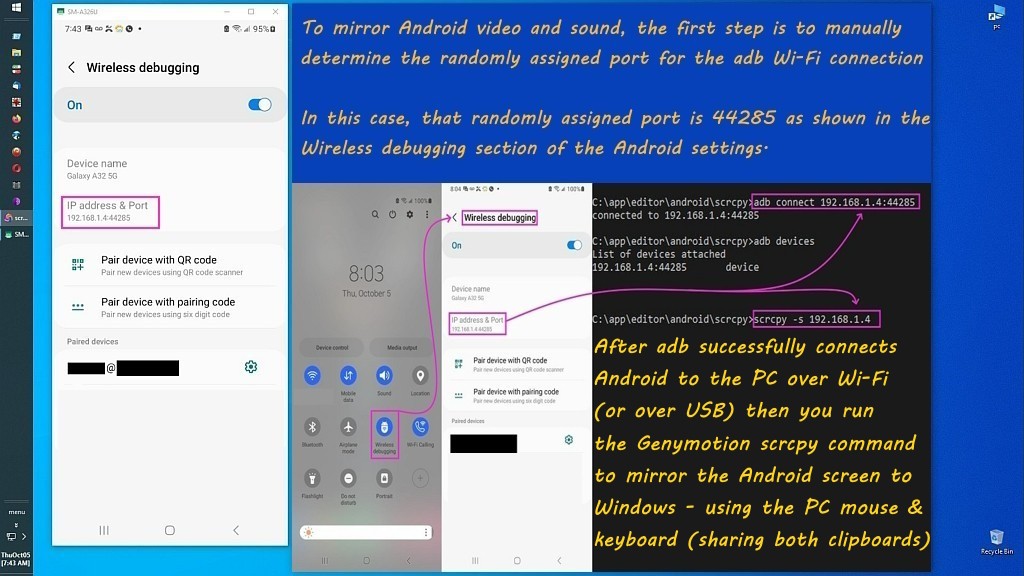
    The beauty of adb is that you can do everything you need to on the phone
    from the PC keyboard/mouse/speakers/clipboard which is extremely handy.

    Scrcpy, which mirrors the phone two feet tall, is powered by adb also.
    <https://i.postimg.cc/pr8NPNKs/scrcpy33.jpg>

    When I'm home, I use the phone without even knowing where the phone is. :)
    (I have to play a song on the phone from the PC just to find the phone.)


    WinUSBCoInstaller2.dll = 1 <=== we need to find out what a "WinUSB" driver is
    WdfCoInstaller01009.dll = 1 <=== grease for installing the Windows Device Framework driver

    https://learn.microsoft.com/en-us/windows-hardware/drivers/usbcon/introduction-to-winusb-for-developers

    "Components of WinUSB

    WinUSB includes:

    A kernel-mode driver (winusb.sys)
    A user-mode dynamic link library (winusb.dll) that exposes WinUSB functions described in winusb.h.
    You can use these functions to manage USB devices with user-mode software.

    By default, winusb.sys is installed in the device's kernel-mode stack as an upper filter driver.
    Apps communicate with the device's User-Mode Driver Framework (UMDF) function driver to
    issue read, write, or device I/O control requests. In this configuration, winusb.sys serves as
    the device stack's Plug and Play and power owner. You can also install winusb.sys as the
    function driver for a USB device.
    "

    That doesn't tell me what it does, but I do have that winusb.sys file and
    I don't own a phone so it could not have been triggered by
    connecting a phone to the PC and a driver getting automatically downloaded.

    Paul

    --- PyGate Linux v1.5.14
    * Origin: Dragon's Lair, PyGate NNTP<>Fido Gate (3:633/10)
  • From Paul@3:633/10 to All on Sat May 9 08:37:51 2026
    Subject: Re: Tutorial: How to install split spoofed APKs on Android using only your PC (Windows or Linux)

    On Sat, 5/9/2026 3:24 AM, Maria Sophia wrote:
    Maria Sophia wrote:
    However, I have to admit I have no idea where my current driver came from. >> It may just as well have been that years ago, I installed an OEM driver.

    I just checked if my PC is using a Samsung OEM ADB driver, or WinUSB,
    (where I ran this while scrcpy was mirroring my Android on the PC monitor).

    pnputil /enum-drivers | findstr /i winusb
    (reported nothing)

    pnputil /enum-devices /connected | findstr /i adb
    Instance ID: USB\VID_04E8&PID_6860&ADB\6&421596b&8&0003
    Device Description: SAMSUNG Android ADB Interface

    Apparently:
    a. VID_04E8 = Samsung
    b. Device Description = Samsung

    Apparently If it were WinUSB, it would say something like:
    a. Android ADB Interface or
    b. WinUSB Device
    c. and the driver provider would be Microsoft.

    pnputil /enum-drivers | findstr /i samsung
    Provider Name: SAMSUNG Electronics Co., Ltd.
    Provider Name: SAMSUNG Electronics Co., Ltd.
    Class Name: SAMSUNG Android Phone
    Provider Name: SAMSUNG Electronics Co., Ltd.
    Class Name: SAMSUNG Android Phone
    Provider Name: SAMSUNG Electronics Co., Ltd.
    Class Name: SAMSUNG Android Phone
    Provider Name: SAMSUNG Electronics Co., Ltd.
    Provider Name: SAMSUNG Electronics Co., Ltd.

    pnputil /enum-drivers /drivers | findstr /i oem
    pnputil /add-driver c:\oem\*.inf
    /delete-driver <oem#.inf> [/uninstall] [/force] [/reboot]
    pnputil /delete-driver oem0.inf
    pnputil /delete-driver oem1.inf /force
    /export-driver <oem#.inf | *> <target directory>
    pnputil /export-driver oem6.inf .
    Enumerate all OEM driver packages:

    pnputil /enum-drivers | findstr /i ssud
    Original Name: ssudbus.inf
    Original Name: ssudadb.inf
    Original Name: ssudadb.inf
    Original Name: ssudadb.inf
    Original Name: ssudmdm.inf
    Original Name: ssudrnds.inf

    pnputil /enum-drivers | findstr /i winusb
    (reports nothing so WinUSB isn't being used)
    pnputil /enum-drivers | findstr /i android_winusb
    (reports nothing so Google USB isn't being used)

    wmic path Win32_PnPSignedDriver where "DeviceName like '%ADB%'" get DeviceName,DriverProviderName,DriverVersion,InfName
    DeviceName DriverProviderName DriverVersion InfName
    SAMSUNG Android ADB Interface SAMSUNG Electronics Co., Ltd. 2.19.1.0 oem56.inf

    This confirms Lawrence is likely correct, as is Paul, that I prolly' installed a Samsung OEM adb driver at some point in the life of this PC although it's just as likely that Windows update installed it perhaps.

    To see who installed the driver, I ran this command.
    pnputil /enum-drivers
    ... stuff ...
    Published Name: oem56.inf
    Original Name: ssudadb.inf
    Provider Name: SAMSUNG Electronics Co., Ltd.
    Driver Version: 09/26/2022 2.19.1.0
    Signer Name: Microsoft Windows Hardware Compatibility Publisher
    ... stuff ...

    This proves the driver came from Microsoft's driver catalog, so
    it's most likely Windows installed it automatically the first time
    I had plugged the phone into the PC USB port (as far as I can tell).


    The drivers seem to be from different eras.
    Some seem to have "mdm" modem or Ethernet and they might be
    composite devices or something. Others just mention the framework
    and no specifics (as if the devices on the other side use "class"
    drivers which are in-box for the OS). The Samsung one was provided
    by MCCI

    "Copyright (c) 1997-2009 by MCCI Corporation"

    Some of the URLs at the bottom, can only be found via archive.org .

    https://developer.android.com/studio/run/oem-usb

    It's hard to make sense, at this level, about what is going on :-)

    Paul


    --- PyGate Linux v1.5.14
    * Origin: Dragon's Lair, PyGate NNTP<>Fido Gate (3:633/10)